AI agent for general managers
Emergency Closure and Continuity Call Tree Agent
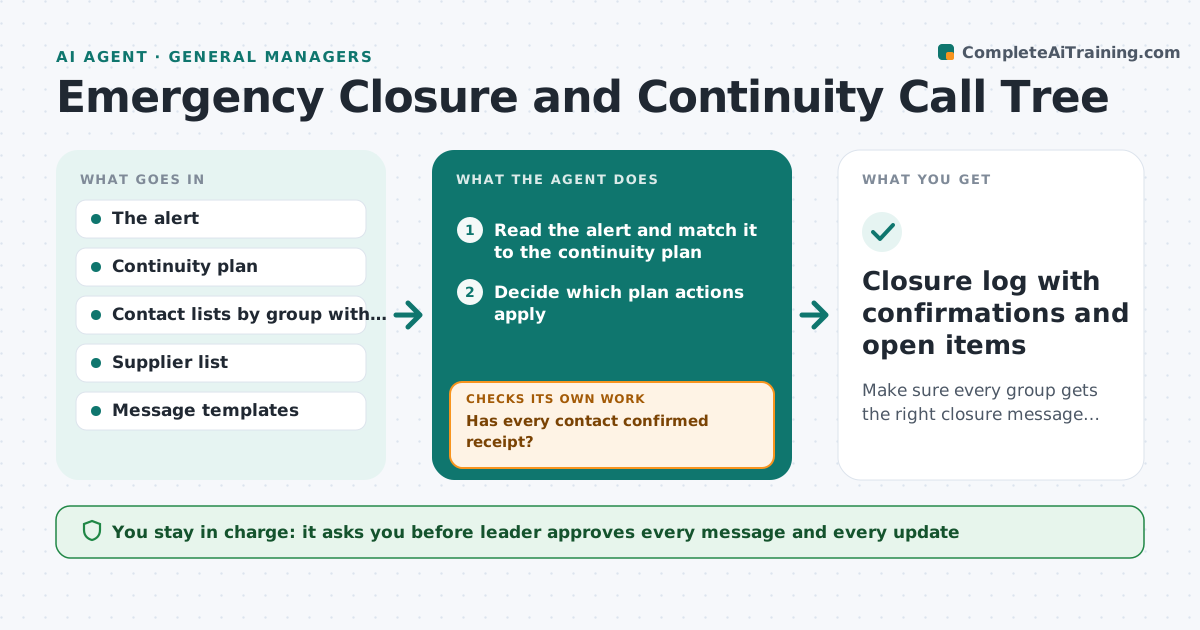
Make sure every group gets the right closure message quickly and confirms receipt
What it does
At 5:30 a.m. a storm closes the road, the power fails or the water supply is cut, and the leader has minutes to tell staff, families, guests and suppliers what to do. Messages go out late, differ by channel and nobody knows who has read them. This agent runs the call tree. When an alert arrives, it reads it, decides which parts of the continuity plan apply and drafts messages for each group in the right channel. Once the leader approves, it sends them and tracks confirmations. It chases those who do not reply, escalates to a phone call list and updates messages as the situation changes. Edge case: a message goes to a bounced address. The agent switches to text and flags it.
How it works
Follow the arrows from top to bottom. The orange dashed arrow is the loop: when a check fails, the agent goes back and tries again.
Read the steps as a list
- Alert or closure decision received
- Read the alert and match it to the continuity plan
- Decide which plan actions apply
- Draft messages for staff, customers or families and suppliers
- Leader approves each messageThe agent waits here for your OK.
- Send messages by the preferred channel for each group
- Track confirmations and bounces
- Has every contact confirmed receipt?If not: Resend by another channel and add non-responders to the phone list. Back to step 6.
- Update messages when the situation changes
- Have all critical contacts confirmed the latest update?If not: Escalate to the leader with the list of unreached contacts. Back to step 7.
- Closure log with confirmations and open items
How it decides
It picks the plan section matching the type and severity of the alert. It prioritizes staff safety, then people on site or travelling, then suppliers and others.
- Staff on duty and people on the way are contacted first
- Messages go by the group's preferred channel then a second channel
- Non-confirmation after 20 minutes triggers a second channel
- Suppliers with deliveries that day are contacted before others
Make it yours
Every agent is a starting point. You choose these settings for your own situation.
- Contact groups and channels
- Delay before resending (default 20 minutes)
- Message templates and tone
- Who may approve when the leader is away
- Plans by type of event
What keeps you in control
It always asks you first
- Leader approves every message and every update
Hard limits
- Never sends without the leader's approval
- Does not contact emergency services
It stops when
- Done: all contacts confirmed or closed with a note
- Stop: alert is unclear or conflicting, hand to the leader
Set it up
We guide you through the set-up, step by step
Members get the full set-up guide for this agent. No technical skills needed: you copy, paste and upload.
- One set of instructions to paste into your AI, with the clicks for ChatGPT, Claude, Microsoft 365 Copilot, Gemini and Grok
- The agent then walks you through connecting your own data, one source at a time
- A downloadable copy with the flow chart, the rules and the full guide