AI agent for receptionists
Emergency Contact and Drill Readiness Agent
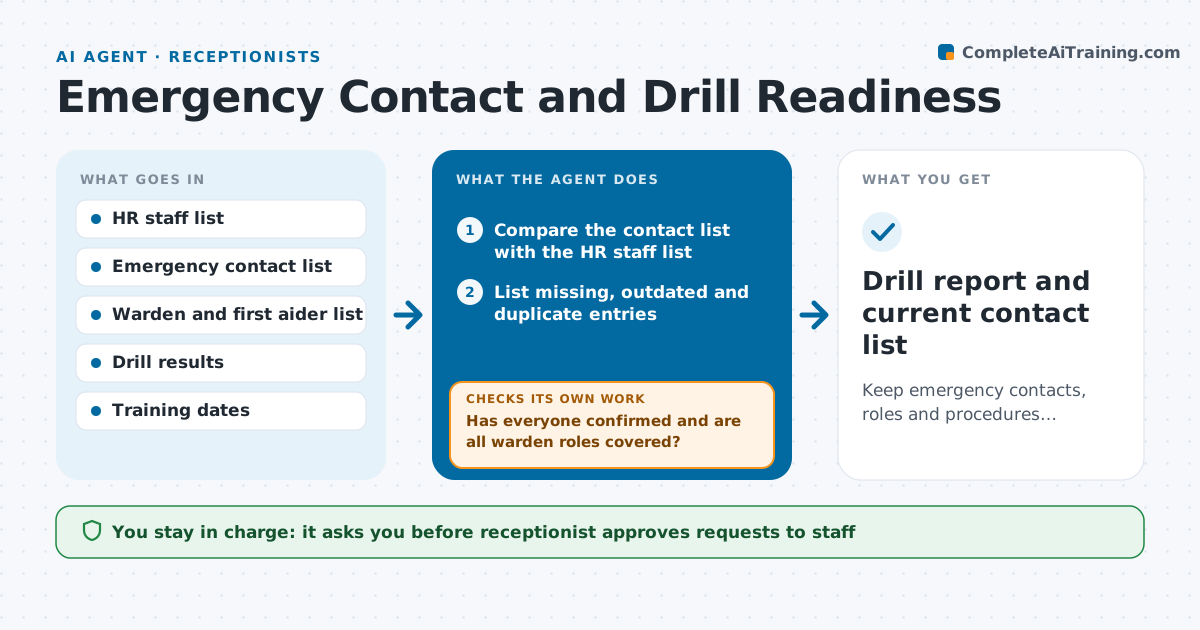
Keep emergency contacts, roles and procedures current and prove it with drill results.
What it does
During a fire drill, the receptionist finds that three people on the emergency list left last year, and two current staff are not on it. This agent compares the emergency contact list with the staff list from HR and finds missing, outdated and duplicate entries. It asks each person with missing or old details to confirm their contact and an emergency contact. It tracks who replied and chases the rest. It also checks that floor wardens and first aiders are still in the company and that their training is current. When a drill is scheduled, it prepares the plan and notices. After the drill, it reads the results, such as time to evacuate, missing wardens and failed alarms, and lists the gaps. It follows each gap until it is closed. The receptionist approves the updated list and notices. Edge case: a person asks that their details are not shared widely, so the agent limits access.
How it works
Follow the arrows from top to bottom. The orange dashed arrow is the loop: when a check fails, the agent goes back and tries again.
Read the steps as a list
- Monthly check or drill scheduled
- Compare the contact list with the HR staff list
- List missing, outdated and duplicate entries
- Draft confirmation requests to affected staff
- Receptionist approves the requestsThe agent waits here for your OK.
- Send the requests and record the replies
- Has everyone confirmed and are all warden roles covered?If not: send a reminder and propose a replacement for any uncovered role. Back to step 6.
- Read the drill results and list the gaps
- Is every gap assigned and closed?If not: remind the owner and recheck the item before the next drill. Back to step 8.
- Receptionist approves the updated list and noticesThe agent waits here for your OK.
- Drill report and current contact list
How it decides
A record is outdated if the person is not on the HR list or the details are older than 12 months. A drill passes when each gap has an owner and a closed action.
- Treat contact details older than 12 months as outdated
- Require at least one warden per floor and one first aider per 25 people
- Remove a person only when HR confirms they left
- Keep restricted details limited to named roles
Make it yours
Every agent is a starting point. You choose these settings for your own situation.
- Drill schedule
- Outdated record limit (default 12 months)
- Warden and first aider coverage rules
- Reminder timing
- Who can see the list
What keeps you in control
It always asks you first
- Receptionist approves requests to staff
- Receptionist approves the updated list and drill notices
Hard limits
- Never send notices without approval
- Never share restricted contact details widely
It stops when
- Done: all records confirmed and drill gaps closed
- Stop: HR list is unavailable
Set it up
We guide you through the set-up, step by step
Members get the full set-up guide for this agent. No technical skills needed: you copy, paste and upload.
- One set of instructions to paste into your AI, with the clicks for ChatGPT, Claude, Microsoft 365 Copilot, Gemini and Grok
- The agent then walks you through connecting your own data, one source at a time
- A downloadable copy with the flow chart, the rules and the full guide