AI agent for process engineers
Energy Use Anomaly Agent
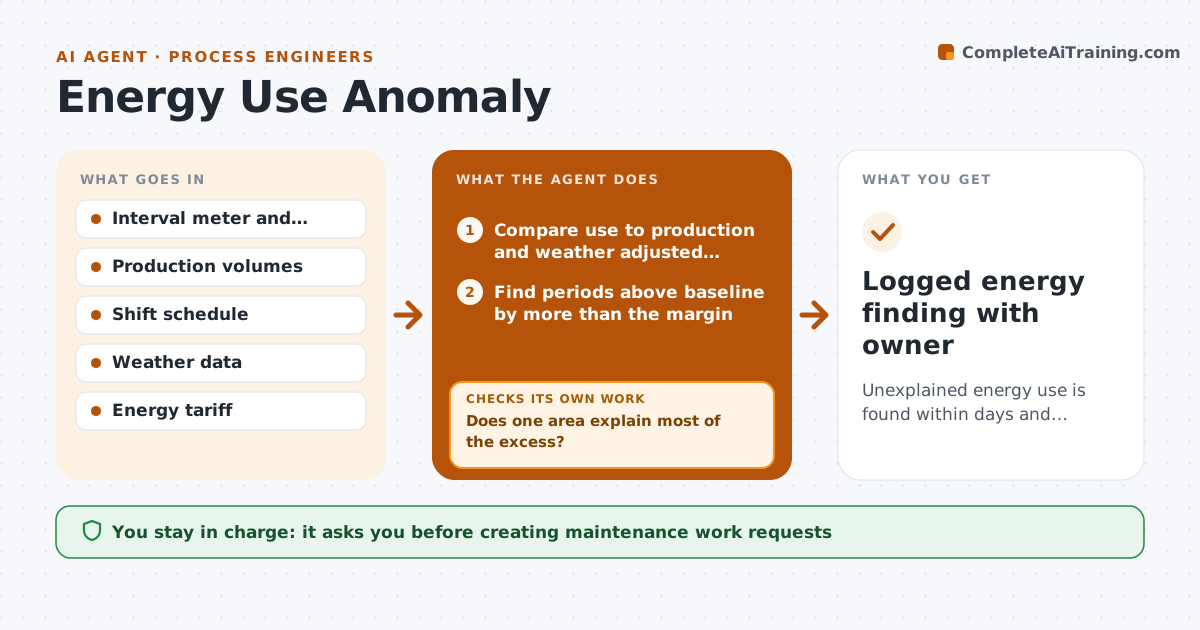
Unexplained energy use is found within days and traced to an area and likely cause
What it does
Energy waste hides in daily meter data that nobody reads, and an air leak or a heater left on can cost thousands a month. Each day this agent compares interval meter readings with a baseline adjusted for production volume, weather and shift pattern. It flags use above baseline by more than the set margin for longer than the set time, and night and weekend baseload above the set level. It reads the production plan first, so a new line starting up is not flagged. It breaks the excess down by sub-meter. If no single area explains most of the gap, it goes one sub-meter level deeper or adds non-production hours data. It estimates the monthly cost and drafts a finding with a suggested check, such as an air leak walk. Findings are ranked by cost. The engineer approves any work request or field check.
How it works
Follow the arrows from top to bottom. The orange dashed arrow is the loop: when a check fails, the agent goes back and tries again.
Read the steps as a list
- Daily meter data arrives
- Compare use to production and weather adjusted baseline
- Find periods above baseline by more than the margin
- Break the excess down by sub-meter and check the schedule
- Does one area explain most of the excess?If not: go one sub-meter level deeper or add non-production hours data. Back to step 4.
- Estimate cost and draft finding with a suggested check
- Engineer approves a work request or field checkThe agent waits here for your OK.
- Logged energy finding with owner
How it decides
It flags use above the volume and weather adjusted baseline by more than the set margin for longer than the set time, and drills to the sub-meter that explains most of the gap.
- Ignore excess explained by a scheduled production change
- Flag weekend and night baseload above the set level
- Rank findings by estimated monthly cost
Make it yours
Every agent is a starting point. You choose these settings for your own situation.
- Margin above baseline that triggers a flag (default 10%)
- How long excess must last
- Sub-meters to include
- Weekly or daily summary
What keeps you in control
It always asks you first
- Creating maintenance work requests
- Changing equipment schedules
Hard limits
- Never switches equipment on or off
- States cost estimates as estimates
It stops when
- Done: finding logged with owner or closed as explained
- Stop: meter data missing for more than a day; alert the energy contact
Set it up
We guide you through the set-up, step by step
Members get the full set-up guide for this agent. No technical skills needed: you copy, paste and upload.
- One set of instructions to paste into your AI, with the clicks for ChatGPT, Claude, Microsoft 365 Copilot, Gemini and Grok
- The agent then walks you through connecting your own data, one source at a time
- A downloadable copy with the flow chart, the rules and the full guide