AI agent for process development scientists
Feedstock Price and Margin Impact Agent
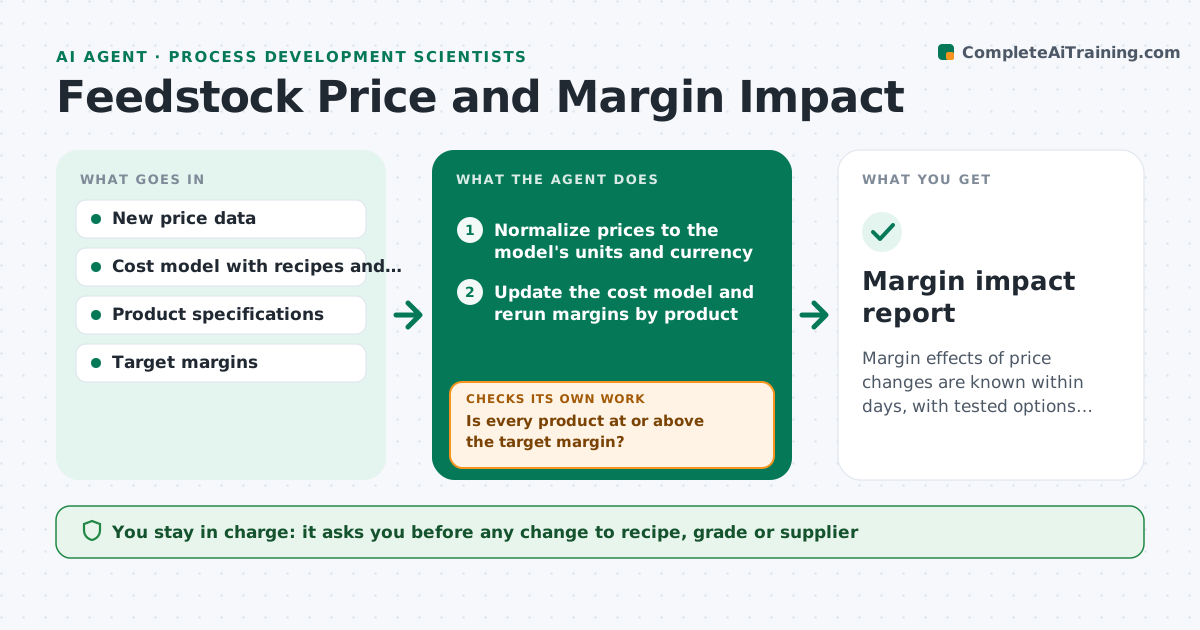
Margin effects of price changes are known within days, with tested options for products that fall below target.
What it does
A solvent or flour price goes up 14 percent, and the effect on product margins shows up months later in a finance report. This agent updates the cost model with new prices as soon as they arrive. It reruns margins by product, then tests alternatives such as different recipes, grades or suppliers against the current specifications. It flags products that fall below the target margin and rechecks alternatives to make sure each one still meets spec limits and yield. You get a table of products, margin change and options with their risk. You approve any change. Edge case: a price in a different unit or currency is converted before it enters the model.
How it works
Follow the arrows from top to bottom. The orange dashed arrow is the loop: when a check fails, the agent goes back and tries again.
Read the steps as a list
- New price list received
- Normalize prices to the model's units and currency
- Update the cost model and rerun margins by product
- Is every product at or above the target margin?If not: list products below target and the size of the shortfall. Back to step 3.
- Test alternatives such as recipe changes, grades and suppliers
- Does each alternative meet the specification limits and yield?If not: adjust or drop the alternative and test the next one. Back to step 5.
- Rank options by margin recovery and risk
- Write the margin impact table with recommendations
- Engineer approves any recipe, grade or supplier changeThe agent waits here for your OK.
- Margin impact report
How it decides
It reruns product margins from the cost model. Products below target get alternatives, each checked against spec limits before it is recommended.
- Margin below target by over 2 points: test alternatives
- Alternative changes a critical specification: reject
- Price rise under 3 percent: report only, no alternative search
- Supplier alternative needs requalification: show time and cost to qualify
Make it yours
Every agent is a starting point. You choose these settings for your own situation.
- Target margin by product
- Price change threshold for alternatives (default 3 percent)
- Currency and units
- Suppliers allowed
- Specification limits
What keeps you in control
It always asks you first
- Any change to recipe, grade or supplier
- Price changes to customers
Hard limits
- Never place orders or change suppliers
- Never use an alternative that fails a specification
It stops when
- Done: report issued
- Stop: price data incomplete
Set it up
We guide you through the set-up, step by step
Members get the full set-up guide for this agent. No technical skills needed: you copy, paste and upload.
- One set of instructions to paste into your AI, with the clicks for ChatGPT, Claude, Microsoft 365 Copilot, Gemini and Grok
- The agent then walks you through connecting your own data, one source at a time
- A downloadable copy with the flow chart, the rules and the full guide