AI agent for microbiologists
Environmental Swab Trend Agent
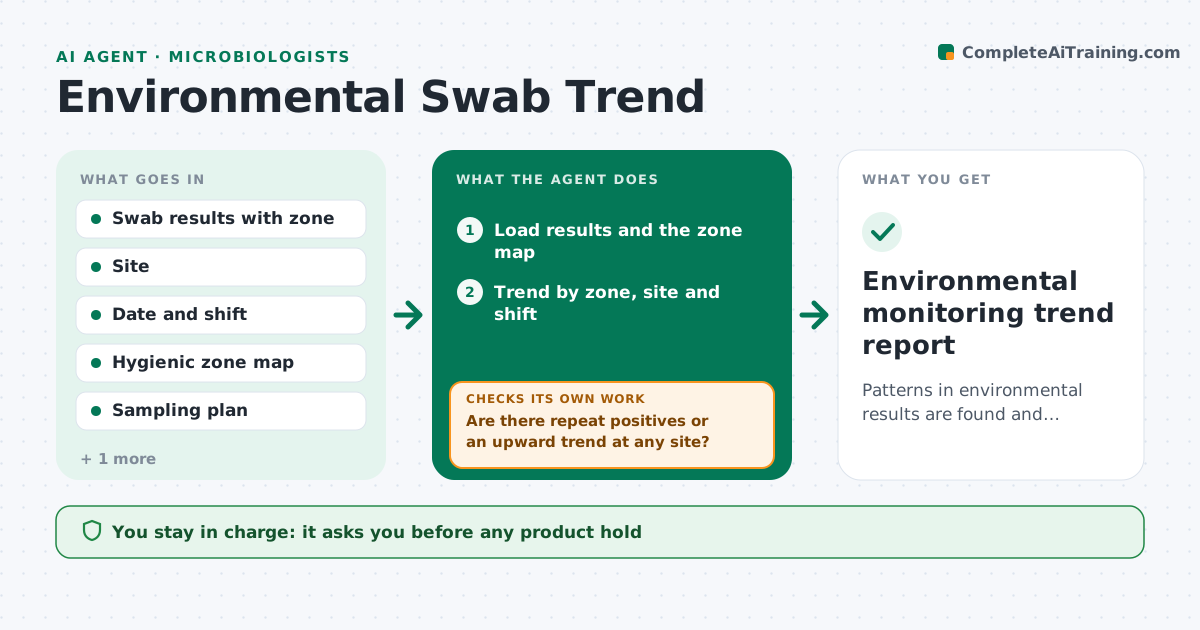
Patterns in environmental results are found and resolved early, not after a product positive.
What it does
Each swab result is read as a pass or fail, and a pattern like repeat positives in one drain area or on one shift goes unseen. This agent collects environmental swab results and trends them by zone, site and shift. It flags patterns such as repeat positives, rising counts or a positive linked to a specific line or time. It proposes extra sampling, such as a vector swab around a positive site. After cleaning actions, it rechecks new results to see whether the problem cleared. You approve any hold or sanitation order. Edge case: a positive found in zone 1, food contact, is treated at once and not left to the weekly trend.
How it works
Follow the arrows from top to bottom. The orange dashed arrow is the loop: when a check fails, the agent goes back and tries again.
Read the steps as a list
- New swab results arrive
- Load results and the zone map
- Trend by zone, site and shift
- Are there repeat positives or an upward trend at any site?If not: log as in control and continue routine sampling. Back to step 3.
- Propose extra sampling, such as vector swabs
- Manager approves extra sampling, holds or sanitation ordersThe agent waits here for your OK.
- Read new results after the actions
- Did results return to negative for the required number of rounds?If not: escalate with the new data and propose a deeper clean or equipment check. Back to step 5.
- Update the trend report and the corrective action log
- Environmental monitoring trend report
How it decides
Results are scored by zone risk. Repeat positives in a site or an upward trend trigger extra sampling and a corrective action check.
- Positive in zone 1 food contact: immediate action, not weekly trend
- Two positives at one site within 30 days: repeat positive, vector sample
- Counts rising three samples in a row: flag as a trend
- Three consecutive negatives after cleaning: close the action
Make it yours
Every agent is a starting point. You choose these settings for your own situation.
- Zone risk classes
- Repeat positive window in days (default 30)
- Negatives needed to close (default 3)
- Organisms tracked
- Report schedule
What keeps you in control
It always asks you first
- Any product hold
- Any sanitation order
Hard limits
- Never release or hold product
- Never close an action before the required negative rounds
It stops when
- Done: all flagged sites closed or under action
- Stop: results delayed by the lab
Set it up
We guide you through the set-up, step by step
Members get the full set-up guide for this agent. No technical skills needed: you copy, paste and upload.
- One set of instructions to paste into your AI, with the clicks for ChatGPT, Claude, Microsoft 365 Copilot, Gemini and Grok
- The agent then walks you through connecting your own data, one source at a time
- A downloadable copy with the flow chart, the rules and the full guide