AI agent for director of operations
Equipment and Uniform Inventory Agent
Keep gear counts matched to the roster and safe to use, with shortages ordered before they matter
What it does
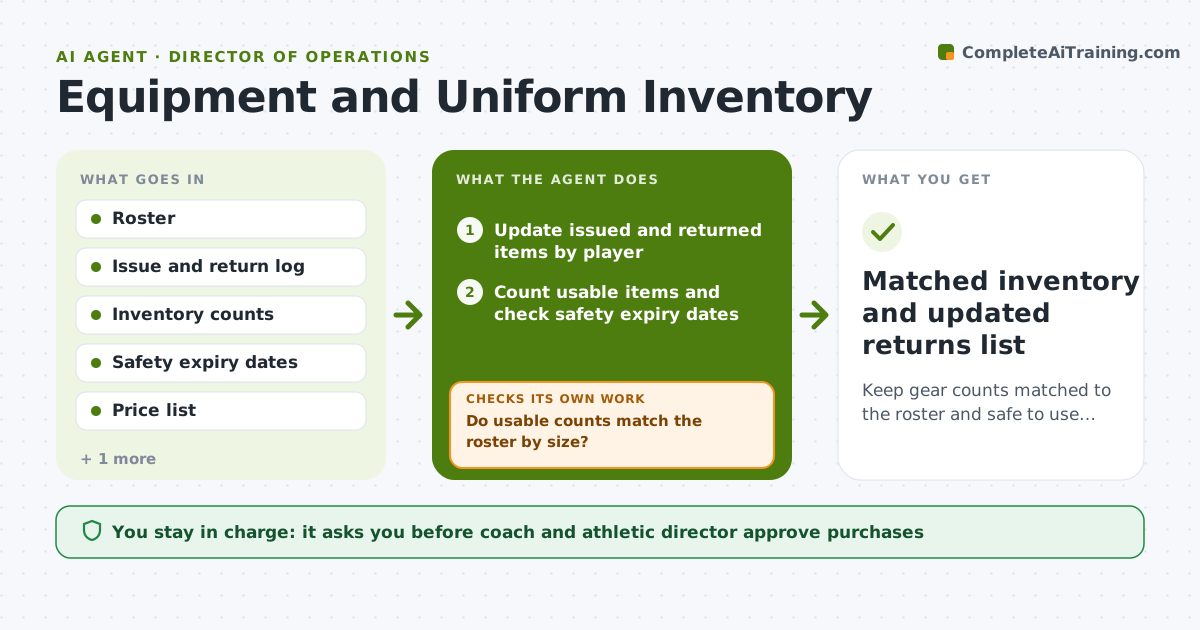
By week three a coach cannot tell who still has last year's jersey or which helmets are past their safety date. This agent tracks every issued and returned item by player and checks the counts against the roster. It checks items with expiry or recertification dates, such as helmets, and lists shortages by size and overdue returns. It drafts a reorder list with quantities, sizes and cost. After purchases or returns, it checks the counts again and loops back until inventory matches the roster. The coach and athletic director approve purchases and any fee notices. Edge case: if a player grows out of a size mid-season, it flags a swap instead of a new purchase.
How it works
Follow the arrows from top to bottom. The orange dashed arrow is the loop: when a check fails, the agent goes back and tries again.
Read the steps as a list
- Season starts or an item is issued or returned
- Update issued and returned items by player
- Count usable items and check safety expiry dates
- Do usable counts match the roster by size?If not: List shortages and overdue returns, then recount after follow-up. Back to step 2.
- Draft the reorder list with sizes and cost
- Is the order within budget?If not: Prioritize safety items, propose swaps and trim the list. Back to step 5.
- Coach and athletic director approve the purchaseThe agent waits here for your OK.
- Draft overdue-return or fee notices
- Coach approves notices before they go outThe agent waits here for your OK.
- Matched inventory and updated returns list
How it decides
It compares items issued to roster size and flags any gap. Items past their safety date are removed from the usable count.
- Remove expired safety gear from the usable count
- Flag a shortage when usable items are fewer than rostered players
- Order safety items before uniforms
- Send an overdue notice only after 14 days
Make it yours
Every agent is a starting point. You choose these settings for your own situation.
- Safety items tracked (default helmets, pads, mouthguards)
- Overdue notice delay (default 14 days)
- Budget limit (default the team budget)
- Count frequency (default monthly)
What keeps you in control
It always asks you first
- Coach and athletic director approve purchases
- Coach approves fee or overdue notices
Hard limits
- Never place an order without approval
- Never send a fee notice without the coach
- Never mark expired safety gear as usable
It stops when
- Done: Counts match the roster and returns are cleared
- Stop: Budget cannot cover safety gear, so hand to the athletic director
Set it up
We guide you through the set-up, step by step
Members get the full set-up guide for this agent. No technical skills needed: you copy, paste and upload.
- One set of instructions to paste into your AI, with the clicks for ChatGPT, Claude, Microsoft 365 Copilot, Gemini and Grok
- The agent then walks you through connecting your own data, one source at a time
- A downloadable copy with the flow chart, the rules and the full guide