AI agent for catering managers
Event Permit and Alcohol License Agent
Every required permit, license and certificate is in hand before the event.
What it does
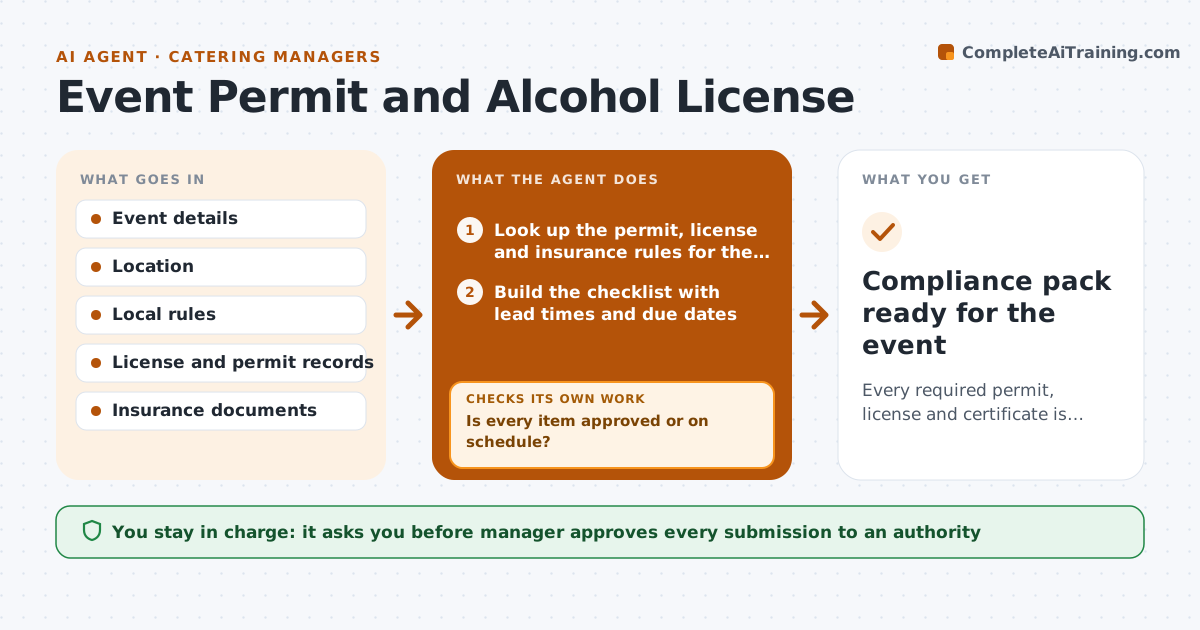
An event is a week away and the temporary alcohol license is still pending because no one noticed the 10 business day lead time. For each event, this agent lists the permits, licenses and certificates needed for the location: food, alcohol, fire, street closure, insurance for the venue and others. It checks the status and dates of each, requests missing certificates from the insurer, and tracks approvals with the authorities. Anything pending close to its deadline is escalated with a clear fallback, such as a different license type or a licensed bar vendor. The manager approves every submission. Edge case: the venue requires its own insurance certificate naming it as an additional insured.
How it works
Follow the arrows from top to bottom. The orange dashed arrow is the loop: when a check fails, the agent goes back and tries again.
Read the steps as a list
- Event confirmed with a location
- Look up the permit, license and insurance rules for the location
- Build the checklist with lead times and due dates
- Check status of each item and request missing certificates
- Prepare the application and attachments for each pending item
- Manager approves each submissionThe agent waits here for your OK.
- Submit and track approvals daily
- Is every item approved or on schedule?If not: escalate the delayed item with a fallback option and follow up with the authority. Back to step 7.
- Check documents against the venue's own requirements
- Do the certificates name the right parties and dates?If not: request corrected certificates and recheck. Back to step 4.
- Compliance pack ready for the event
How it decides
It plans each item from its lead time and escalates anything not approved by the date that leaves 3 days of buffer.
- Start each application at its lead time plus 5 business days.
- Escalate any item not approved 3 days before its latest safe date.
- Offer a fallback such as a licensed bar vendor when a license is late.
- Check certificate names and dates before filing.
Make it yours
Every agent is a starting point. You choose these settings for your own situation.
- Jurisdictions covered
- Lead time buffer (default 5 business days)
- Fallback options
- Checklist per event type
What keeps you in control
It always asks you first
- Manager approves every submission to an authority
Hard limits
- Never submit to an authority without approval
- Show the rule behind every lead time
It stops when
- Done: all items approved.
- Stop: an item cannot be approved in time, so the manager picks the fallback.
Set it up
We guide you through the set-up, step by step
Members get the full set-up guide for this agent. No technical skills needed: you copy, paste and upload.
- One set of instructions to paste into your AI, with the clicks for ChatGPT, Claude, Microsoft 365 Copilot, Gemini and Grok
- The agent then walks you through connecting your own data, one source at a time
- A downloadable copy with the flow chart, the rules and the full guide