AI agent for catering managers
Event Staffing Roster Agent
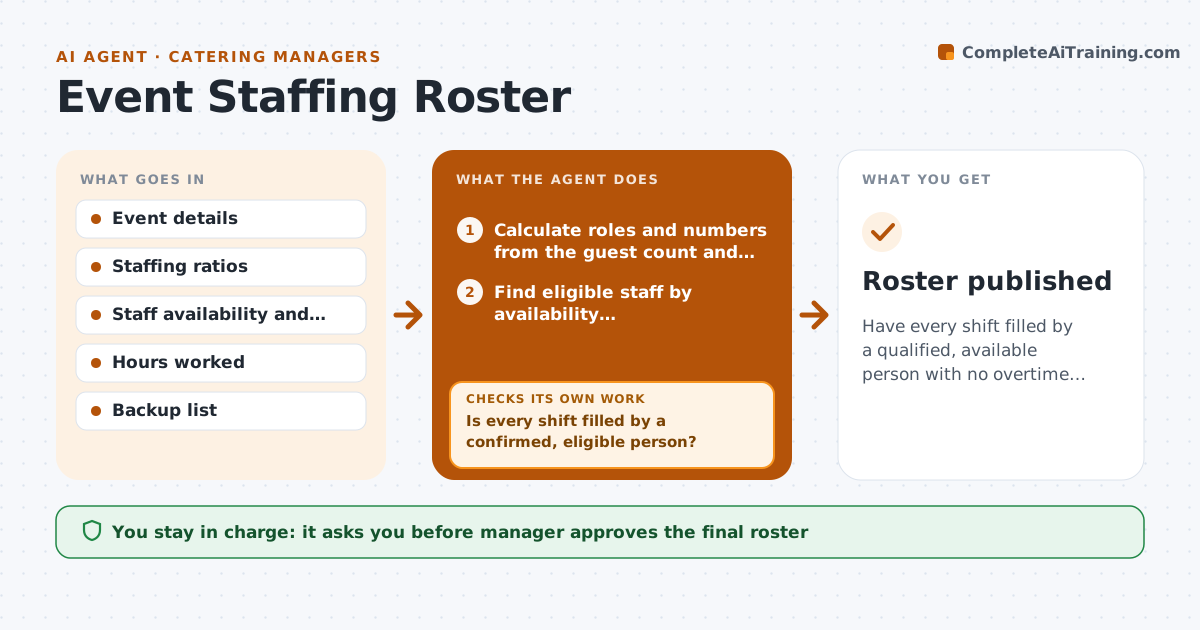
Have every shift filled by a qualified, available person with no overtime surprises.
What it does
For a 220-guest wedding the catering manager works out how many cooks, servers and bartenders are needed, then makes a dozen phone calls and still finds two shifts empty the day before. The agent calculates roles and numbers from the guest count, service style and venue. It then offers shifts to available staff, tracks who confirms, declines or stays silent, and fills the gaps from a backup list with follow-up messages. For each staff member it checks certifications, such as food handler and alcohol service, and overtime limits for the week. It rebuilds the roster after every change and flags what is still open. Edge case: a confirmed server who calls in sick on the day, when a replacement must be found quickly. The manager approves the final roster.
How it works
Follow the arrows from top to bottom. The orange dashed arrow is the loop: when a check fails, the agent goes back and tries again.
Read the steps as a list
- Event is confirmed
- Calculate roles and numbers from the guest count and service style
- Find eligible staff by availability, certifications and weekly hours
- Send shift offers in order of fit
- Track confirmations and declines
- Is every shift filled by a confirmed, eligible person?If not: offer open shifts to the next staff and the backup list. Back to step 3.
- Check the final roster for overtime and certification issues
- Does the roster pass the overtime and certification rules?If not: replace the person who breaks the rule and offer the shift again. Back to step 3.
- Manager approves the final rosterThe agent waits here for your OK.
- Send the roster and call times to the staff
- Roster published
How it decides
Roles follow the ratio for the service style. A person is eligible when available, certified and under the overtime limit. Offers go in order of fit and fairness.
- Use 1 server per 20 guests for plated and 1 per 30 for buffet
- Require food handler and alcohol certificates for the matching roles
- Do not offer shifts that take someone over 40 hours
- Offer open shifts to the backup list after 24 hours with no reply
Make it yours
Every agent is a starting point. You choose these settings for your own situation.
- Staffing ratios
- Overtime limit (default 40 hours)
- Reply window (default 24 hours)
- Required certificates
- Backup list
What keeps you in control
It always asks you first
- Manager approves the final roster
- Manager approves any overtime
Hard limits
- Never schedule an uncertified person
- Do not exceed overtime limits without approval
It stops when
- Done: roster published with all shifts filled
- Stop: too few eligible staff, tell the manager and propose an agency
Set it up
We guide you through the set-up, step by step
Members get the full set-up guide for this agent. No technical skills needed: you copy, paste and upload.
- One set of instructions to paste into your AI, with the clicks for ChatGPT, Claude, Microsoft 365 Copilot, Gemini and Grok
- The agent then walks you through connecting your own data, one source at a time
- A downloadable copy with the flow chart, the rules and the full guide