AI agent for judges
Evidentiary Ruling Consistency Agent
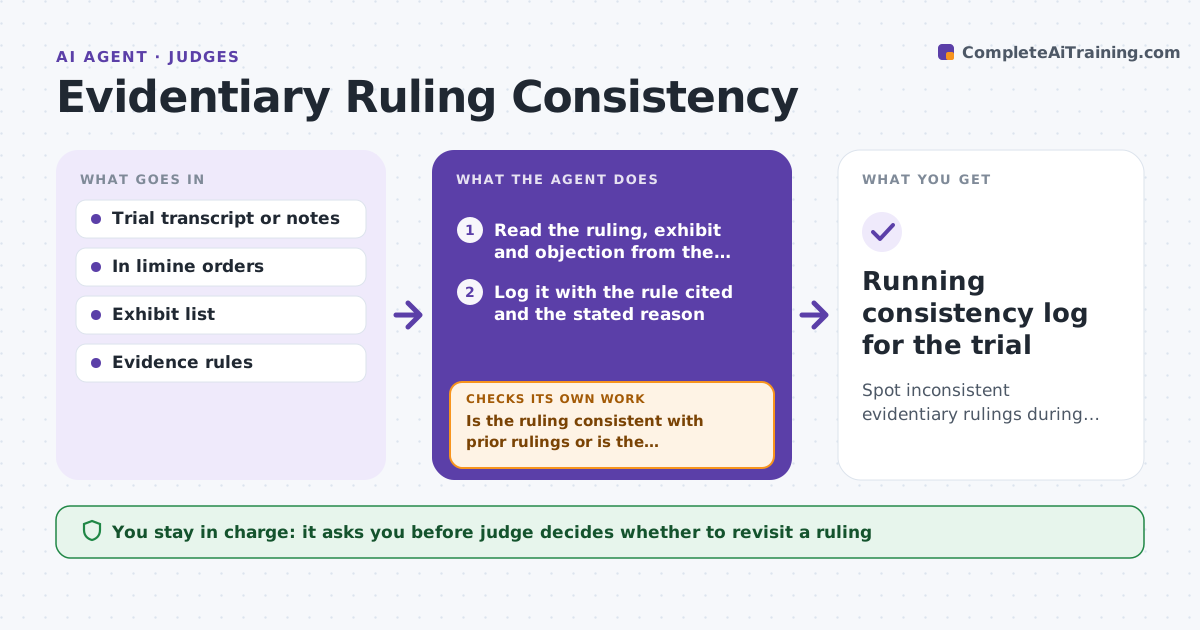
Spot inconsistent evidentiary rulings during trial while the judge can still address them.
What it does
In a long trial, a judge rules on dozens of objections on the fly. It is easy to rule one way on a document early in the week and the other way on a similar exhibit later, or to contradict an in limine order. During the trial the agent logs each ruling from the transcript or notes with the exhibit, the objection, and the rule cited. It compares each new ruling with the pretrial in limine orders and the earlier rulings on similar exhibits. When two rulings conflict, it pulls both passages and the cited rule and prepares a short note. The judge decides whether to revisit on the record. Edge case: the same email chain is admitted as Exhibit 12 but excluded as Exhibit 31, and the agent catches it.
How it works
Follow the arrows from top to bottom. The orange dashed arrow is the loop: when a check fails, the agent goes back and tries again.
Read the steps as a list
- New ruling logged during trial
- Read the ruling, exhibit and objection from the transcript
- Log it with the rule cited and the stated reason
- Search in limine orders and earlier rulings for similar exhibits
- Compare outcomes and reasons
- Is the ruling consistent with prior rulings or is the difference explained?If not: Pull both passages and the cited rule and draft a short note. Back to step 4.
- Did the judge's follow-up decision change the record or other rulings?If not: Re-log the changed ruling and re-run the comparison. Back to step 2.
- Judge decides whether to revisit the ruling on the recordThe agent waits here for your OK.
- Running consistency log for the trial
How it decides
It compares each new ruling with prior rulings on the same exhibit, the same objection type and the same evidence issue. A conflict is raised when the outcome differs and no stated reason distinguishes the two.
- Same exhibit with a different outcome is always flagged
- Similar exhibits with different outcomes are flagged unless a reason is stated
- A ruling that contradicts an in limine order is flagged as high priority
- Flag at most 3 notes per session to keep them useful
Make it yours
Every agent is a starting point. You choose these settings for your own situation.
- Sources for rulings (transcript or notes)
- How similar an exhibit must be to compare
- Maximum notes per session
- Priority for conflicts with in limine orders
What keeps you in control
It always asks you first
- Judge decides whether to revisit a ruling
- Judge approves anything shared with counsel
Hard limits
- Never advises the judge on how to rule
- Never shares the log with counsel
It stops when
- Done: trial ends and log is closed
- Stop: transcript feed fails, so the judge gets the last good log
Set it up
We guide you through the set-up, step by step
Members get the full set-up guide for this agent. No technical skills needed: you copy, paste and upload.
- One set of instructions to paste into your AI, with the clicks for ChatGPT, Claude, Microsoft 365 Copilot, Gemini and Grok
- The agent then walks you through connecting your own data, one source at a time
- A downloadable copy with the flow chart, the rules and the full guide