AI agent for proofreaders
Opinion Cite and Quote Verification Agent
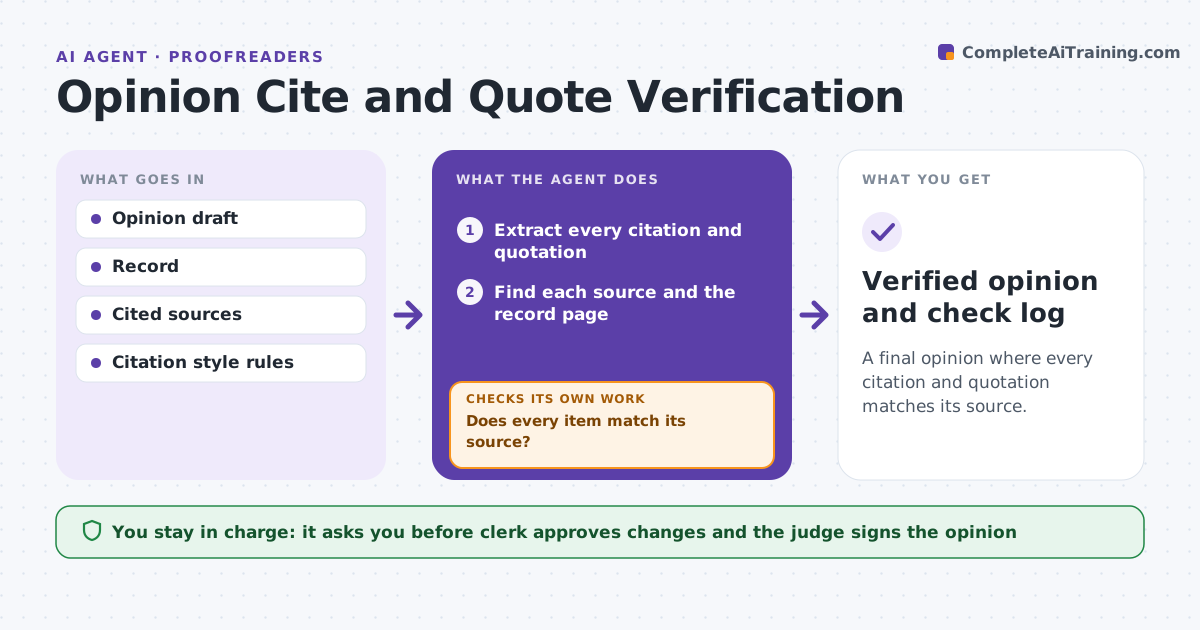
A final opinion where every citation and quotation matches its source.
What it does
A wrong pin cite or misquote in a final opinion damages credibility. Checking each one is slow work done in the last days before release. This agent extracts every citation and quotation from the draft and checks each against the source text and the record. It flags wrong page numbers, altered quotes and misdescribed holdings. After corrections it rechecks every item, because a changed sentence can alter a nearby cite. The clerk approves changes and the judge signs. Edge case: a quote from the record omits a word that changes meaning, so the agent flags it with both versions.
How it works
Follow the arrows from top to bottom. The orange dashed arrow is the loop: when a check fails, the agent goes back and tries again.
Read the steps as a list
- Opinion draft is ready for final check
- Extract every citation and quotation
- Find each source and the record page
- Compare pin cites and quoted words to the source
- Flag errors and altered quotes with both versions
- Draft proposed corrections
- Clerk approves the correctionsThe agent waits here for your OK.
- Recheck every citation and quote after changes
- Does every item match its source?If not: flag any new errors and return them to the clerk. Back to step 4.
- Verified opinion and check log
How it decides
It marks a citation wrong when the page, volume or year does not match the source. It marks a quotation wrong when any word differs from the source text.
- Flag any quote with a word difference
- Flag a pin cite that does not contain the cited point
- Flag a record cite to a missing page
- Apply the court's citation style
Make it yours
Every agent is a starting point. You choose these settings for your own situation.
- Citation style
- Sources searched
- Items checked
- Output format
- Flag strictness
What keeps you in control
It always asks you first
- Clerk approves changes and the judge signs the opinion
Hard limits
- Never alter the opinion text
- Never mark a citation correct without reading the source
It stops when
- Done: all items verified
- Stop: a source cannot be located
Set it up
We guide you through the set-up, step by step
Members get the full set-up guide for this agent. No technical skills needed: you copy, paste and upload.
- One set of instructions to paste into your AI, with the clicks for ChatGPT, Claude, Microsoft 365 Copilot, Gemini and Grok
- The agent then walks you through connecting your own data, one source at a time
- A downloadable copy with the flow chart, the rules and the full guide