AI agent for head of operations
Executive Scenario Tabletop Agent
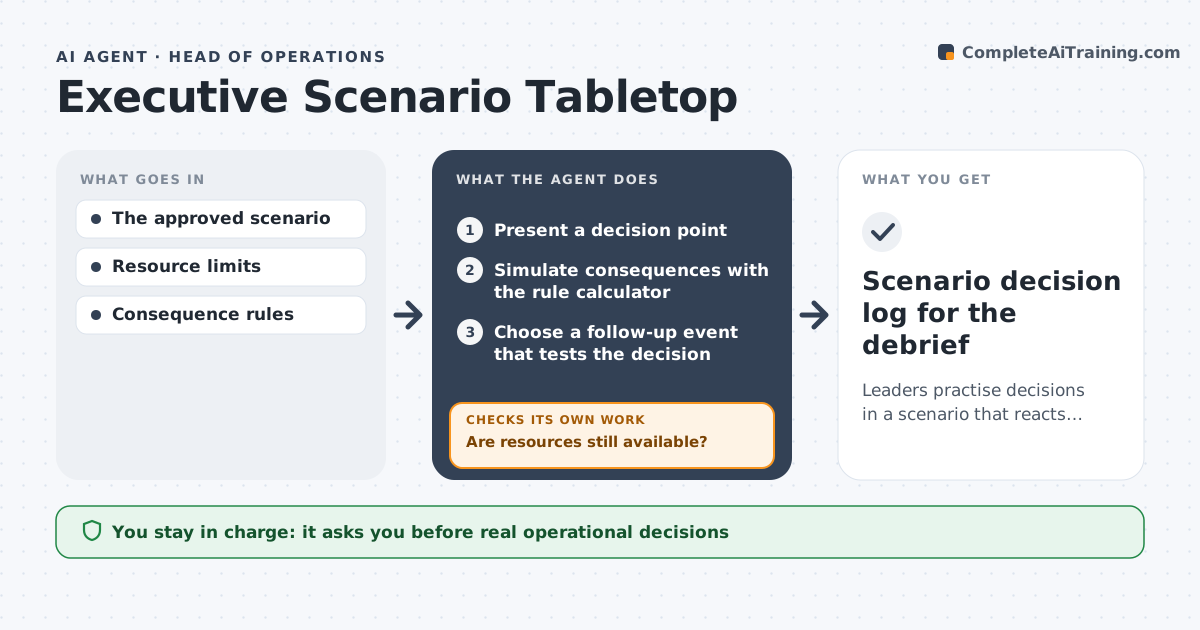
Leaders practise decisions in a scenario that reacts realistically to their choices.
What it does
Leadership tabletop exercises are often scripted and do not react to participants' decisions, so teams learn little. This agent runs the session: it presents a decision point, then simulates realistic consequences with a rule calculator inside the scenario rules. It checks whether the team still has resources such as staff, budget and time. When resources run out, it presents a constrained decision instead of resetting the scenario. It then picks a follow-up event that tests the decision just made. It logs every decision and outcome for the debrief, which the facilitator leads. Edge case: a decision outside the scenario rules is paused and referred to the facilitator.
How it works
Follow the arrows from top to bottom. The orange dashed arrow is the loop: when a check fails, the agent goes back and tries again.
Read the steps as a list
- Session started
- Present a decision point
- Simulate consequences with the rule calculator
- Are resources still available?If not: present a constrained decision. Back to step 2.
- Choose a follow-up event that tests the decision
- Log decisions and outcomes
- Scenario decision log for the debrief
How it decides
It chooses events that test the consequences of the last decision and enforces resource limits.
- Next event: one that tests the team's last decision.
- Constraint handling: present a constrained choice, never silently reset.
- Consequences: calculated only within the scenario rules.
- Out-of-rules decision: pause and refer to the facilitator.
Make it yours
Every agent is a starting point. You choose these settings for your own situation.
- Scenario library and rules (default crisis, cyber and supply scenarios)
- Starting resources (default staff, budget and time limits per scenario)
- Session length (default 90 minutes)
- Debrief log format (default timeline of decisions and outcomes)
- Who facilitates and may override (default the exercise facilitator)
What keeps you in control
It always asks you first
- Real operational decisions
- Employee evaluation
Hard limits
- Not used for evaluations.
It stops when
- Done: scenario end reached.
Set it up
We guide you through the set-up, step by step
Members get the full set-up guide for this agent. No technical skills needed: you copy, paste and upload.
- One set of instructions to paste into your AI, with the clicks for ChatGPT, Claude, Microsoft 365 Copilot, Gemini and Grok
- The agent then walks you through connecting your own data, one source at a time
- A downloadable copy with the flow chart, the rules and the full guide