AI agent for executive directors
Executive Stakeholder Map Maintenance Agent
Keep the stakeholder map current and act on changes while they matter.
What it does
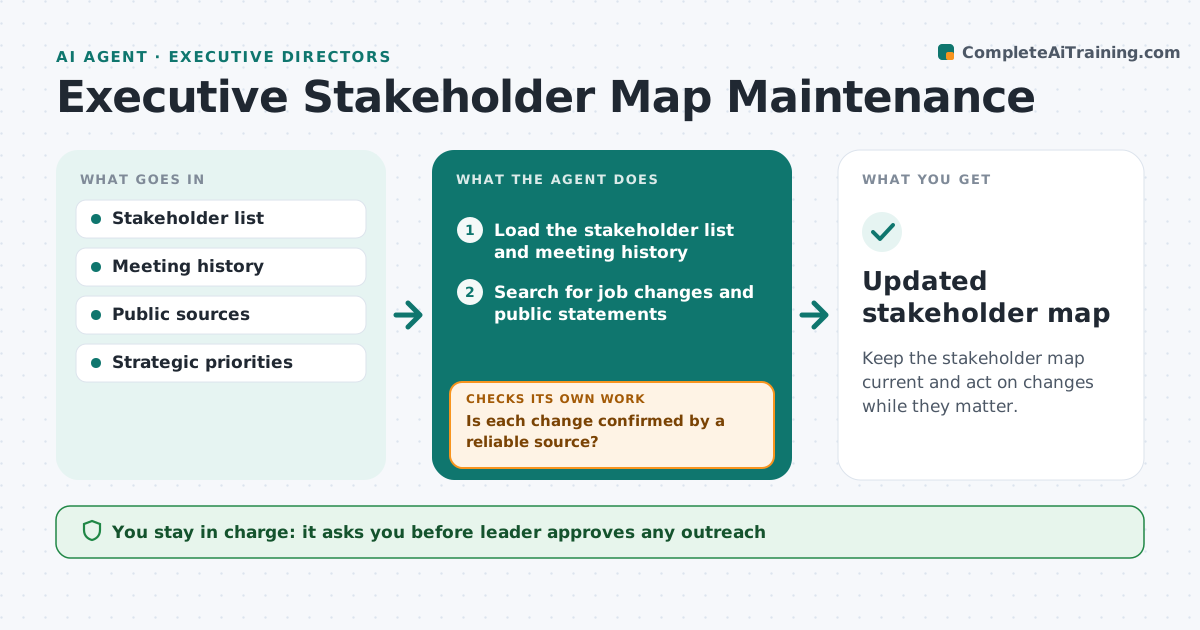
Stakeholder maps go stale: people change jobs, take new positions in public and meet less often, and influence shifts without notice. The agent tracks job changes, public statements and meeting history for each stakeholder, updates the map, and flags changes in position, such as a supporter who voiced doubts. It checks each claim against a reliable source before changing the map. It proposes outreach where a change matters. The leader approves any outreach. Edge case: a board contact moves to a competitor, so the agent marks the relationship at risk and proposes a congratulation note.
How it works
Follow the arrows from top to bottom. The orange dashed arrow is the loop: when a check fails, the agent goes back and tries again.
Read the steps as a list
- Weekly stakeholder scan
- Load the stakeholder list and meeting history
- Search for job changes and public statements
- Is each change confirmed by a reliable source?If not: Search for a second source before changing the map. Back to step 3.
- Update the map and the stance of each stakeholder
- Rate each change by effect on current priorities
- Draft outreach for high effect changes
- Leader approves any outreachThe agent waits here for your OK.
- Log the outreach and next check
- Did the stakeholder respond or change position again?If not: Re-scan and update the map. Back to step 2.
- Updated stakeholder map
How it decides
It updates a stakeholder only when a change is confirmed by a reliable source. A change in role or stance is rated by its effect on current priorities and, if high, leads to outreach.
- Two sources before recording a job change
- A move to a competitor sets the relationship to at risk
- High effect changes are reviewed in 1 week
- No outreach on private information
Make it yours
Every agent is a starting point. You choose these settings for your own situation.
- Scan frequency (default weekly)
- Sources considered reliable
- Priority levels
- Who owns each relationship
What keeps you in control
It always asks you first
- Leader approves any outreach
Hard limits
- Never contacts a stakeholder without approval
- Never uses private or non-public information
It stops when
- Done: map updated and outreach decided
- Stop: stakeholder asks not to be contacted
Set it up
We guide you through the set-up, step by step
Members get the full set-up guide for this agent. No technical skills needed: you copy, paste and upload.
- One set of instructions to paste into your AI, with the clicks for ChatGPT, Claude, Microsoft 365 Copilot, Gemini and Grok
- The agent then walks you through connecting your own data, one source at a time
- A downloadable copy with the flow chart, the rules and the full guide