AI agent for insurance actuaries
Experience Study Agent
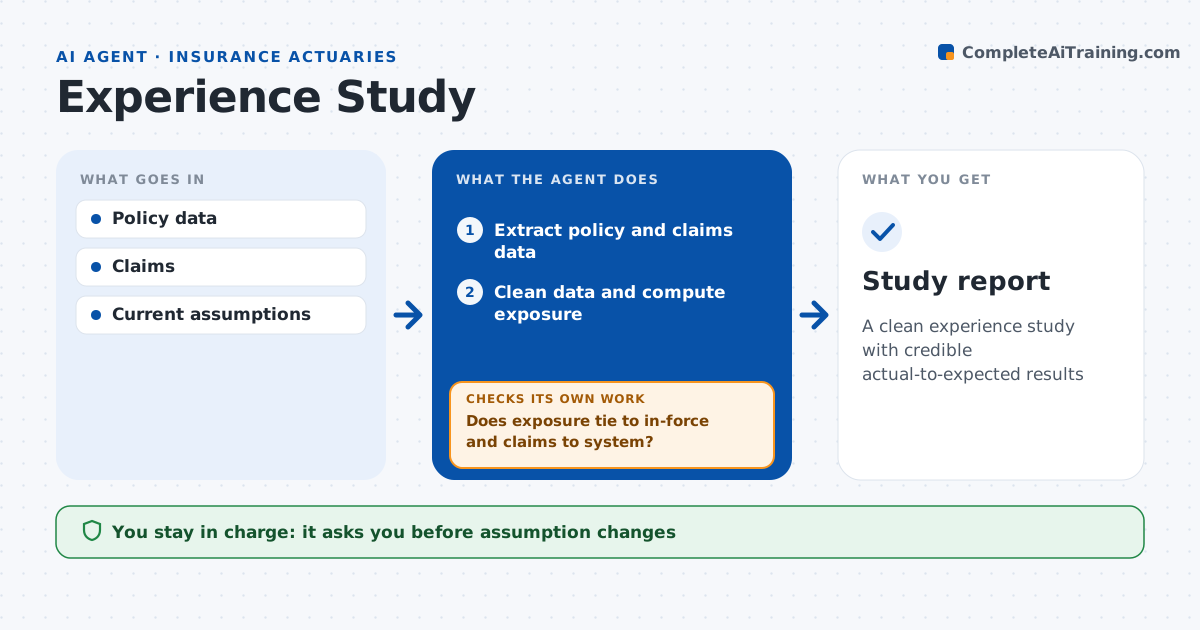
A clean experience study with credible actual-to-expected results
What it does
The annual experience study sets mortality, lapse and other assumptions, and bad data can push an assumption the wrong way. This agent extracts policy and claim data, cleans it, and calculates exposure and actual versus expected ratios by age, duration, product and other factors. It checks data quality first: exposure must tie to in-force counts, no exposure may be negative, and claims must match the claims system. When records fail, it fixes or excludes them and recomputes. It calculates credibility and blends low-credibility cells with prior results. Ratios outside 80 to 120 percent are checked for data errors before being treated as real. It writes results tables and a draft summary. The actuary decides on every assumption change. Edge case: a block converted from another system has missing issue dates, so the agent excludes it and notes the effect if it exceeds 5 percent of exposure.
How it works
Follow the arrows from top to bottom. The orange dashed arrow is the loop: when a check fails, the agent goes back and tries again.
Read the steps as a list
- Study period set
- Extract policy and claims data
- Clean data and compute exposure
- Does exposure tie to in-force and claims to system?If not: fix or exclude bad records and recompute. Back to step 3.
- Calculate actual-to-expected and credibility
- Build tables and draft summary
- Actuary decides assumption changesThe agent waits here for your OK.
- Study report
How it decides
It calculates actual-to-expected by cell and uses credibility rules to decide which results are reliable.
- Cell with under full credibility: blend with prior
- Ratio outside 80% to 120%: check data first
- Excluded block over 5% of exposure: note impact
Make it yours
Every agent is a starting point. You choose these settings for your own situation.
- Study factors
- Credibility method
- Data checks
- Report layout
What keeps you in control
It always asks you first
- Assumption changes
Hard limits
- Never changes assumptions
- Never signs off results
It stops when
- Done: report delivered
- Stop: data does not tie
Set it up
We guide you through the set-up, step by step
Members get the full set-up guide for this agent. No technical skills needed: you copy, paste and upload.
- One set of instructions to paste into your AI, with the clicks for ChatGPT, Claude, Microsoft 365 Copilot, Gemini and Grok
- The agent then walks you through connecting your own data, one source at a time
- A downloadable copy with the flow chart, the rules and the full guide