AI agent for blockchain developers
Explorer Source Verification Agent
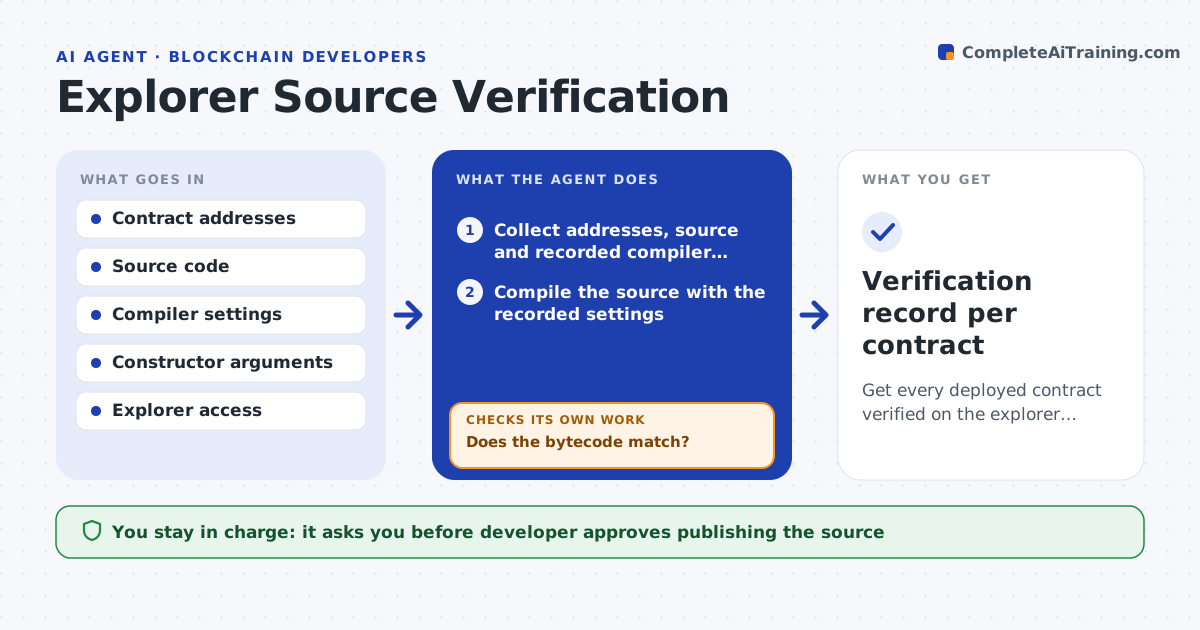
Get every deployed contract verified on the explorer with source that matches the deployed bytecode.
What it does
After a contract is deployed, the explorer page shows only bytecode until the source is verified, and mismatched compiler settings make verification fail in confusing ways. The agent takes the deployed address, compiles the source with the recorded settings, and compares the resulting bytecode with what is on chain. If they match, it submits verification and checks the explorer status. If it fails, it changes one setting at a time, such as optimizer runs, compiler version or constructor arguments, and tries again. It reports which settings worked. The developer approves publishing. Edge case: bytecode differs only in the metadata hash, so the agent treats it as a match and says so.
How it works
Follow the arrows from top to bottom. The orange dashed arrow is the loop: when a check fails, the agent goes back and tries again.
Read the steps as a list
- Deployment finishes
- Collect addresses, source and recorded compiler settings
- Compile the source with the recorded settings
- Compare compiled bytecode with deployed bytecode
- Does the bytecode match?If not: Change one setting (compiler version, optimizer runs, constructor arguments) and recompile. Back to step 3.
- Developer approves publishing the sourceThe agent waits here for your OK.
- Submit verification to the explorer
- Check the verification status
- Is the contract shown as verified?If not: Adjust the submission format or settings and retry. Back to step 7.
- Verification record per contract
How it decides
It submits verification only when compiled bytecode matches on chain bytecode, ignoring the metadata hash. If not, it tries documented setting changes one at a time and records each attempt.
- Ignore the metadata hash when comparing bytecode
- Try settings in a fixed order and record each try
- Stop after 8 attempts per contract
- Proxies are verified with their implementation and linked
Make it yours
Every agent is a starting point. You choose these settings for your own situation.
- Maximum attempts per contract (default 8)
- Explorers to submit to
- Order of settings to try
- Whether to verify proxies and implementations together
What keeps you in control
It always asks you first
- Developer approves publishing the source
Hard limits
- Never publishes source the developer has not approved
- Never changes source code, only settings
It stops when
- Done: all contracts verified and recorded
- Stop: attempt limit reached, so the developer gets the log
Set it up
We guide you through the set-up, step by step
Members get the full set-up guide for this agent. No technical skills needed: you copy, paste and upload.
- One set of instructions to paste into your AI, with the clicks for ChatGPT, Claude, Microsoft 365 Copilot, Gemini and Grok
- The agent then walks you through connecting your own data, one source at a time
- A downloadable copy with the flow chart, the rules and the full guide