AI agent for event planners
Family Engagement Event Planner Agent
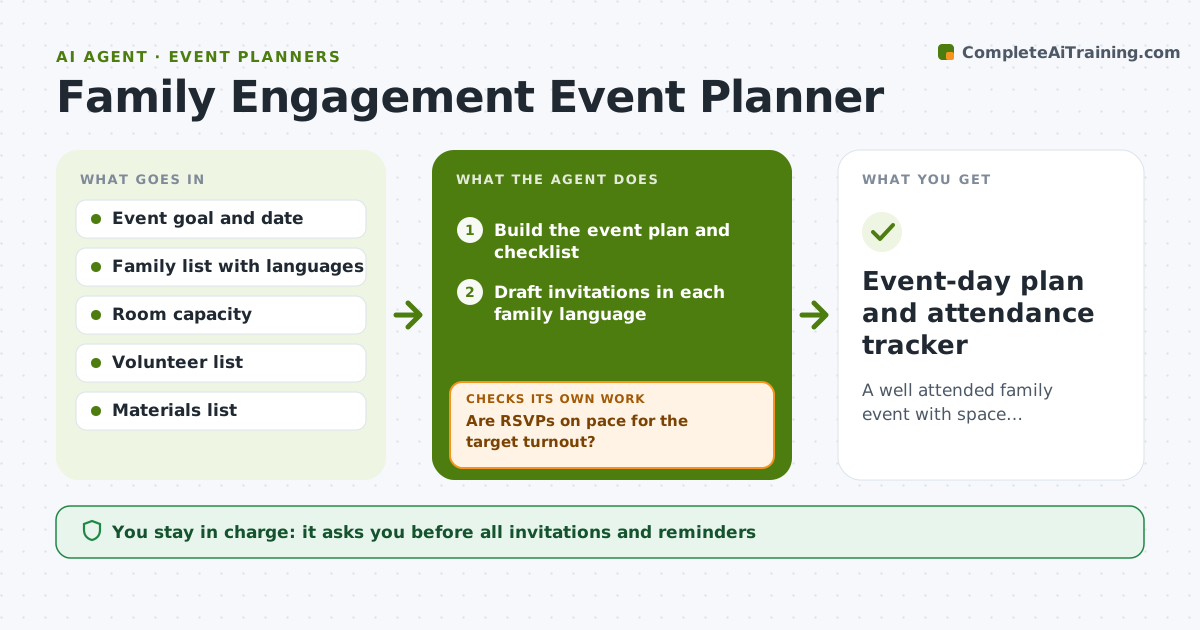
A well attended family event with space, volunteers and materials matched to the headcount.
What it does
Family nights have low turnout, language barriers and last-minute scrambles for chairs and volunteers. This agent plans the event from your date, goal and expected numbers. It builds invitations in the languages your families use, tracks RSVPs, and checks space, volunteers and materials against the likely headcount. If RSVPs are low, it adjusts reminders and suggests another channel. If the headcount outgrows the room, it flags it early. It keeps a single tracker so you can see at a glance who replied, who needs a second reminder and what is still missing. Edge case: a family's language is not available in the template, so the agent asks for a translator. The teacher approves all outgoing invitations.
How it works
Follow the arrows from top to bottom. The orange dashed arrow is the loop: when a check fails, the agent goes back and tries again.
Read the steps as a list
- Event date and goal set
- Build the event plan and checklist
- Draft invitations in each family language
- Teacher approves the invitationsThe agent waits here for your OK.
- Send approved invitations and track RSVPs
- Are RSVPs on pace for the target turnout?If not: draft reminders through another channel such as text or paper note. Back to step 5.
- Check space, volunteers and materials against RSVPs
- Are space, volunteers and materials enough for the headcount?If not: draft requests for more volunteers or a space change. Back to step 7.
- Teacher approves final changesThe agent waits here for your OK.
- Event-day plan and attendance tracker
How it decides
It reads RSVPs against the target turnout and increases reminders or changes channels when the count lags.
- Send the first reminder at 2 weeks and another at 3 days.
- If RSVPs are under 60% of target at 10 days out, change channel.
- Plan seats for RSVPs plus 15%.
- Each invitation goes in the family's home language.
Make it yours
Every agent is a starting point. You choose these settings for your own situation.
- Target turnout
- Languages used
- Reminder timing
- Channels
- Volunteer ratio
What keeps you in control
It always asks you first
- All invitations and reminders
- Any space or volunteer request
Hard limits
- Do not send messages without approval.
- Do not publish family information.
It stops when
- Done: event held with materials ready and tracker complete
- Stop: the room is unavailable, so the agent proposes another date or space
Set it up
We guide you through the set-up, step by step
Members get the full set-up guide for this agent. No technical skills needed: you copy, paste and upload.
- One set of instructions to paste into your AI, with the clicks for ChatGPT, Claude, Microsoft 365 Copilot, Gemini and Grok
- The agent then walks you through connecting your own data, one source at a time
- A downloadable copy with the flow chart, the rules and the full guide