AI agent for product analysts
Feature Adoption Review Agent
Raise a new feature's adoption to its target or decide to retire it with evidence.
What it does
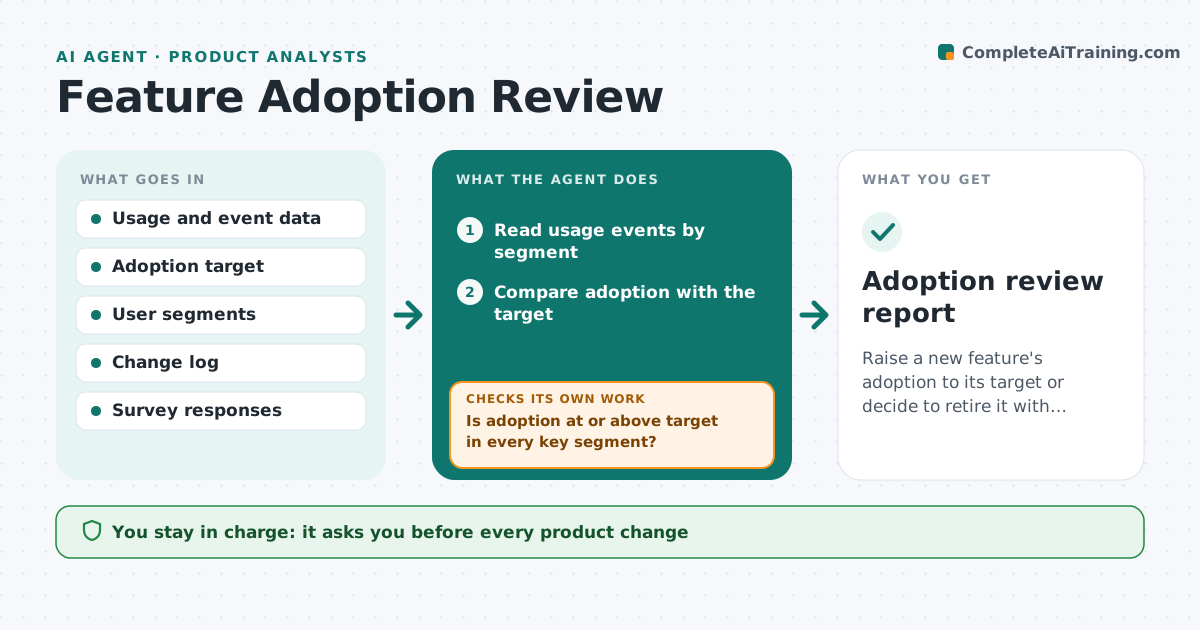
A team ships a feature, celebrates, and moves on. Months later, someone asks if anyone uses it. This agent starts after each launch. It reads usage data against the adoption target set at launch, splits users by segment such as plan, role or new versus old, and finds where they drop off in the flow. It drafts actions to try, such as a prompt, a tour step or a layout change. It tracks usage after each change to see whether it helped. If not, it suggests a different action. The manager approves each change. Edge case: if adoption is high in one segment and zero in another, it points to a discovery problem, not a design problem.
How it works
Follow the arrows from top to bottom. The orange dashed arrow is the loop: when a check fails, the agent goes back and tries again.
Read the steps as a list
- Feature launched with an adoption target
- Read usage events by segment
- Compare adoption with the target
- Is adoption at or above target in every key segment?If not: Find the funnel step with the biggest drop-off in the weak segments. Back to step 3.
- Draft actions such as prompts or onboarding changes
- Manager approves each changeThe agent waits here for your OK.
- Track usage for two weeks after the change
- Did usage rise by the expected lift?If not: Revise the action or try the next one. Back to step 5.
- After 8 weeks decide to keep, improve or retire
- Adoption review report
How it decides
Compares weekly usage to the target by segment and funnel step, picks the biggest drop-off, and judges a change by lift after two weeks.
- Target adoption from launch is the baseline
- Biggest drop-off step gets the first action
- A change is judged after 2 weeks
- Zero adoption after 8 weeks suggests retirement
Make it yours
Every agent is a starting point. You choose these settings for your own situation.
- Adoption target and date
- Segments to track
- Lift expected after a change (default 5 points)
- Weeks of review (default 8)
- Data sources
What keeps you in control
It always asks you first
- Every product change
- Retirement of the feature
- Any message to users
Hard limits
- Never ship a change itself
- Never email users without approval
It stops when
- Done: target met
- Stop: feature retired
- Stop: launch paused
Set it up
We guide you through the set-up, step by step
Members get the full set-up guide for this agent. No technical skills needed: you copy, paste and upload.
- One set of instructions to paste into your AI, with the clicks for ChatGPT, Claude, Microsoft 365 Copilot, Gemini and Grok
- The agent then walks you through connecting your own data, one source at a time
- A downloadable copy with the flow chart, the rules and the full guide