AI agent for prompt engineers
Few-Shot Example Selection Agent
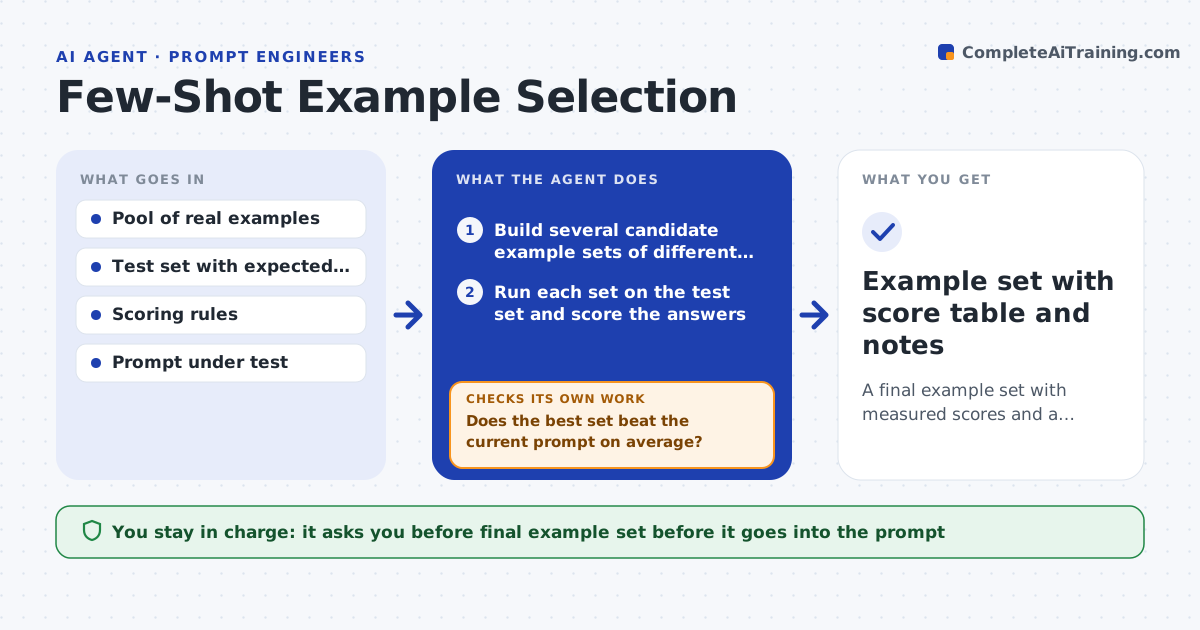
A final example set with measured scores and a record of what each example did
What it does
Adding examples to a prompt can raise quality, lower it, or just change the style, and most teams choose examples by feel. This agent starts with a pool of real inputs and good answers and a fixed test set. It builds several candidate example sets of different sizes and mixes, runs each set on the test set, and scores the results with the team's scoring rules. It then removes single examples one at a time to see which ones hurt, and tries new sets from the remaining pool. After each round it checks whether the best score improved and stops when two rounds in a row show no gain. It also checks that gains hold on a held-out slice, so the prompt does not just memorize the test set. The engineer approves the final set. Edge case: an example with a rare edge case lifts one category but drops another.
How it works
Follow the arrows from top to bottom. The orange dashed arrow is the loop: when a check fails, the agent goes back and tries again.
Read the steps as a list
- Engineer supplies a prompt, an example pool and a test set
- Build several candidate example sets of different sizes
- Run each set on the test set and score the answers
- Remove one example at a time and rescore to find the harmful ones
- Does the best set beat the current prompt on average?If not: build new sets from the pool, changing size and mix. Back to step 2.
- Run the best set on the held-out slice
- Does the gain hold on the held-out slice and in every category?If not: drop the example that hurts a category and rescore. Back to step 4.
- Engineer approves the final example setThe agent waits here for your OK.
- Example set with score table and notes
How it decides
It keeps a set only if the average score rises and no category drops by more than the allowed margin. It stops when gains flatten.
- Keep an example set only if the average rises by at least 2 points
- Reject any set that drops one category by more than 3 points
- Stop after two rounds with no gain
- Always score on the held-out slice before approval
Make it yours
Every agent is a starting point. You choose these settings for your own situation.
- Minimum gain to accept (default 2 points)
- Maximum category drop allowed (default 3 points)
- Candidate set sizes
- Which model runs the tests
What keeps you in control
It always asks you first
- Final example set before it goes into the prompt
Hard limits
- Never changes the live prompt
- Never uses held-out items as examples
It stops when
- Done: best set found and gains hold on held-out data
- Stop: test set is too small to separate results
Set it up
We guide you through the set-up, step by step
Members get the full set-up guide for this agent. No technical skills needed: you copy, paste and upload.
- One set of instructions to paste into your AI, with the clicks for ChatGPT, Claude, Microsoft 365 Copilot, Gemini and Grok
- The agent then walks you through connecting your own data, one source at a time
- A downloadable copy with the flow chart, the rules and the full guide