AI agent for agricultural scientists
Field Trial Data Quality Agent
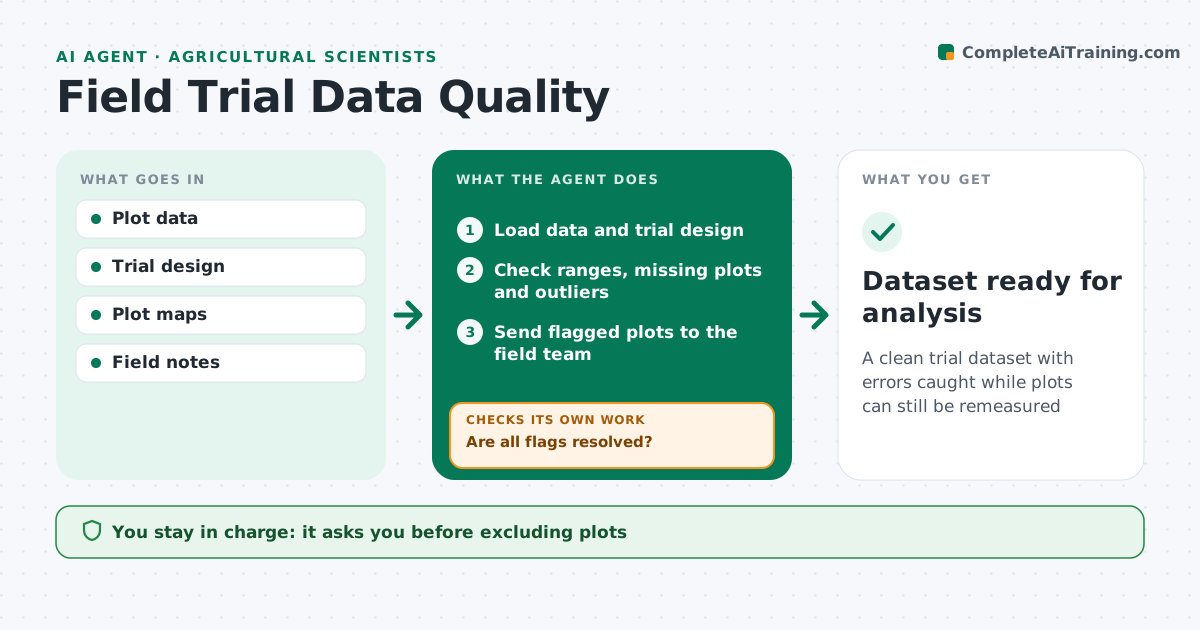
A clean trial dataset with errors caught while plots can still be remeasured
What it does
Field trials collect data from hundreds of plots, often by several people, and errors found after harvest cannot be remeasured. When field data is uploaded, this agent loads it with the trial design and checks for impossible values, missing plots, outliers compared with neighboring plots and readings taken out of order. It sends flagged plots to the field team to confirm or remeasure while the crop is still in the ground. After corrections arrive, it checks again until every flag is resolved or explained. It never deletes an outlier on its own. The scientist approves the clean dataset before analysis. Edge case: an outlier plot near a field edge or a drainage problem is kept and flagged with that note, so the scientist can decide whether to exclude it.
How it works
Follow the arrows from top to bottom. The orange dashed arrow is the loop: when a check fails, the agent goes back and tries again.
Read the steps as a list
- Field data uploaded
- Load data and trial design
- Check ranges, missing plots and outliers
- Send flagged plots to the field team
- Are all flags resolved?If not: follow up with the field team. Back to step 3.
- Scientist approves the clean datasetThe agent waits here for your OK.
- Dataset ready for analysis
How it decides
It flags values outside plausible ranges, missing plots, and outliers relative to neighboring plots and the same treatment.
- Flag values outside plausible ranges
- Compare plots with neighbors
- Never delete outliers without approval
Make it yours
Every agent is a starting point. You choose these settings for your own situation.
- Plausible ranges by crop
- Outlier rule
- Follow-up timing
- Report format
What keeps you in control
It always asks you first
- Excluding plots
- Final dataset
Hard limits
- Never deletes data
It stops when
- Done: dataset approved
- Stop: field team unavailable
Set it up
We guide you through the set-up, step by step
Members get the full set-up guide for this agent. No technical skills needed: you copy, paste and upload.
- One set of instructions to paste into your AI, with the clicks for ChatGPT, Claude, Microsoft 365 Copilot, Gemini and Grok
- The agent then walks you through connecting your own data, one source at a time
- A downloadable copy with the flow chart, the rules and the full guide