AI agent for phd students
Analysis Plan Deviation Tracker Agent
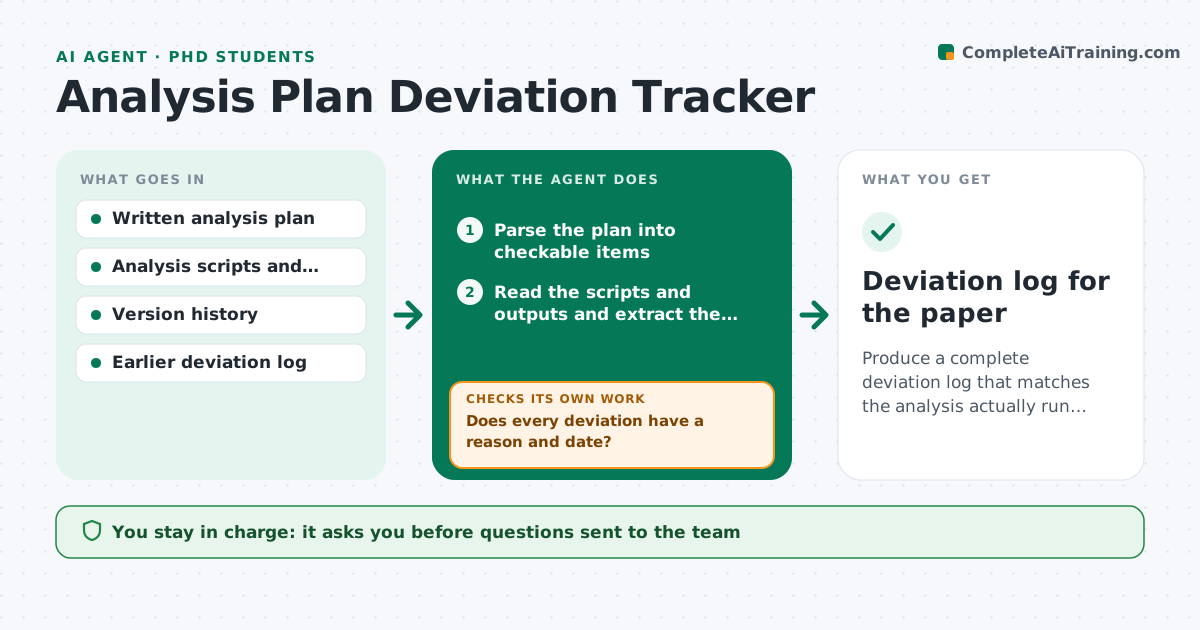
Produce a complete deviation log that matches the analysis actually run to the plan written.
What it does
A written analysis plan protects a study from after-the-fact choices, but real projects change: an exclusion rule shifts, a model is swapped, a test is added. Those changes are often forgotten by the time of writing. This agent reads the written plan and breaks it into checkable items such as variables, exclusions, models, tests and thresholds. It then reads the analysis scripts and outputs and compares each item. Where the script differs, it flags the difference and asks the researcher for the reason and the date. It builds a deviation log marking each change as planned, justified or unexplained, and rechecks after every edit to the scripts. It never changes the scripts. The researcher approves the log. Edge case: an added exploratory test is logged as exploratory, not as a deviation from the primary plan.
How it works
Follow the arrows from top to bottom. The orange dashed arrow is the loop: when a check fails, the agent goes back and tries again.
Read the steps as a list
- Scripts or outputs change
- Parse the plan into checkable items
- Read the scripts and outputs and extract the same items
- Compare each item between plan and scripts
- List differences and mark exploratory additions
- Researcher approves sending the questions about reasonsThe agent waits here for your OK.
- Record reasons and dates in the deviation log
- Does every deviation have a reason and date?If not: mark unexplained and ask again. Back to step 5.
- After the next edit, do the scripts still match the logged state?If not: compare again and add the new differences to the log. Back to step 3.
- Researcher approves the logThe agent waits here for your OK.
- Deviation log for the paper
How it decides
It counts any difference in variables, exclusions, models, tests or thresholds as a deviation, and sorts it as justified only when the researcher gives a reason and date.
- Count any change to exclusion rules, models or thresholds as a deviation
- Log added tests as exploratory, not as deviations
- Mark a deviation unexplained until a reason and date are recorded
- Re-run the comparison after every script version
Make it yours
Every agent is a starting point. You choose these settings for your own situation.
- Plan items to track
- Where scripts live
- Exploratory label rule
- Question template
- Log format
What keeps you in control
It always asks you first
- Questions sent to the team
- The final deviation log
Hard limits
- Never edit the plan or scripts
- Never mark a deviation justified without a recorded reason
It stops when
- Done: log complete and approved
- Stop: plan document missing
Set it up
We guide you through the set-up, step by step
Members get the full set-up guide for this agent. No technical skills needed: you copy, paste and upload.
- One set of instructions to paste into your AI, with the clicks for ChatGPT, Claude, Microsoft 365 Copilot, Gemini and Grok
- The agent then walks you through connecting your own data, one source at a time
- A downloadable copy with the flow chart, the rules and the full guide