AI agent for quantity surveyors
Final Account Reconciliation Agent
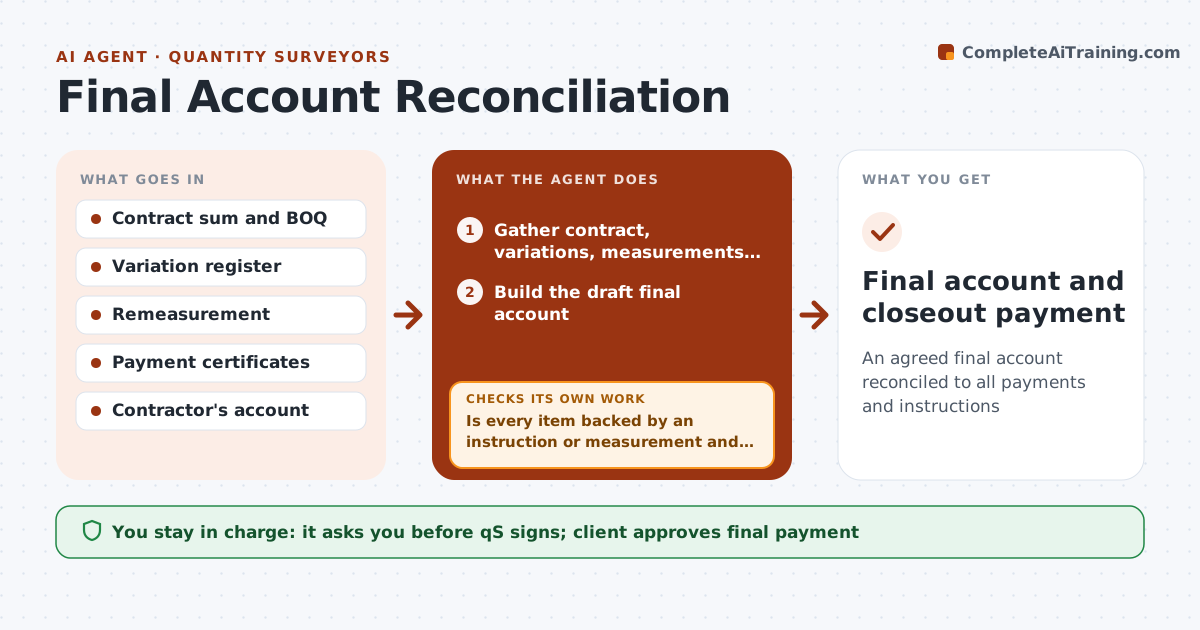
An agreed final account reconciled to all payments and instructions
What it does
At the end of a contract, the quantity surveyor must agree the final account: original sum, approved variations, remeasured items, provisional sums and payments made. Gaps lead to long disputes. At practical completion, this agent gathers the contract, variation register, remeasurement records and payment certificates, and builds the draft final account. It compares it with the contractor's claimed account. Every item must be backed by an instruction or measurement; no instruction means no variation. Provisional sums are replaced with actual cost. It lists items to agree and updates after each meeting. It calculates retention release and final payment from the actual completion certificate. The quantity surveyor signs the final account. Edge case: retention dates use the actual certificate date, not the planned one.
How it works
Follow the arrows from top to bottom. The orange dashed arrow is the loop: when a check fails, the agent goes back and tries again.
Read the steps as a list
- Practical completion
- Gather contract, variations, measurements and payments
- Build the draft final account
- Compare with the contractor's claimed account
- Is every item backed by an instruction or measurement and agreed?If not: list items to agree and update after each meeting. Back to step 3.
- Calculate retention release and final payment
- QS signs the final accountThe agent waits here for your OK.
- Final account and closeout payment
How it decides
Each item must link to an instruction or measurement. Differences with the contractor's account become items to agree.
- No instruction means no variation
- Provisional sums replaced with actual cost
- Retention dates from actual certificates
Make it yours
Every agent is a starting point. You choose these settings for your own situation.
- Contract form (JCT, NEC, AIA)
- Item categories
- Meeting cadence
- Report format
What keeps you in control
It always asks you first
- QS signs; client approves final payment
Hard limits
- Never certifies payment
- Never agrees amounts with the contractor itself
It stops when
- Done: final account signed
- Stop: dispute goes to formal resolution
Set it up
We guide you through the set-up, step by step
Members get the full set-up guide for this agent. No technical skills needed: you copy, paste and upload.
- One set of instructions to paste into your AI, with the clicks for ChatGPT, Claude, Microsoft 365 Copilot, Gemini and Grok
- The agent then walks you through connecting your own data, one source at a time
- A downloadable copy with the flow chart, the rules and the full guide