AI agent for quantity surveyors
Construction Change Evidence Assembly Agent
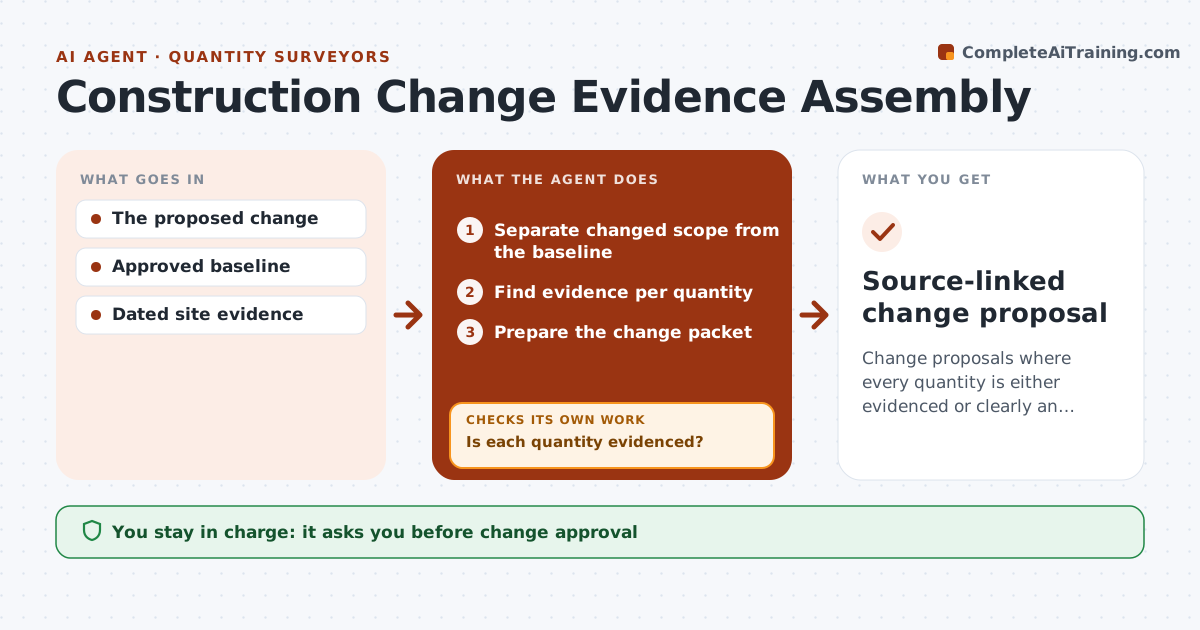
Change proposals where every quantity is either evidenced or clearly an assumption.
What it does
Construction change proposals often mix real changed work with assumptions, so the owner either overpays or rejects the whole thing. This agent separates the changed scope from the baseline contract scope, then looks for evidence behind each changed quantity: site photos, survey data, delivery records or marked-up drawings. Quantities with evidence are linked to it. Quantities without evidence are kept but clearly labelled as assumptions, never presented as fact. It recalculates the value using contract rates and prepares a change packet that shows both. The contract administrator approves before anything goes to the owner. Pricing judgments and entitlement stay with people. Edge case: work that is already in the baseline scope is removed from the change, even if it was done late.
How it works
Follow the arrows from top to bottom. The orange dashed arrow is the loop: when a check fails, the agent goes back and tries again.
Read the steps as a list
- Change drafted
- Separate changed scope from the baseline
- Find evidence per quantity
- Is each quantity evidenced?If not: label it as an assumption. Back to step 3.
- Prepare the change packet
- Contract administrator approvesThe agent waits here for your OK.
- Source-linked change proposal
How it decides
It accepts only evidenced quantities as certifiable.
- Unverified quantities stay labelled as assumptions.
- Baseline scope is never part of a change.
- Value uses contract rates unless a rate is agreed.
- The agent does not judge entitlement.
Make it yours
Every agent is a starting point. You choose these settings for your own situation.
- Evidence types accepted per quantity
- Contract rate schedule to use
- How assumptions are shown (default: separate line with label)
- Who approves the packet (default: contract administrator)
- Packet format for the owner
What keeps you in control
It always asks you first
- Change approval
- Engineering
- Payment certification
Hard limits
- No certification.
It stops when
- Done: packet ready.
Set it up
We guide you through the set-up, step by step
Members get the full set-up guide for this agent. No technical skills needed: you copy, paste and upload.
- One set of instructions to paste into your AI, with the clicks for ChatGPT, Claude, Microsoft 365 Copilot, Gemini and Grok
- The agent then walks you through connecting your own data, one source at a time
- A downloadable copy with the flow chart, the rules and the full guide