AI agent for credit analysts
Financial Statement Spreading Agent
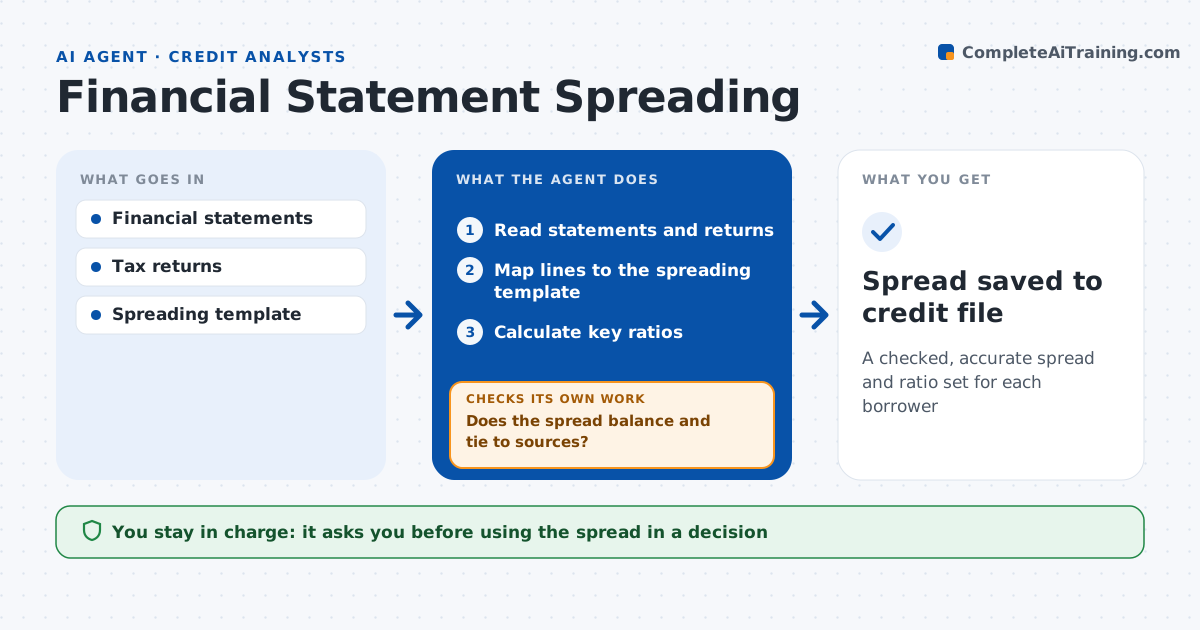
A checked, accurate spread and ratio set for each borrower
What it does
Spreading borrower financials by hand is slow, and one misplaced line can change a credit decision. When a borrower sends financial statements or tax returns, this agent spreads them into the bank's template. It reads the documents, maps each line to the standard chart, and calculates ratios such as debt service coverage, leverage and current ratio. It then checks the spread: the balance sheet must balance, net income must tie to retained earnings changes, and figures must match the tax return when both are given. If a check fails, it re-reads the source and fixes the mapping or lists the gap. It flags one-time items over 10% of net income. The analyst reviews before the spread is used. Edge case: a statement shows a large one-time gain, so the agent flags it as a candidate adjustment.
How it works
Follow the arrows from top to bottom. The orange dashed arrow is the loop: when a check fails, the agent goes back and tries again.
Read the steps as a list
- Financials uploaded
- Read statements and returns
- Map lines to the spreading template
- Calculate key ratios
- Does the spread balance and tie to sources?If not: re-read the source and correct the mapping or list the gap. Back to step 3.
- Analyst reviews the spreadThe agent waits here for your OK.
- Spread saved to credit file
How it decides
It maps lines using the chart of accounts and accepts the spread only when balance and tie-out checks pass.
- Balance sheet off by over $1: fail
- One-time items over 10% of net income: flag for adjustment
- Tax return and statement differ by over 5%: ask why
Make it yours
Every agent is a starting point. You choose these settings for your own situation.
- Spreading template
- Ratios to calculate
- Tie-out tolerance
- Adjustment flags
What keeps you in control
It always asks you first
- Using the spread in a decision
Hard limits
- Never changes source documents
- Never makes credit decisions
It stops when
- Done: spread approved
- Stop: documents incomplete or unreadable
Set it up
We guide you through the set-up, step by step
Members get the full set-up guide for this agent. No technical skills needed: you copy, paste and upload.
- One set of instructions to paste into your AI, with the clicks for ChatGPT, Claude, Microsoft 365 Copilot, Gemini and Grok
- The agent then walks you through connecting your own data, one source at a time
- A downloadable copy with the flow chart, the rules and the full guide