AI agent for embedded systems engineers
Flash Endurance and Wear Agent
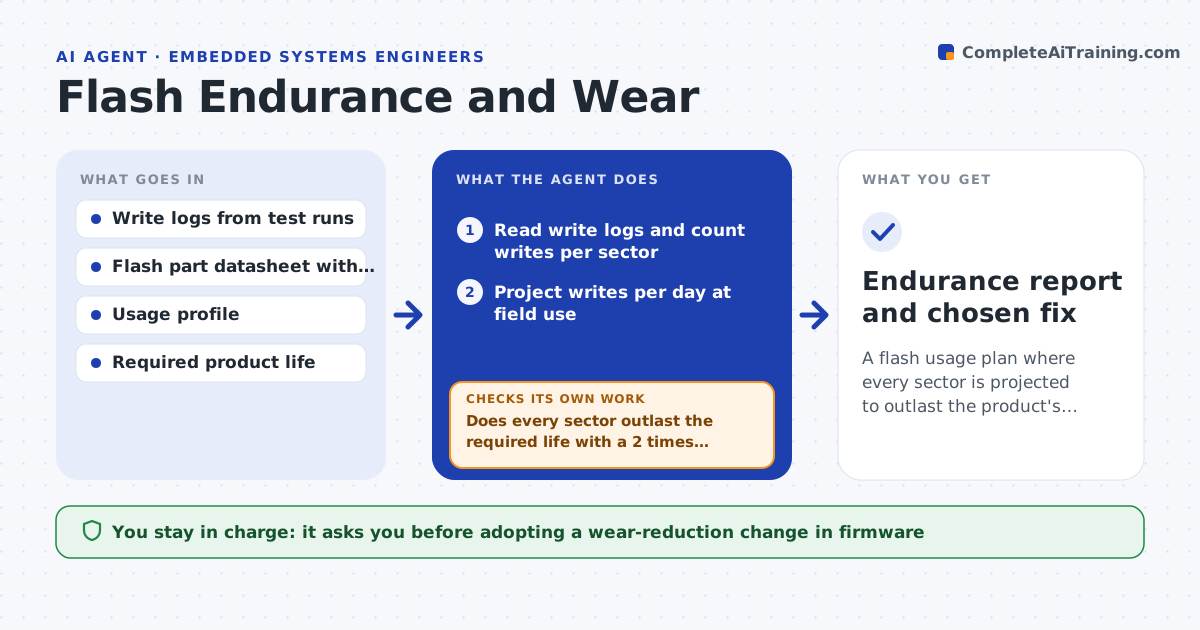
A flash usage plan where every sector is projected to outlast the product's required life
What it does
A device that logs every second can wear out its flash in two years instead of ten. This agent reads write logs from test runs and counts the writes to each sector, then estimates writes per day for each sector at expected field use. It compares them with the rated endurance of the flash part, including the drop at high temperature, and calculates the projected life. For sectors that will wear out too soon, it proposes changes such as wear leveling, write batching or a change to the log interval. After the change is built and tested, it measures again and compares the new projection. The engineer approves the change. Edge case: a settings sector written only at setup is ignored, to avoid noise in the report.
How it works
Follow the arrows from top to bottom. The orange dashed arrow is the loop: when a check fails, the agent goes back and tries again.
Read the steps as a list
- Test run finishes
- Read write logs and count writes per sector
- Project writes per day at field use
- Compare with rated endurance and temperature derating
- Does every sector outlast the required life with a 2 times margin?If not: list the sectors at risk with their projected life. Back to step 2.
- Propose wear leveling, write batching or a longer interval
- Engineer approves the change to tryThe agent waits here for your OK.
- Run the test again with the change and re-measure
- Did the projected life improve enough?If not: try the next option or combine two changes. Back to step 6.
- Endurance report and chosen fix
How it decides
A sector is at risk when projected life is under the required life with a 2 times safety factor. Fixes are chosen by how much they reduce writes.
- Require a 2 times safety factor on projected life
- Derate endurance at the maximum field temperature
- Ignore sectors written only at setup or update
- Prefer write batching before larger redesigns
Make it yours
Every agent is a starting point. You choose these settings for your own situation.
- Required product life in years
- Safety factor (default 2)
- Flash part endurance values
- Temperature range for derating
What keeps you in control
It always asks you first
- Adopting a wear-reduction change in firmware
Hard limits
- Never changes the firmware itself
- States the data loss risk for any batching change
It stops when
- Done: all sectors meet the life target
- Stop: logs lack per-sector detail
Set it up
We guide you through the set-up, step by step
Members get the full set-up guide for this agent. No technical skills needed: you copy, paste and upload.
- One set of instructions to paste into your AI, with the clicks for ChatGPT, Claude, Microsoft 365 Copilot, Gemini and Grok
- The agent then walks you through connecting your own data, one source at a time
- A downloadable copy with the flow chart, the rules and the full guide