AI agent for fraud analysts
Fraud Rule Tuning Agent
Better rules with tested changes and fewer false alerts
What it does
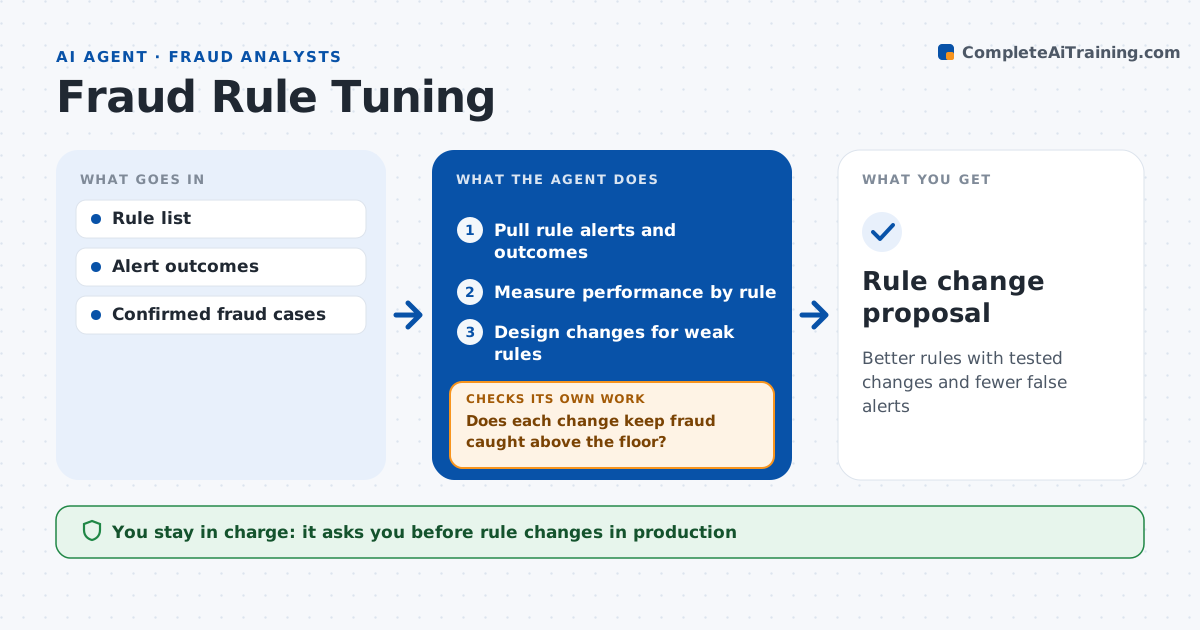
Fraud rules drift over time: some flood analysts with false alarms while others stop catching anything. Each month this agent reviews rule performance. It pulls alerts and outcomes and measures, for each rule, alert volume, true fraud found, false positive rate and missed fraud. For weak rules it designs changes such as new thresholds or added conditions and tests them on six months of past data. It shows the effect on fraud caught and alert volume. It checks that each change keeps fraud caught above the set floor. If a change misses too much fraud, it rejects it and tries another. It writes a change proposal with test results. Fraud leaders approve changes and IT puts them live. Edge case: a rule looks weak only because a fraud wave ended, so the agent compares several months before proposing a change.
How it works
Follow the arrows from top to bottom. The orange dashed arrow is the loop: when a check fails, the agent goes back and tries again.
Read the steps as a list
- Monthly review
- Pull rule alerts and outcomes
- Measure performance by rule
- Design changes for weak rules
- Test changes on past data
- Does each change keep fraud caught above the floor?If not: try another change and retest. Back to step 4.
- Fraud leader approves changesThe agent waits here for your OK.
- Rule change proposal
How it decides
It ranks rules by false positive rate and tests changes on historical data.
- False positive rate over 98%: review rule
- Change cuts fraud caught by over 2%: reject
- Use 6 months of data for tests
Make it yours
Every agent is a starting point. You choose these settings for your own situation.
- Fraud caught floor
- Test period
- Rules in scope
- Report format
What keeps you in control
It always asks you first
- Rule changes in production
Hard limits
- Never changes live rules
- Never uses customer data outside the system
It stops when
- Done: proposal ready
- Stop: outcomes data incomplete
Set it up
We guide you through the set-up, step by step
Members get the full set-up guide for this agent. No technical skills needed: you copy, paste and upload.
- One set of instructions to paste into your AI, with the clicks for ChatGPT, Claude, Microsoft 365 Copilot, Gemini and Grok
- The agent then walks you through connecting your own data, one source at a time
- A downloadable copy with the flow chart, the rules and the full guide