AI agent for patent agents
Freedom to Operate Analysis Agent
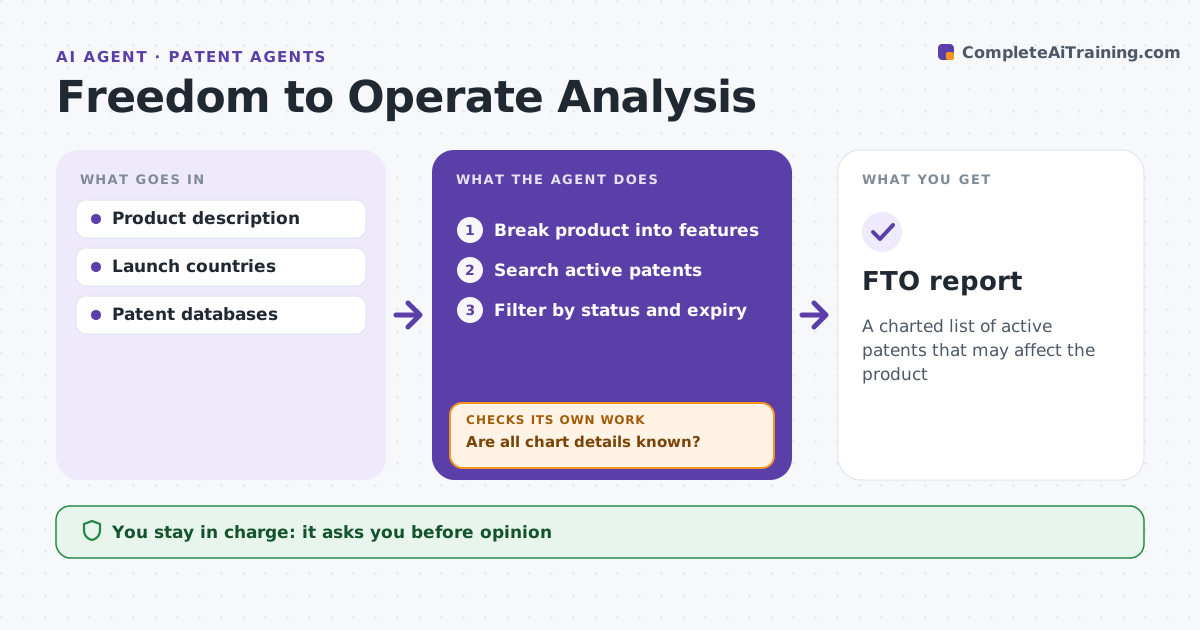
A charted list of active patents that may affect the product
What it does
Launching a product that infringes an active patent can bring an injunction and costly damages. For a product or feature, this agent builds a freedom-to-operate search. It breaks the product into features, searches active patents in the launch countries, and filters out expired or lapsed ones. It confirms each claim is the granted version. For each relevant patent, it charts the independent claims against the product features and flags claims where all elements may be present. If a chart has unknown product details, it asks the engineering team and updates the chart. Pending applications that may issue go on a watch list. The patent agent or attorney gives any opinion. Edge case: a published application may still issue with broader claims, so the agent marks it to watch.
How it works
Follow the arrows from top to bottom. The orange dashed arrow is the loop: when a check fails, the agent goes back and tries again.
Read the steps as a list
- Launch planned
- Break product into features
- Search active patents
- Filter by status and expiry
- Chart claims to features
- Are all chart details known?If not: ask engineering for product details. Back to step 5.
- Patent agent or attorney gives opinionThe agent waits here for your OK.
- FTO report
How it decides
It charts independent claims against product features and filters by status.
- All claim elements present: high risk
- Expired or lapsed: exclude
- Pending application: watch list
Make it yours
Every agent is a starting point. You choose these settings for your own situation.
- Countries
- Risk scale
- Chart format
- Watch list
What keeps you in control
It always asks you first
- Opinion
- Sharing with business
Hard limits
- Never gives legal opinions
- Never shares outside privilege
It stops when
- Done: report ready
- Stop: product design not final
Set it up
We guide you through the set-up, step by step
Members get the full set-up guide for this agent. No technical skills needed: you copy, paste and upload.
- One set of instructions to paste into your AI, with the clicks for ChatGPT, Claude, Microsoft 365 Copilot, Gemini and Grok
- The agent then walks you through connecting your own data, one source at a time
- A downloadable copy with the flow chart, the rules and the full guide