AI agent for sports coachs
Game Film Tagging and Stat Review Agent
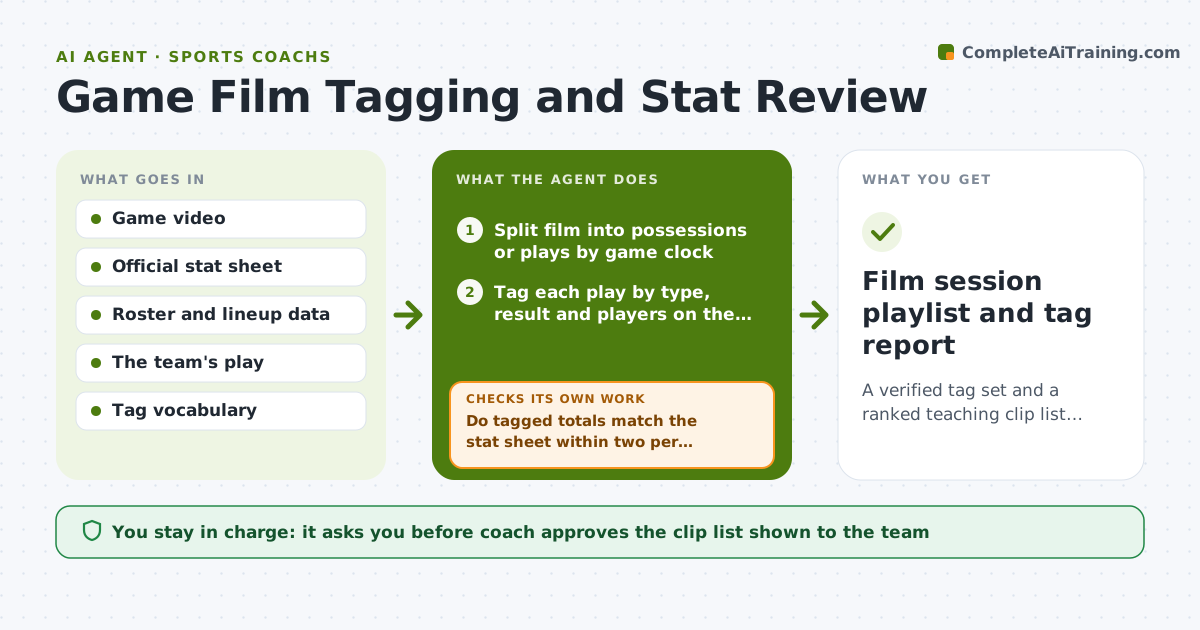
A verified tag set and a ranked teaching clip list ready for the next film session
What it does
After each game a coach has hours of film and a box score that do not agree. This agent pulls the game video and the stat sheet, tags every possession or play by type, outcome and players on the field, then lines the tags up with the official stats. It checks that tagged totals match the stat sheet, such as shots or turnovers. When the totals differ by more than two, it re-reviews the time ranges where the gap sits and marks clips it is unsure of. It then ranks patterns by points lost and builds a short clip list. It decides between teaching clips by picking plays that repeat at least three times. The coach approves which clips the team sees and anything said about a single player. Edge case: if the camera angle drops for a stretch, it marks that period as untagged instead of guessing.
How it works
Follow the arrows from top to bottom. The orange dashed arrow is the loop: when a check fails, the agent goes back and tries again.
Read the steps as a list
- Game film and stat sheet arrive
- Split film into possessions or plays by game clock
- Tag each play by type, result and players on the field
- Do tagged totals match the stat sheet within two per category?If not: re-review the time ranges where counts differ and flag uncertain tags. Back to step 3.
- Group tags into repeating patterns and score their effect on points
- Pick teaching clips for patterns seen three or more times
- Does each pattern have at least two clear clips?If not: merge thin patterns or note them as watch items without clips. Back to step 5.
- Coach approves clip list and any player-specific notesThe agent waits here for your OK.
- Film session playlist and tag report
How it decides
It ranks patterns by points lost or gained and frequency, and only proposes teaching clips for patterns seen three or more times.
- Tag-to-stat gap over 2 in any category triggers a re-review of that period
- Only patterns seen 3 or more times become teaching clips
- Plays with unclear camera view are marked untagged, never guessed
- Limit the team playlist to 12 clips unless the coach raises it
Make it yours
Every agent is a starting point. You choose these settings for your own situation.
- Tag vocabulary and play types (default: team playbook terms)
- Stat gap that triggers re-review (default 2)
- Maximum clips per session (default 12)
- Whether players get individual clip links (default off)
What keeps you in control
It always asks you first
- Coach approves the clip list shown to the team
- Coach approves any note naming an individual player
Hard limits
- Never shares clips outside the team account
- Never posts player-specific criticism without coach approval
It stops when
- Done: tags reconciled and playlist approved
- Stop: film is missing more than a quarter of the game
Set it up
We guide you through the set-up, step by step
Members get the full set-up guide for this agent. No technical skills needed: you copy, paste and upload.
- One set of instructions to paste into your AI, with the clicks for ChatGPT, Claude, Microsoft 365 Copilot, Gemini and Grok
- The agent then walks you through connecting your own data, one source at a time
- A downloadable copy with the flow chart, the rules and the full guide