AI agent for retail sales associates
Gift Card and Promo Code Issue Resolution Agent
Resolve the failed code or card at checkout with a valid result and a fair total
What it does
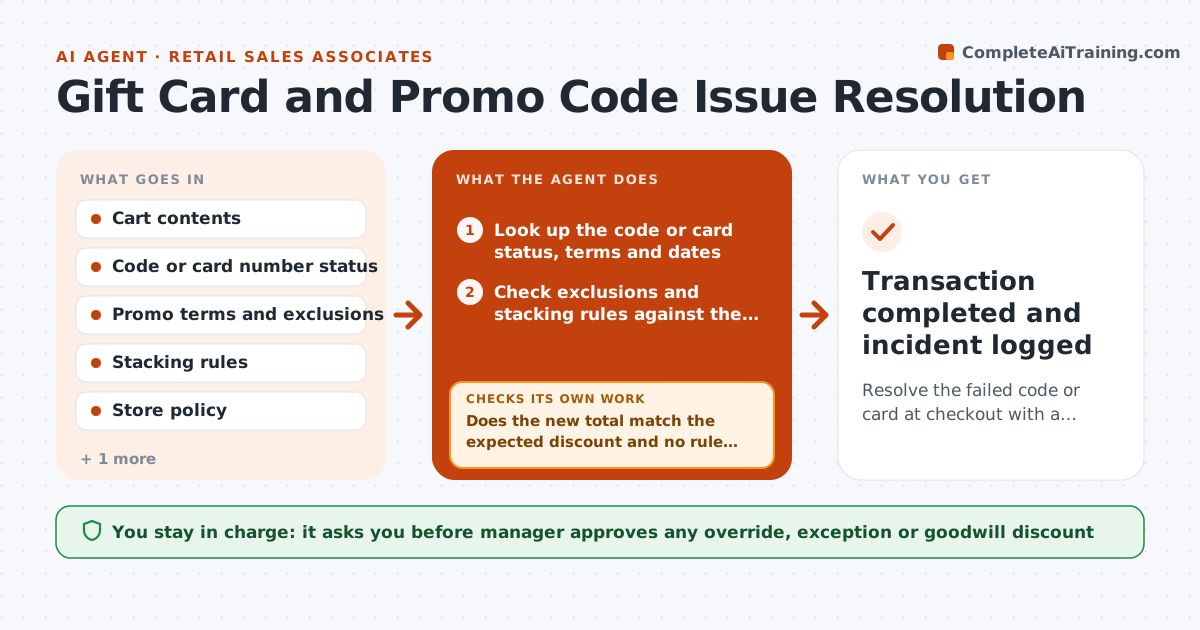
A customer waits while a promo code is declined and the associate guesses why. The line grows, someone calls a manager, and the customer leaves unhappy. This agent works through the problem in the moment. When a promo or card fails, it checks the terms, dates, exclusions and stacking rules against the items in the cart, finds the most likely reason and the best valid alternative, such as a different code or applying the card first. It walks the associate through the fix step by step, then re-tests the cart total after the change. A manager approves any override or goodwill discount. Edge case: an expired gift card. The agent checks the store policy and prepares the exception request.
How it works
Follow the arrows from top to bottom. The orange dashed arrow is the loop: when a check fails, the agent goes back and tries again.
Read the steps as a list
- Code or card declined at checkout
- Look up the code or card status, terms and dates
- Check exclusions and stacking rules against the items in the cart
- Find the reason for the decline
- List valid alternatives and rank by customer benefit
- Guide the associate through applying the best alternative
- Recalculate the cart total after the change
- Does the new total match the expected discount and no rule is broken?If not: Try the next alternative and recalculate. Back to step 4.
- Manager approves any override or goodwill discountThe agent waits here for your OK.
- Transaction completed and incident logged
How it decides
It tests each code against the cart and picks the combination that gives the largest valid discount. Overrides are never applied without a manager.
- Apply the single largest valid discount unless stacking is allowed
- Expired gift cards follow the store policy, never silent overrides
- Excluded brands are removed from the discount, not the whole cart
- Overrides above $10 need a manager
Make it yours
Every agent is a starting point. You choose these settings for your own situation.
- Override limit without a manager (default $10)
- Promo rules and exclusions
- Gift card expiry policy
- Language and tone for the associate
- Incident log fields
What keeps you in control
It always asks you first
- Manager approves any override, exception or goodwill discount
Hard limits
- Never overrides a rule without a manager
- Never reads out full gift card numbers
It stops when
- Done: sale completed with a valid total
- Stop: suspected fraud, call the manager and do not proceed
Set it up
We guide you through the set-up, step by step
Members get the full set-up guide for this agent. No technical skills needed: you copy, paste and upload.
- One set of instructions to paste into your AI, with the clicks for ChatGPT, Claude, Microsoft 365 Copilot, Gemini and Grok
- The agent then walks you through connecting your own data, one source at a time
- A downloadable copy with the flow chart, the rules and the full guide