AI agent for team leads
Daily Store Opening Readiness Agent
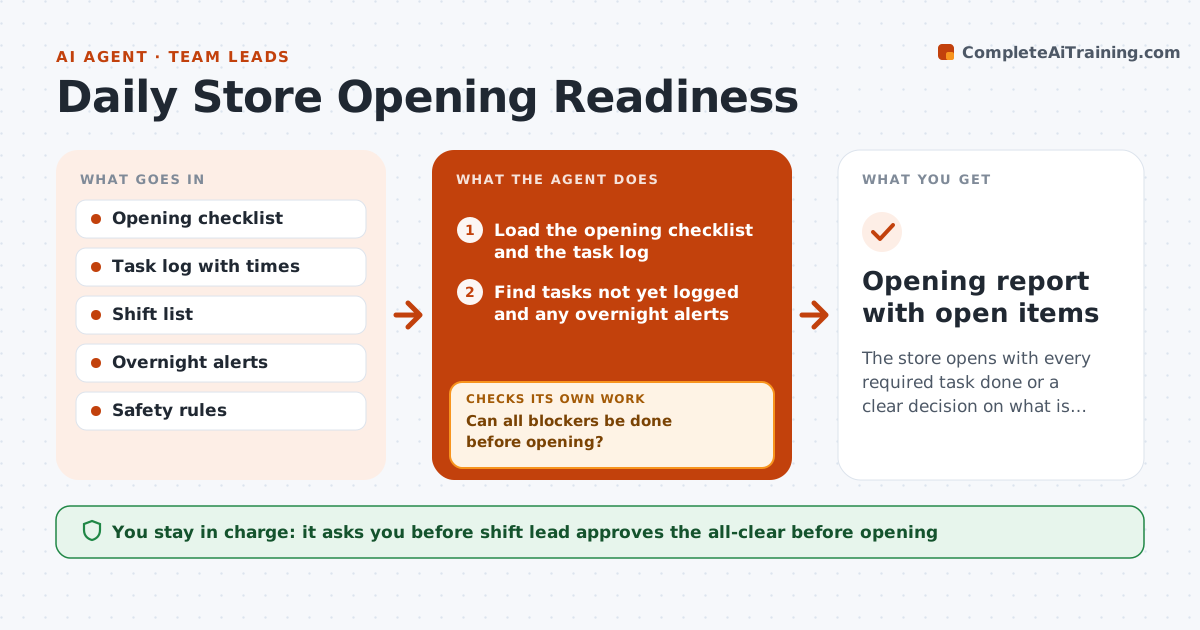
The store opens with every required task done or a clear decision on what is not
What it does
Stores open with missed tasks: the till float is not counted, the safety walk is skipped, or a sign is wrong. This agent checks the opening task log before opening time for cash, signs, safety checks, stock and equipment, and flags items not marked done. It reassigns the missing tasks to the people on shift, estimating time against the time left. It rechecks the log before the doors open and reports what is still open. If something cannot be done in time, it suggests a workaround or a later opening of that area. The shift lead approves the all-clear. Edge case: a freezer alarm was logged overnight, so the agent makes it a blocker, not a normal task.
How it works
Follow the arrows from top to bottom. The orange dashed arrow is the loop: when a check fails, the agent goes back and tries again.
Read the steps as a list
- 45 minutes before opening
- Load the opening checklist and the task log
- Find tasks not yet logged and any overnight alerts
- Classify each as a blocker or a postponable task
- Assign tasks to staff on shift with time estimates
- Can all blockers be done before opening?If not: reassign people or suggest delaying the affected area. Back to step 4.
- Recheck the log 10 minutes before opening
- Are all blockers logged as done?If not: alert the shift lead and hold the all-clear. Back to step 5.
- Shift lead approves the all-clearThe agent waits here for your OK.
- Opening report with open items
How it decides
A task is complete when it is logged with a time and a person. Safety and cash tasks block opening until done. Others can be postponed with a note.
- Treat safety, cash and alarms as blockers
- Allow signage and tidying to be postponed with a note
- Assign tasks by who is nearest and free
- Rerun the check 10 minutes before opening
Make it yours
Every agent is a starting point. You choose these settings for your own situation.
- Opening checklist
- Blocker rules
- Check times
- Who gets alerts
What keeps you in control
It always asks you first
- Shift lead approves the all-clear before opening
Hard limits
- Never mark a task done itself
- Do not skip a safety blocker
- Alert the lead on any alarm
It stops when
- Done: store opens with tasks done or noted
- Stop: a safety blocker keeps an area closed
Set it up
We guide you through the set-up, step by step
Members get the full set-up guide for this agent. No technical skills needed: you copy, paste and upload.
- One set of instructions to paste into your AI, with the clicks for ChatGPT, Claude, Microsoft 365 Copilot, Gemini and Grok
- The agent then walks you through connecting your own data, one source at a time
- A downloadable copy with the flow chart, the rules and the full guide