AI agent for energy engineers
Grid Interconnection Application Tracker Agent
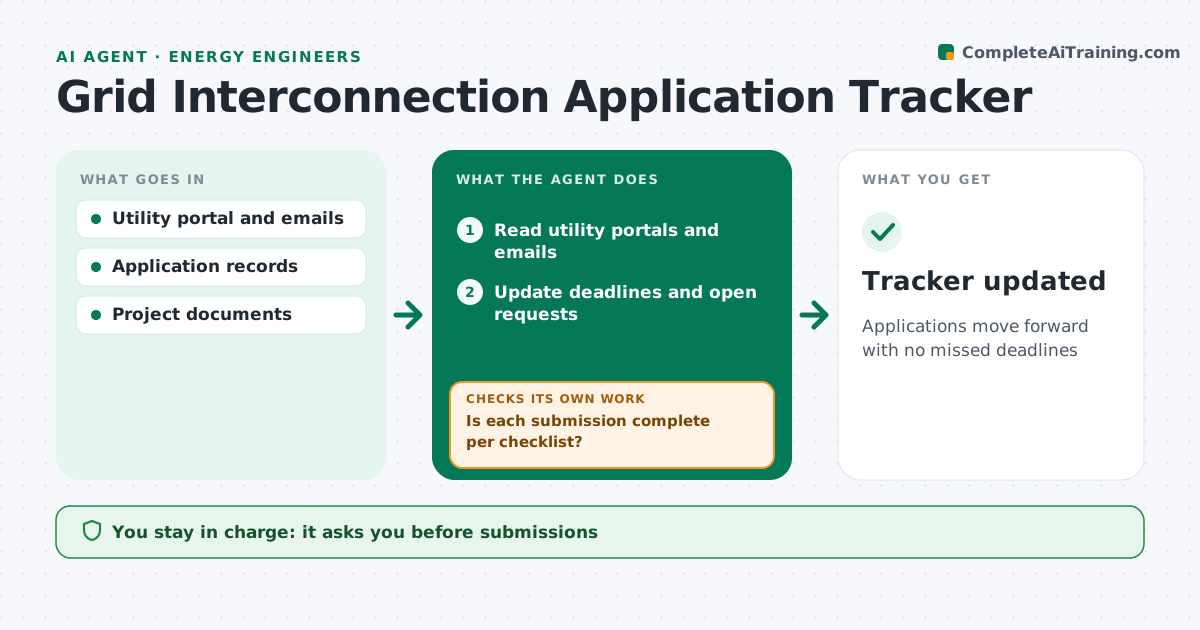
Applications move forward with no missed deadlines
What it does
Getting a project connected to the grid involves applications, studies, deposits and utility requests over many months, and one missed deadline can drop a project from the queue. Each day this agent reads utility portals and emails and updates each application's record: queue position, study stage, deadlines and open requests. It drafts responses with the required documents, prioritized by deadline. Before anything is sent, it checks each submission against the utility's checklist. If something is missing, it lists it and checks again once added. The engineer approves every submission and every deposit or payment; the agent never pays or submits on its own. Edge case: a study result that requires network upgrades is flagged with the cost and the deadline to accept or withdraw, since that is a major business decision.
How it works
Follow the arrows from top to bottom. The orange dashed arrow is the loop: when a check fails, the agent goes back and tries again.
Read the steps as a list
- Daily check
- Read utility portals and emails
- Update deadlines and open requests
- Draft responses with documents
- Is each submission complete per checklist?If not: gather missing documents. Back to step 4.
- Engineer approves submissions and paymentsThe agent waits here for your OK.
- Tracker updated
How it decides
It ranks tasks by deadline and checks submissions against the utility's checklist.
- Prioritize by deadline
- Flag upgrade cost decisions
- Check documents against checklist
Make it yours
Every agent is a starting point. You choose these settings for your own situation.
- Deadline warning days
- Utilities
- Checklist
- Report format
What keeps you in control
It always asks you first
- Submissions
- Deposits and payments
- Accepting upgrade costs
Hard limits
- Never pays deposits
- Never accepts study results
It stops when
- Done: tasks current
- Stop: portal access fails
Set it up
We guide you through the set-up, step by step
Members get the full set-up guide for this agent. No technical skills needed: you copy, paste and upload.
- One set of instructions to paste into your AI, with the clicks for ChatGPT, Claude, Microsoft 365 Copilot, Gemini and Grok
- The agent then walks you through connecting your own data, one source at a time
- A downloadable copy with the flow chart, the rules and the full guide