AI agent for geologists
Groundwater Level Monitoring Agent
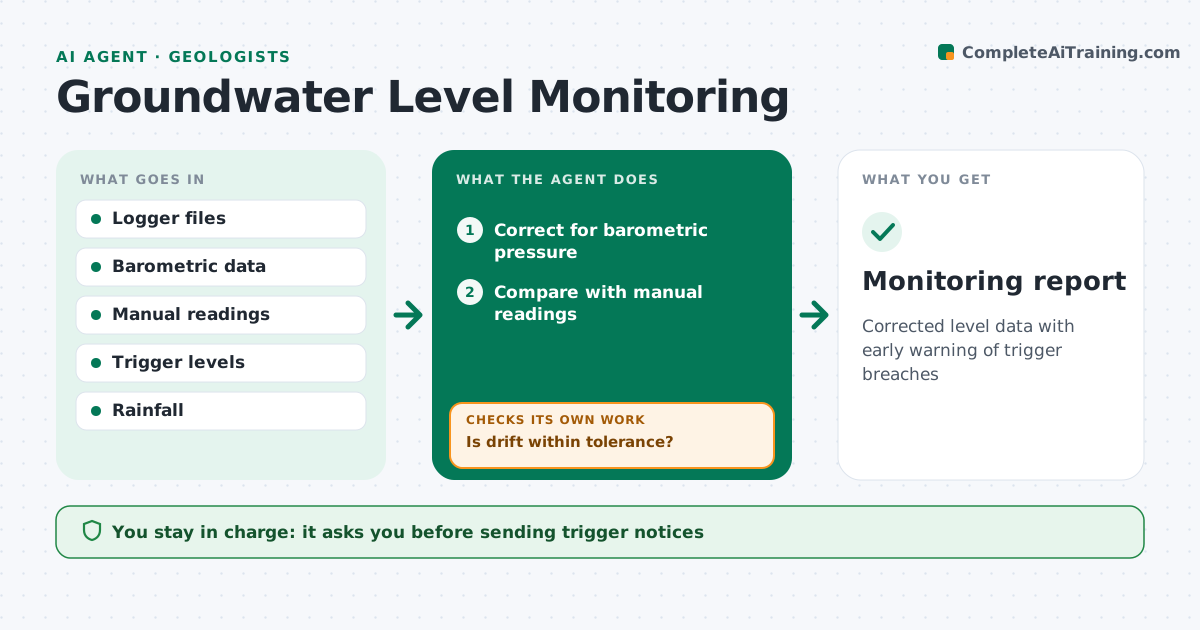
Corrected level data with early warning of trigger breaches
What it does
Water level loggers record every hour, but raw data must be corrected and checked before anyone can trust it. This agent downloads logger data, corrects it for barometric pressure, and compares it with manual readings to check for drift. If drift is beyond tolerance, it applies a correction or flags the logger for service. It also flags gaps and spikes. It then compares levels with trigger levels and seasonal patterns, for example near a pumping well or a dewatering project. When a trigger is crossed, it drafts a notice with charts and the readings behind it. It never sends notices on its own. You approve every notice. Edge case: a sudden rise after heavy rain is checked against rainfall data before an alarm is raised, so a normal storm response is not reported as a problem.
How it works
Follow the arrows from top to bottom. The orange dashed arrow is the loop: when a check fails, the agent goes back and tries again.
Read the steps as a list
- Logger data downloaded
- Correct for barometric pressure
- Compare with manual readings
- Is drift within tolerance?If not: apply drift correction or flag logger for service. Back to step 2.
- Compare with triggers and rainfall
- Geologist approves noticesThe agent waits here for your OK.
- Monitoring report
How it decides
It corrects data, checks drift against manual readings, and flags levels past triggers that rainfall does not explain.
- Correct for barometric pressure
- Flag drift above tolerance
- Check rainfall before alarms
Make it yours
Every agent is a starting point. You choose these settings for your own situation.
- Drift tolerance (default 2 cm)
- Trigger levels
- Report frequency
- Rainfall source
What keeps you in control
It always asks you first
- Sending trigger notices
Hard limits
- Never sends notices without approval
It stops when
- Done: report filed
- Stop: logger failed
Set it up
We guide you through the set-up, step by step
Members get the full set-up guide for this agent. No technical skills needed: you copy, paste and upload.
- One set of instructions to paste into your AI, with the clicks for ChatGPT, Claude, Microsoft 365 Copilot, Gemini and Grok
- The agent then walks you through connecting your own data, one source at a time
- A downloadable copy with the flow chart, the rules and the full guide