AI agent for physiotherapists
Group Exercise Class Planner Agent
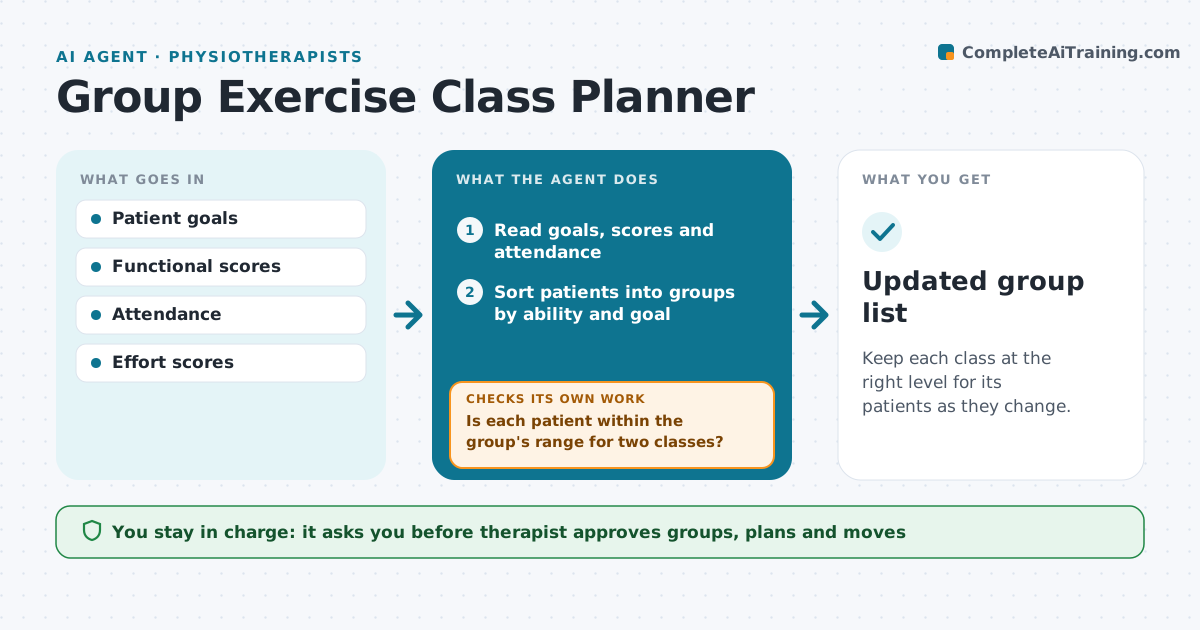
Keep each class at the right level for its patients as they change.
What it does
Group classes work when patients are matched by ability, but ability changes fast. This agent runs monthly. It reads each patient's goals, functional scores and attendance, and sorts them into groups. For each group, it drafts a class plan with exercises, intensity and a progression. After each class, it records attendance and effort scores. If a patient is clearly ahead or behind the group, it proposes a move and explains the data. The therapist approves the groups, the plans and each move. Edge case: a patient just recovered from a flare, so the agent keeps them in their group but lowers their load for two weeks.
How it works
Follow the arrows from top to bottom. The orange dashed arrow is the loop: when a check fails, the agent goes back and tries again.
Read the steps as a list
- Monthly planning date
- Read goals, scores and attendance
- Sort patients into groups by ability and goal
- Draft a class plan for each group
- Therapist approves groups and plansThe agent waits here for your OK.
- Record attendance and effort after each class
- Is each patient within the group's range for two classes?If not: propose a move or a load change and explain the data. Back to step 3.
- Therapist approves movesThe agent waits here for your OK.
- Update the groups and plans
- Updated group list
How it decides
It moves a patient when scores differ from the group by more than a set margin for two classes in a row.
- Move a patient after 2 classes outside the group range
- Cap groups at 8 patients
- Keep a patient in the group after a flare but reduce load
- Keep patients with the same goals together
Make it yours
Every agent is a starting point. You choose these settings for your own situation.
- Group size (default 8)
- Move margin
- Class length and equipment
- Planning day of the month
What keeps you in control
It always asks you first
- Therapist approves groups, plans and moves
Hard limits
- Never move a patient without approval
- Never share one patient's scores with others
It stops when
- Done: groups match ability
- Stop: not enough patients to form a group
Set it up
We guide you through the set-up, step by step
Members get the full set-up guide for this agent. No technical skills needed: you copy, paste and upload.
- One set of instructions to paste into your AI, with the clicks for ChatGPT, Claude, Microsoft 365 Copilot, Gemini and Grok
- The agent then walks you through connecting your own data, one source at a time
- A downloadable copy with the flow chart, the rules and the full guide