AI agent for warehouse managers
Healthcare Stock Recall Evidence Agent
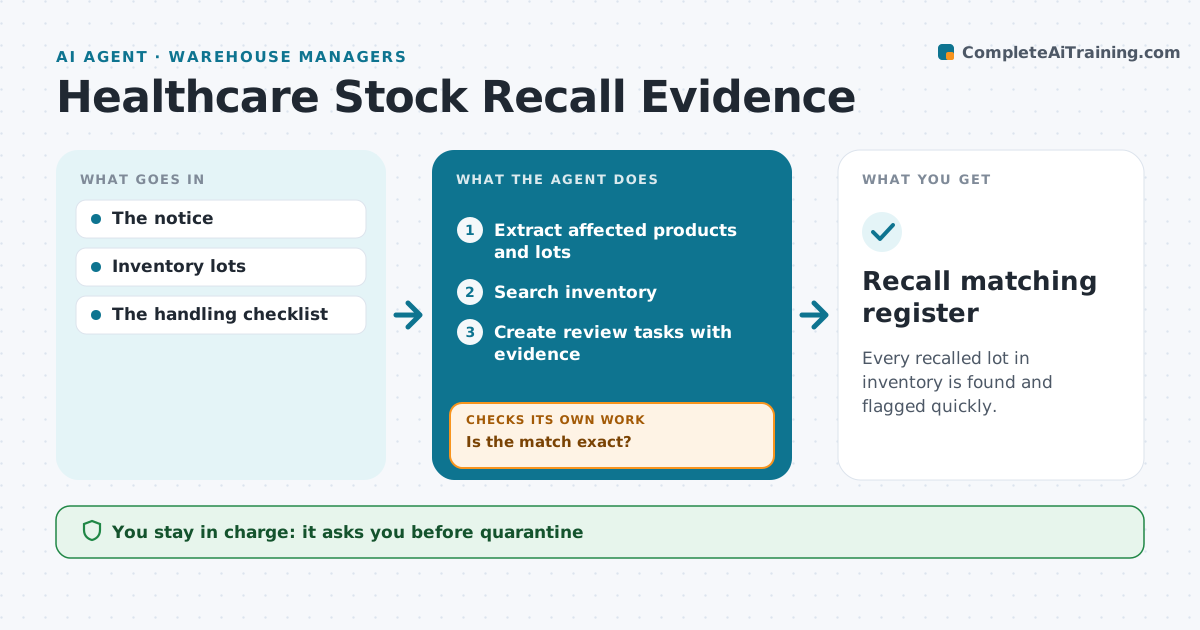
Every recalled lot in inventory is found and flagged quickly.
What it does
Recall notices for medical supplies must be matched to inventory lots quickly, and partial lot numbers make that hard. When a recall notice arrives, this agent extracts the affected products and lot numbers and searches inventory across storerooms and clinical areas. Only an exact product and lot match counts as confirmed. A partial match, such as a lot recorded as 23A-4 without the last digits, is flagged as possibly affected rather than dismissed. It creates review tasks with evidence for the responsible person, with items in clinical areas first. That person decides on quarantine; disposal and clinical safety decisions stay with staff. Edge case: the same product exists under two supplier codes, so the agent searches both.
How it works
Follow the arrows from top to bottom. The orange dashed arrow is the loop: when a check fails, the agent goes back and tries again.
Read the steps as a list
- Recall notice arrives
- Extract affected products and lots
- Search inventory
- Is the match exact?If not: flag as uncertain for the responsible person. Back to step 3.
- Create review tasks with evidence
- Responsible person decides quarantineThe agent waits here for your OK.
- Recall matching register
How it decides
It matches on exact product and lot; partial matches are flagged, not dismissed.
- Confirmed only on exact product and lot match.
- Partial matches are flagged as possibly affected, never dismissed.
- Items in clinical areas are handled first.
- Quarantine and disposal are decided by the responsible person.
Make it yours
Every agent is a starting point. You choose these settings for your own situation.
- Inventory systems and locations to search
- Product code lists, including alternate supplier codes
- Who receives recall tasks per area
- Hours to complete review before escalation (default 4)
- Register format
What keeps you in control
It always asks you first
- Quarantine
- Disposal
- Clinical safety decisions
Hard limits
- No disposal decisions.
It stops when
- Done: all lots checked.
Set it up
We guide you through the set-up, step by step
Members get the full set-up guide for this agent. No technical skills needed: you copy, paste and upload.
- One set of instructions to paste into your AI, with the clicks for ChatGPT, Claude, Microsoft 365 Copilot, Gemini and Grok
- The agent then walks you through connecting your own data, one source at a time
- A downloadable copy with the flow chart, the rules and the full guide