AI agent for process engineers
Heat Exchanger Fouling Cleaning Planner Agent
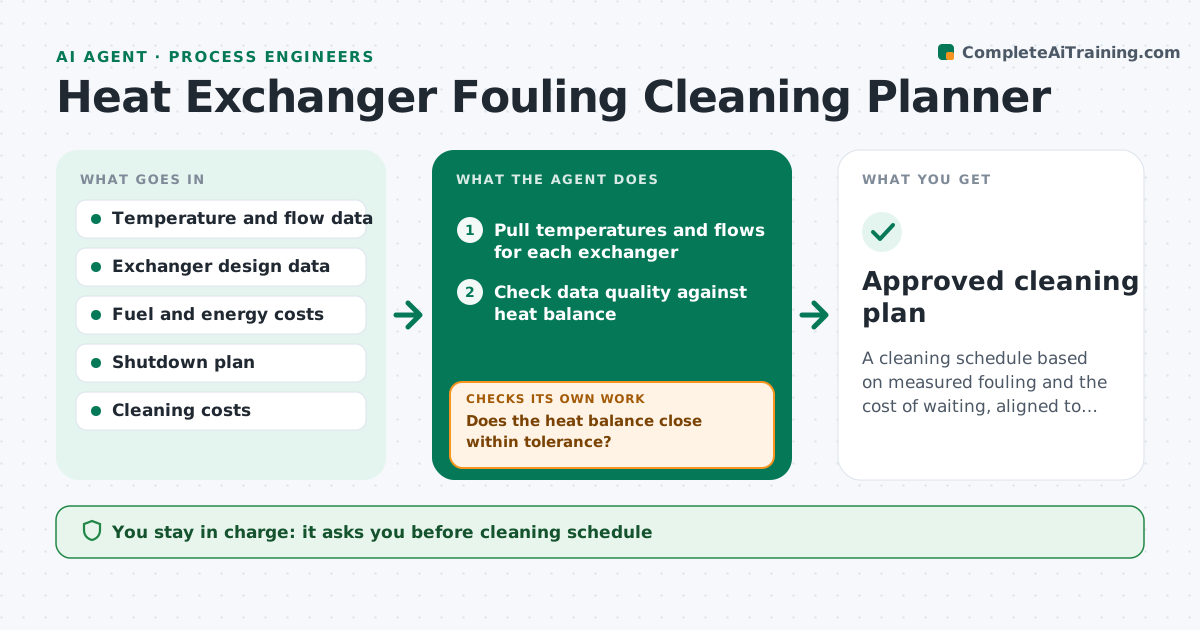
A cleaning schedule based on measured fouling and the cost of waiting, aligned to the shutdown plan
What it does
Heat exchangers are often cleaned on a calendar, even when some are fouled badly and others are fine. This agent reads inlet and outlet temperatures and flows, calculates the fouling factor, and trends it over time. It estimates the cost of waiting, using lost heat recovery or higher pumping or fuel use. Then it proposes a cleaning date that fits the shutdown plan and avoids clashes with other work. As new data arrives it rechecks the trend and moves the date if the rate changes. First it checks that the temperature and flow data are credible, since a bad flow meter makes any fouling number meaningless. The engineer approves the schedule. Edge case: a flow meter is out of calibration, so the agent holds the exchanger's score.
How it works
Follow the arrows from top to bottom. The orange dashed arrow is the loop: when a check fails, the agent goes back and tries again.
Read the steps as a list
- Weekly data refresh
- Pull temperatures and flows for each exchanger
- Check data quality against heat balance
- Does the heat balance close within tolerance?If not: mark the exchanger as data suspect and request instrument checks. Back to step 2.
- Calculate the fouling factor and trend it
- Estimate the cost of waiting by week
- Read the shutdown plan and cleaning cost
- Propose a cleaning date that fits the plan
- Does the date keep the fouling factor under the design limit?If not: move the date earlier or propose an interim measure. Back to step 8.
- Engineer approves the cleaning scheduleThe agent waits here for your OK.
- Approved cleaning plan
How it decides
Cleaning is proposed when the cost of waiting exceeds the cleaning cost or when the fouling factor nears the design limit.
- Reject data when the heat balance misses by more than 5%
- Propose cleaning when waiting costs exceed the cleaning cost
- Propose cleaning before the fouling factor reaches 80% of the design limit
- Prefer a planned shutdown over a forced outage
Make it yours
Every agent is a starting point. You choose these settings for your own situation.
- Heat balance tolerance (default 5%)
- Cost inputs
- Design fouling limit
- Review day of week
What keeps you in control
It always asks you first
- Cleaning schedule
- Any unplanned outage request
Hard limits
- Never schedules a forced outage on its own
- Never uses data that fails the balance check
It stops when
- Done: dates proposed and approved
- Stop: data is unreliable for most exchangers
Set it up
We guide you through the set-up, step by step
Members get the full set-up guide for this agent. No technical skills needed: you copy, paste and upload.
- One set of instructions to paste into your AI, with the clicks for ChatGPT, Claude, Microsoft 365 Copilot, Gemini and Grok
- The agent then walks you through connecting your own data, one source at a time
- A downloadable copy with the flow chart, the rules and the full guide