AI agent for occupational therapists
Home Modification Project Agent
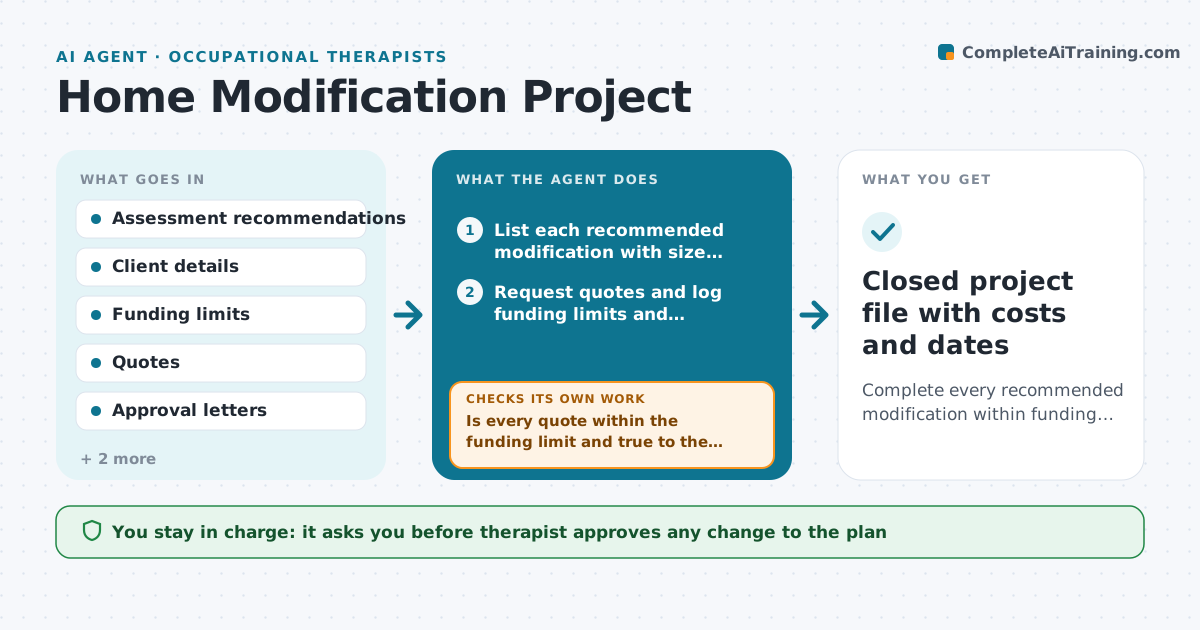
Complete every recommended modification within funding and have the finished work checked against the assessment.
What it does
After a home assessment, an occupational therapist often waits weeks on contractors, funders, landlords and families while the client lives with the risk. This agent turns the assessment recommendations into a project list: ramp, grab rails, bathroom changes. It requests quotes, logs funding limits and approvals, and watches dates. When a quote comes in above the funding limit, it looks for lower cost options such as a different product or a phased plan, then rechecks the whole plan against the recommendations. It flags stalled items with the party responsible. When the work is done, it compares photos and the contractor invoice with the recommendation list and notes anything missing. The therapist approves every plan change, every message to a funder and the final sign-off. Edge case: a contractor offers a cheaper rail that is shorter than recommended, so the agent flags it instead of accepting.
How it works
Follow the arrows from top to bottom. The orange dashed arrow is the loop: when a check fails, the agent goes back and tries again.
Read the steps as a list
- Home assessment is finalized
- List each recommended modification with size, position and priority
- Request quotes and log funding limits and approvals
- Is every quote within the funding limit and true to the recommendation?If not: search for lower cost products or phase the work, then log the options for the therapist. Back to step 3.
- Therapist approves the revised plan and funder requestsThe agent waits here for your OK.
- Track approvals, contractor dates and delays, and chase the party that is late
- Does the finished work match each recommendation?If not: list the gaps with photos and send a correction request to the contractor, then track the fix. Back to step 6.
- Therapist signs off the projectThe agent waits here for your OK.
- Closed project file with costs and dates
How it decides
It accepts a quote only if the price fits the funding limit and the product matches the recommended size and position. Otherwise it searches for options and rechecks.
- Flag any quote over the funding limit by $1 or more and look for options first
- Chase a stalled item after 5 working days
- Mark work as matching only if size and position are within the recommended range
- Escalate a safety item (stair rail, bath access) to the top of the list
Make it yours
Every agent is a starting point. You choose these settings for your own situation.
- Funding limit per client (default from the funder letter)
- Days before a stalled item is chased (default 5)
- Which options to search first (default lower cost, then phased)
- Photo evidence required at sign-off (default yes)
What keeps you in control
It always asks you first
- Therapist approves any change to the plan
- Therapist approves messages to funders and landlords
- Therapist signs off completed work
Hard limits
- Never change a recommendation on its own
- Never send a message to a funder without therapist approval
- Never mark safety items as done without a photo
It stops when
- Done: all items match recommendations and are signed off
- Stop: client moves or funding is withdrawn
Set it up
We guide you through the set-up, step by step
Members get the full set-up guide for this agent. No technical skills needed: you copy, paste and upload.
- One set of instructions to paste into your AI, with the clicks for ChatGPT, Claude, Microsoft 365 Copilot, Gemini and Grok
- The agent then walks you through connecting your own data, one source at a time
- A downloadable copy with the flow chart, the rules and the full guide