AI agent for immigration consultants
Immigration Case Status Tracker Agent
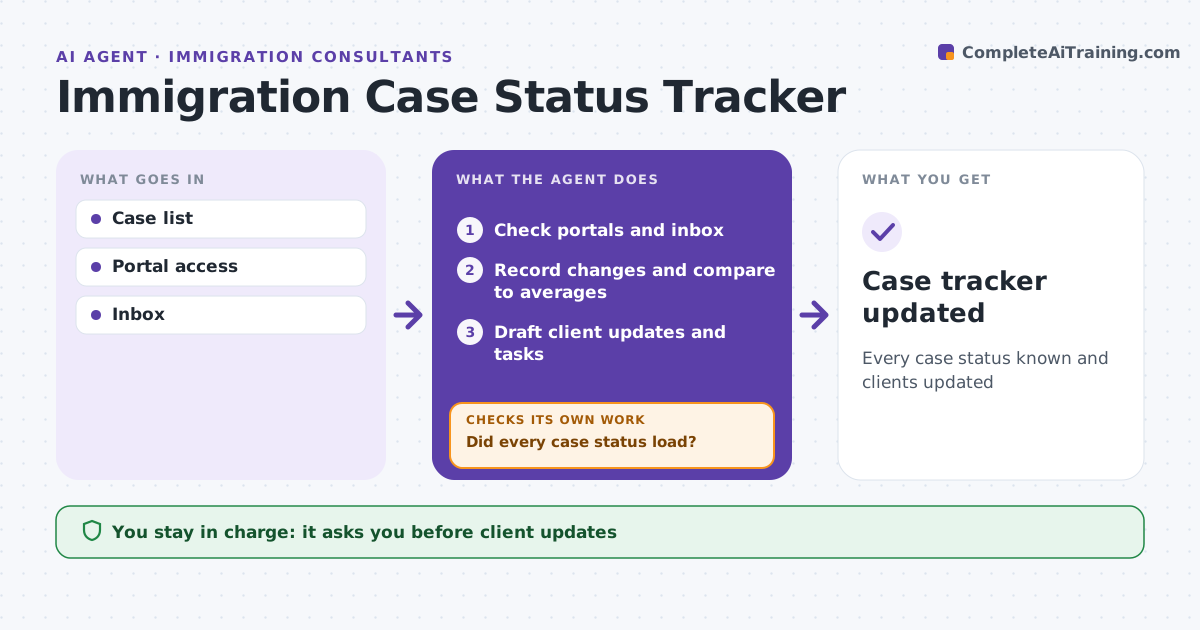
Every case status known and clients updated
What it does
Clients anxious about their immigration case call often, and a missed request for evidence can sink an application. Each day this agent checks the status of submitted cases through official portals and inboxes. It records changes such as receipt, biometrics appointments, requests for evidence or decisions. A request for evidence becomes an urgent task with its deadline; a decision is reported to the consultant first. It compares processing time with published averages. For each change, it drafts a plain-language client update. It checks that every case status loaded; if a portal fails, it retries later and logs the failure so no case goes unchecked for days. The consultant approves every client update and any inquiry to the authorities. Edge case: a case passes the published processing time, so the agent drafts an inquiry for the consultant to review.
How it works
Follow the arrows from top to bottom. The orange dashed arrow is the loop: when a check fails, the agent goes back and tries again.
Read the steps as a list
- Daily status check
- Check portals and inbox
- Did every case status load?If not: retry later and log failures. Back to step 2.
- Record changes and compare to averages
- Draft client updates and tasks
- Consultant approves messagesThe agent waits here for your OK.
- Case tracker updated
How it decides
It flags status changes and cases past processing times.
- Request for evidence: urgent task
- Past average processing time: draft inquiry
- Decision: notify consultant first
Make it yours
Every agent is a starting point. You choose these settings for your own situation.
- Check frequency
- Message tone
- Task rules
- Portals
What keeps you in control
It always asks you first
- Client updates
- Inquiries to authorities
Hard limits
- Never contacts authorities without approval
- Never shares client data
It stops when
- Done: tracker updated
- Stop: portal access lost
Set it up
We guide you through the set-up, step by step
Members get the full set-up guide for this agent. No technical skills needed: you copy, paste and upload.
- One set of instructions to paste into your AI, with the clicks for ChatGPT, Claude, Microsoft 365 Copilot, Gemini and Grok
- The agent then walks you through connecting your own data, one source at a time
- A downloadable copy with the flow chart, the rules and the full guide