AI agent for scrum masters
Impediment Chase Agent
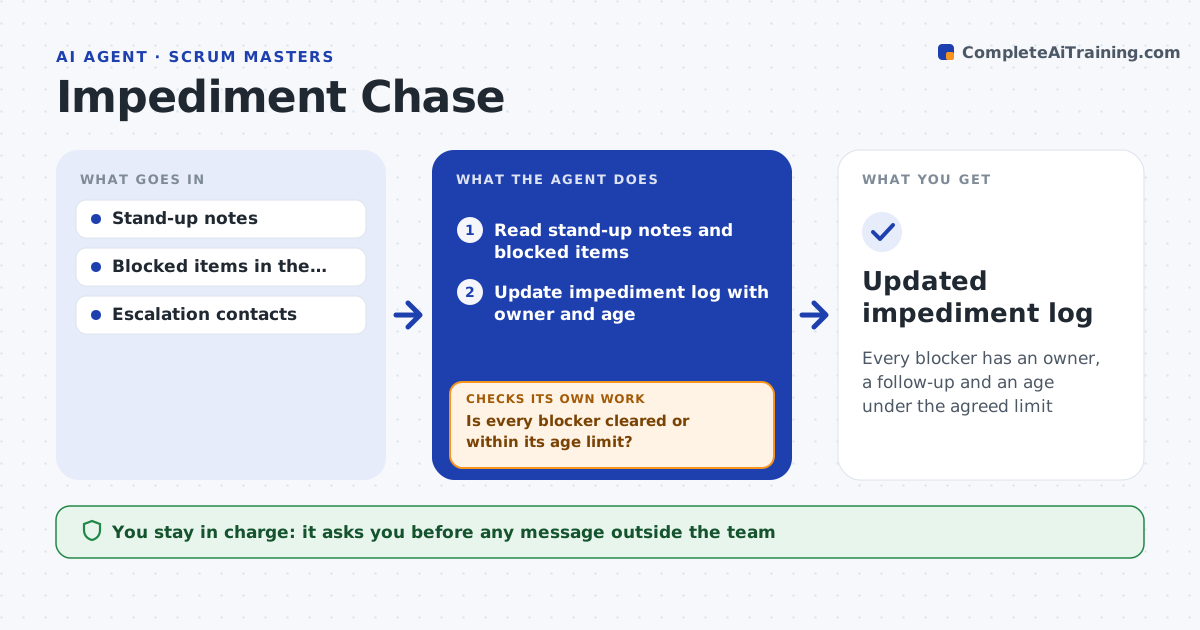
Every blocker has an owner, a follow-up and an age under the agreed limit
What it does
Blockers come up at stand-up or in chat, then quietly disappear from view while work waits. After each stand-up, this agent reads the notes and blocked items in the tracker and keeps an impediment log with owner, cause and age. Blockers older than two working days get a follow-up message to the person outside the team who can unblock them. Blockers older than four working days get an escalation draft to the next level. When several blockers share one root cause, it merges them into one follow-up. The Scrum Master approves every message sent outside the team. The next day it checks whether each item moved. If a blocker is still open past its limit, it drafts the next follow-up or escalation and loops back. Edge case: a blocker the team can solve itself is moved to the team's own task list instead of chased outside.
How it works
Follow the arrows from top to bottom. The orange dashed arrow is the loop: when a check fails, the agent goes back and tries again.
Read the steps as a list
- Stand-up ends
- Read stand-up notes and blocked items
- Update impediment log with owner and age
- Draft follow-ups and escalations by age
- Scrum Master approves messages outside the teamThe agent waits here for your OK.
- Check next day whether each item moved
- Is every blocker cleared or within its age limit?If not: draft the next follow-up or escalation for overdue items. Back to step 4.
- Updated impediment log
How it decides
Blockers older than two working days get a follow-up; older than four get an escalation draft.
- Two working days triggers follow-up
- Four working days triggers escalation draft
- Shared root causes are merged
Make it yours
Every agent is a starting point. You choose these settings for your own situation.
- Follow-up age (default 2 days)
- Escalation age (default 4 days)
- Escalation contacts
- Notes source
What keeps you in control
It always asks you first
- Any message outside the team
- Escalations to managers
Hard limits
- Never sends messages without approval
- Never reassigns work
It stops when
- Done: blocker cleared
- Stop: Scrum Master marks it accepted risk
Set it up
We guide you through the set-up, step by step
Members get the full set-up guide for this agent. No technical skills needed: you copy, paste and upload.
- One set of instructions to paste into your AI, with the clicks for ChatGPT, Claude, Microsoft 365 Copilot, Gemini and Grok
- The agent then walks you through connecting your own data, one source at a time
- A downloadable copy with the flow chart, the rules and the full guide