AI agent for scrum masters
Mid-Sprint Goal Health Agent
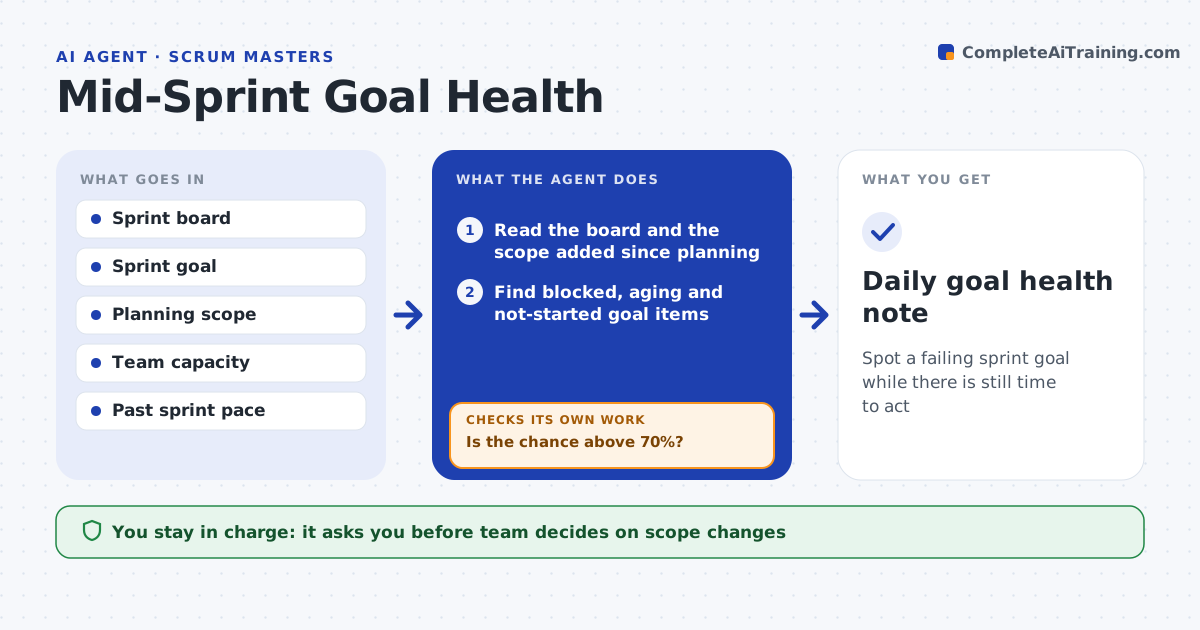
Spot a failing sprint goal while there is still time to act
What it does
Halfway through the sprint, two items are blocked, one is aging and nobody has said the goal is at risk. Each day this agent reads the board and finds blocked items, aging items, work not started and scope added since planning. It estimates the chance that the sprint goal is met, based on remaining work against days left and the past pace of the team. When the chance is low it proposes scope options: swap an item, split a story, pull in help or drop a lower-priority one. The next day it rechecks whether the blocks cleared and whether the estimate improved. The team decides on any scope change. Edge case: a blocked item is waiting on a decision only the product owner can make, so the agent sends it to them directly.
How it works
Follow the arrows from top to bottom. The orange dashed arrow is the loop: when a check fails, the agent goes back and tries again.
Read the steps as a list
- Daily check from mid-sprint
- Read the board and the scope added since planning
- Find blocked, aging and not-started goal items
- Estimate the chance the goal is met
- Is the chance above 70%?If not: build scope options with the chance for each. Back to step 2.
- Route blockers to the person who can clear them
- Team decides on any scope changeThe agent waits here for your OK.
- Update the board only as the team directs
- Recheck the next day
- Did the blocks clear and the estimate improve?If not: offer the next option and escalate to the product owner. Back to step 4.
- Daily goal health note
How it decides
It compares remaining goal work with the capacity left and the team's usual pace and flags the goal when the chance of delivery is below the limit.
- Flag a blocked item after 1 day
- Flag an item with no progress for 3 days
- Alert when the chance of meeting the goal falls under 70%
- Consider the goal at risk when over 20% of scope was added after planning
Make it yours
Every agent is a starting point. You choose these settings for your own situation.
- Alert level (default 70%)
- Block and aging limits
- Start day of checks
- Chat channel
- Capacity source
What keeps you in control
It always asks you first
- Team decides on scope changes
- Scrum master approves messages to stakeholders
Hard limits
- Never change the board without the team
- Never share the estimate outside the team without the scrum master
It stops when
- Done: the sprint ends or the goal is on track
- Stop: the team replans and the agent resets
Set it up
We guide you through the set-up, step by step
Members get the full set-up guide for this agent. No technical skills needed: you copy, paste and upload.
- One set of instructions to paste into your AI, with the clicks for ChatGPT, Claude, Microsoft 365 Copilot, Gemini and Grok
- The agent then walks you through connecting your own data, one source at a time
- A downloadable copy with the flow chart, the rules and the full guide