AI agent for affiliate marketing managers
Inactive Affiliate Reactivation Agent
Get more inactive affiliates back to sending sales
What it does
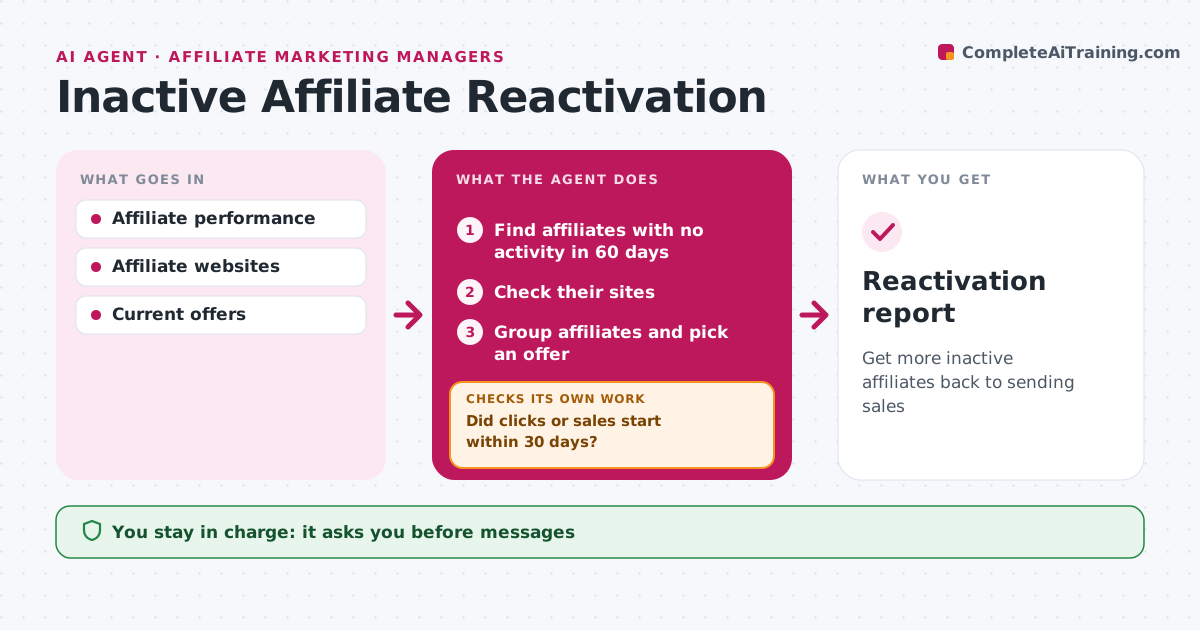
Many affiliates sign up and then stop promoting, leaving reach unused. Each month this agent finds affiliates with no clicks or sales in 60 days and checks their sites for recent content that fits the brand. It groups them by type, such as bloggers, coupon sites or influencers, and picks an offer that suits each group. It drafts a short message with a reason to promote now, like a new product, a higher commission tier or ready-made content. The manager approves all offers and messages before they go out. Over the next 30 days, it tracks clicks and sales. For affiliates who stay quiet, it tries one different offer, and after two tries without activity, it suggests archiving them. Edge case: affiliates whose site is down are marked inactive instead of messaged, since there is nowhere for them to promote.
How it works
Follow the arrows from top to bottom. The orange dashed arrow is the loop: when a check fails, the agent goes back and tries again.
Read the steps as a list
- Monthly review
- Find affiliates with no activity in 60 days
- Check their sites
- Group affiliates and pick an offer
- Manager approves messages and offersThe agent waits here for your OK.
- Did clicks or sales start within 30 days?If not: try a different offer next month. Back to step 4.
- Reactivation report
How it decides
Inactive means no clicks or sales in 60 days. Offer type matches affiliate type.
- Inactive means 60 days with no activity
- Sites down are marked inactive
- Two tries before archive
Make it yours
Every agent is a starting point. You choose these settings for your own situation.
- Inactive period
- Offers
- Message tone
What keeps you in control
It always asks you first
- Messages
- Commission changes
Hard limits
- Never changes commission rates itself
- Never spams affiliates
It stops when
- Done: two tries completed
- Stop: affiliate leaves
Set it up
We guide you through the set-up, step by step
Members get the full set-up guide for this agent. No technical skills needed: you copy, paste and upload.
- One set of instructions to paste into your AI, with the clicks for ChatGPT, Claude, Microsoft 365 Copilot, Gemini and Grok
- The agent then walks you through connecting your own data, one source at a time
- A downloadable copy with the flow chart, the rules and the full guide