AI agent for food scientists
Ingredient Market Approval Check Agent
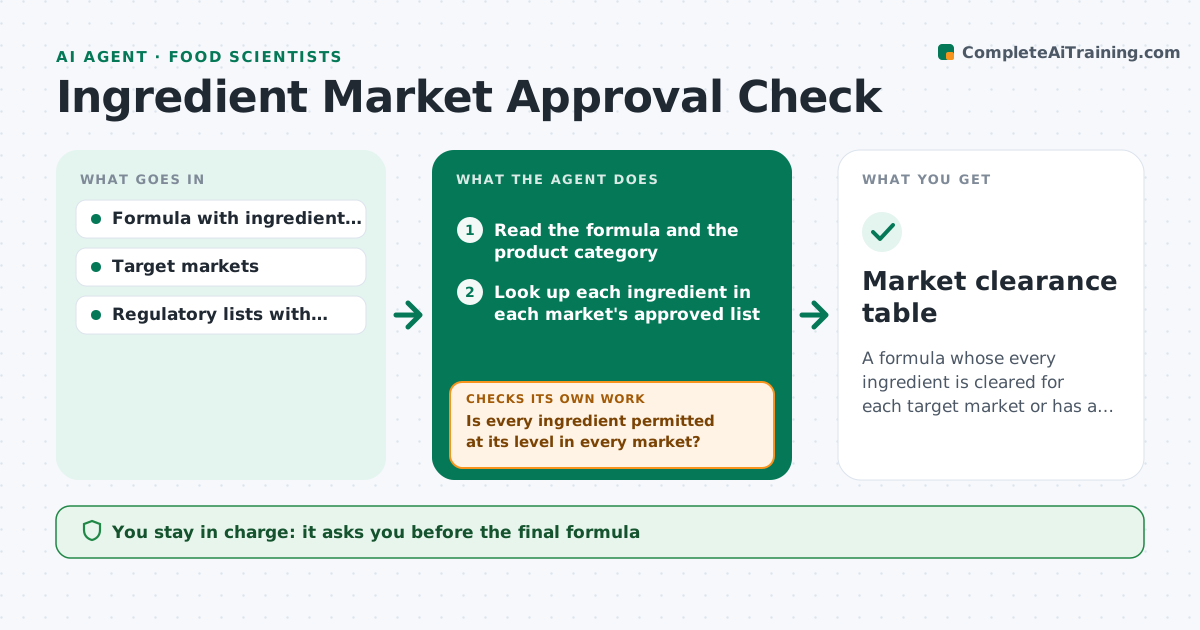
A formula whose every ingredient is cleared for each target market or has a documented alternative.
What it does
A formula uses a color or an emulsifier that is allowed in one market and banned or limited in another, and the problem shows up at registration. This agent checks each ingredient and use level in a new formula against the approved lists for each target market, including food category limits. It flags ingredients not permitted, over the maximum level or needing a warning label, and proposes alternatives. It then rechecks each alternative against the formula limits, such as function, cost and the other markets, until each market is cleared or the problem is clear. You approve the formula. Edge case: an ingredient allowed in the market but only for certain food categories is checked against the category of your product.
How it works
Follow the arrows from top to bottom. The orange dashed arrow is the loop: when a check fails, the agent goes back and tries again.
Read the steps as a list
- Formula or markets changed
- Read the formula and the product category
- Look up each ingredient in each market's approved list
- Compare the use level to the permitted level for the category
- Is every ingredient permitted at its level in every market?If not: list problems by market and propose alternatives or lower levels. Back to step 3.
- Check each proposal against function and cost limits
- Does each alternative clear all target markets?If not: try another alternative or suggest a market-specific formula. Back to step 5.
- Note label requirements and warnings by market
- Scientist approves the formulaThe agent waits here for your OK.
- Market clearance table
How it decides
For each ingredient, market and food category, it compares the use level to the permitted level. Anything not permitted, or above the limit, is a problem.
- Ingredient not on the approved list: propose an alternative
- Use level above the category maximum: reduce or propose an alternative
- Alternative clears one market but fails another: suggest separate formulas
- Ingredient requires a warning statement: add it to the label notes
Make it yours
Every agent is a starting point. You choose these settings for your own situation.
- Target markets
- Regulatory sources
- Cost limit for alternatives
- Food categories
- Output format
What keeps you in control
It always asks you first
- The final formula
- Market-specific variants
Hard limits
- Never state a formula is legal, only that it matches the lists checked
- Never use an unlisted ingredient
It stops when
- Done: all markets cleared
- Stop: regulatory list unavailable
Set it up
We guide you through the set-up, step by step
Members get the full set-up guide for this agent. No technical skills needed: you copy, paste and upload.
- One set of instructions to paste into your AI, with the clicks for ChatGPT, Claude, Microsoft 365 Copilot, Gemini and Grok
- The agent then walks you through connecting your own data, one source at a time
- A downloadable copy with the flow chart, the rules and the full guide