AI agent for laboratory managers
Instrument Downtime and Backup Plan Agent
Keep promised turnaround as close as possible when an instrument fails
What it does
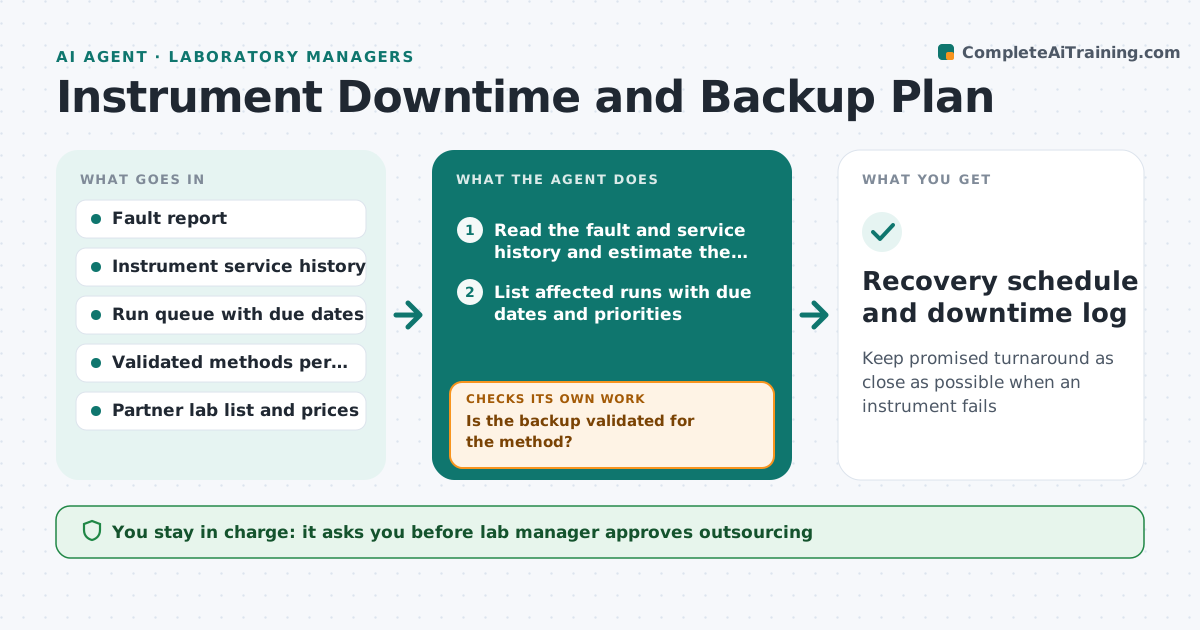
At 9 a.m. a mass spectrometer goes down and 140 samples are queued with promised turnaround dates. The manager spends the morning phoning around and juggling the schedule. This agent responds as soon as the failure is logged. It reads the fault, estimates repair time from the service record, lists the affected runs with due dates and priorities, and finds backup instruments in the lab or partner labs that can run the same method. It checks validation status before rescheduling, reorders the queue and recalculates turnaround for every client. If the backup instrument is not validated for a method, it moves to the next option and notes the delay for the client. The manager approves outsourcing and client messages. Edge case: a run is time-sensitive. The agent puts it first.
How it works
Follow the arrows from top to bottom. The orange dashed arrow is the loop: when a check fails, the agent goes back and tries again.
Read the steps as a list
- Instrument failure logged
- Read the fault and service history and estimate the repair time
- List affected runs with due dates and priorities
- Find backup instruments and partner labs for each method
- Is the backup validated for the method?If not: Move to the next option and note the delay for the client. Back to step 3.
- Reschedule runs by priority and recalculate turnaround
- Does the new plan meet each due date?If not: Propose outsourcing the late runs and recompute. Back to step 4.
- Lab manager approves outsourcing and the new scheduleThe agent waits here for your OK.
- Notify clients and partner labs
- Recovery schedule and downtime log
How it decides
It ranks options by validation status, then speed, then cost. It outsources only when in-house backups cannot meet the date.
- Only validated methods may run on a backup instrument
- Time-sensitive samples go first
- Repairs estimated over 3 days trigger outsourcing options
- Clients are told when a due date moves more than 1 day
Make it yours
Every agent is a starting point. You choose these settings for your own situation.
- Repair time that triggers outsourcing (default 3 days)
- Partner labs and price limits
- Priority rules for samples
- Client notice threshold (default 1 day)
- Who must approve outsourcing
What keeps you in control
It always asks you first
- Lab manager approves outsourcing
- Lab manager approves client delay notices
Hard limits
- Never runs a method on a non-validated instrument
- Never sends outside samples without approval
It stops when
- Done: all runs scheduled and the instrument is back or backed up
- Stop: no validated option exists, escalate to the manager
Set it up
We guide you through the set-up, step by step
Members get the full set-up guide for this agent. No technical skills needed: you copy, paste and upload.
- One set of instructions to paste into your AI, with the clicks for ChatGPT, Claude, Microsoft 365 Copilot, Gemini and Grok
- The agent then walks you through connecting your own data, one source at a time
- A downloadable copy with the flow chart, the rules and the full guide