AI agent for sales engineers
Integration Feasibility Check Agent
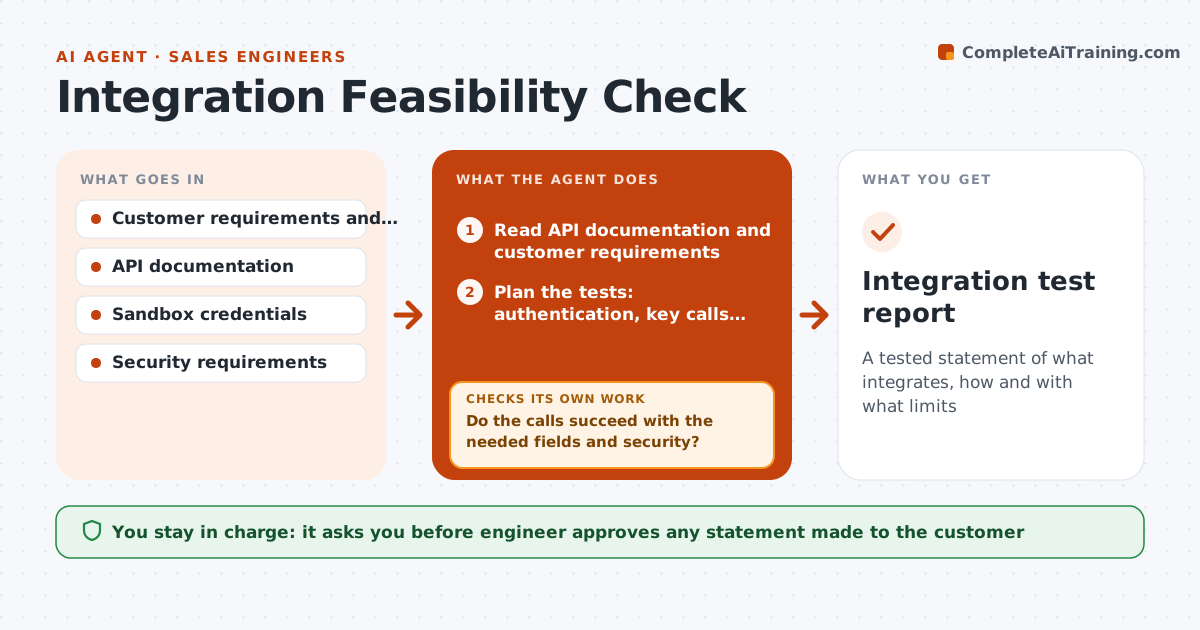
A tested statement of what integrates, how and with what limits
What it does
Saying 'yes, we integrate with that' is easy, and finding out three months later that the API has rate limits or no write access is expensive. Before a promise is made, this agent reads the API documentation for both sides and plans a test: authentication, the key calls and the data volume the customer expects. It runs sample calls in a sandbox, checks limits, field mapping, error cases and security, and records what worked and what did not. If something fails, it revises the plan, tries an alternative, and tests again until the integration works or is ruled out. It drafts the statement the engineer can make. The engineer approves what is said. Edge case: the API works but cannot handle the customer's daily volume, so the agent states the limit.
How it works
Follow the arrows from top to bottom. The orange dashed arrow is the loop: when a check fails, the agent goes back and tries again.
Read the steps as a list
- Customer asks about an integration
- Read API documentation and customer requirements
- Plan the tests: authentication, key calls, volume and errors
- Run sample calls in the sandbox
- Do the calls succeed with the needed fields and security?If not: try an alternative endpoint or method and retest. Back to step 3.
- Check rate limits and volumes against the customer's needs
- Do limits support the expected volume?If not: revise the design, such as batching, and test again. Back to step 3.
- Write the findings and a statement of what can be promised
- Engineer approves what is stated to the customerThe agent waits here for your OK.
- Integration test report
How it decides
A capability is stated only when sample calls succeed at the needed volume and with the needed security. Anything else is reported as a gap or workaround.
- Promise only what a sandbox call confirmed
- Compare rate limits with peak volume plus 20 percent
- State limits and workarounds plainly
- Rule out an integration after two failed alternatives
Make it yours
Every agent is a starting point. You choose these settings for your own situation.
- Sandbox environment
- Volume margin (default 20%)
- Security requirements
- Report format
What keeps you in control
It always asks you first
- Engineer approves any statement made to the customer
- Engineer approves use of any customer credentials
Hard limits
- Use sandbox data only
- Never use customer production credentials without approval
- Do not guess limits
It stops when
- Done: a tested integration plan is documented
- Stop: integration is ruled out and the report explains why
Set it up
We guide you through the set-up, step by step
Members get the full set-up guide for this agent. No technical skills needed: you copy, paste and upload.
- One set of instructions to paste into your AI, with the clicks for ChatGPT, Claude, Microsoft 365 Copilot, Gemini and Grok
- The agent then walks you through connecting your own data, one source at a time
- A downloadable copy with the flow chart, the rules and the full guide