AI agent for sales engineers
Sales Trial Success Coordination Agent
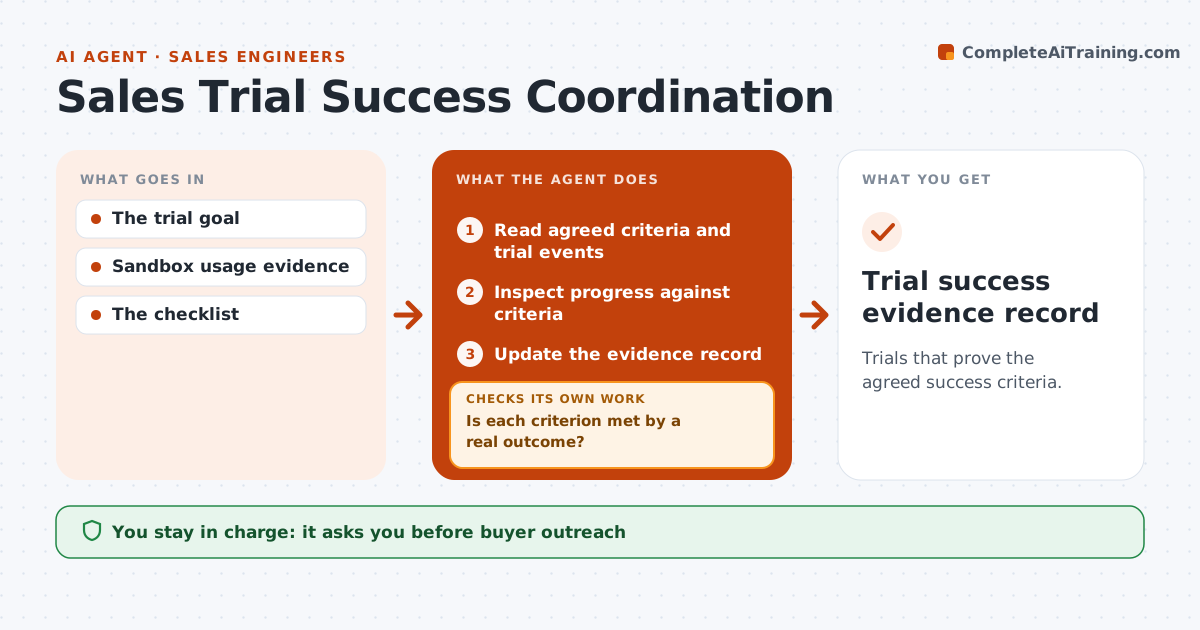
Trials that prove the agreed success criteria.
What it does
Product trials often run their course without anyone checking the success criteria the buyer agreed to at the start, so the trial ends with activity but no proof. This agent runs a daily check on every active trial. It reads the agreed criteria and the product's trial events, and checks whether each criterion has been met by a real outcome, such as a completed export or a published report, not just logins or clicks. For any unmet criterion, it drafts the next trial task, like a guided session or setup help. The rep approves any outreach to the buyer. The agent then rechecks outcomes the next day and updates the evidence record. Edge case: a criterion met once in a test workspace does not count unless it happened in the buyer's trial account.
How it works
Follow the arrows from top to bottom. The orange dashed arrow is the loop: when a check fails, the agent goes back and tries again.
Read the steps as a list
- Daily trial check
- Read agreed criteria and trial events
- Inspect progress against criteria
- Is each criterion met by a real outcome?If not: draft the next trial task for it. Back to step 3.
- Rep approves buyer outreachThe agent waits here for your OK.
- Update the evidence record
- Trial success evidence record
How it decides
It targets the unmet criterion and checks outcomes, not activity.
- Activity without the required result does not count.
- Only events in the buyer's trial account count.
- Each unmet criterion gets one next task.
- No outreach without the rep's approval.
Make it yours
Every agent is a starting point. You choose these settings for your own situation.
- Trial success criteria template
- Events that count as real outcomes per criterion
- Run time (default: daily at 9 am)
- Days before trial end to escalate unmet criteria (default 7)
- Who approves buyer outreach (default: the rep)
What keeps you in control
It always asks you first
- Buyer outreach
- Production changes
Hard limits
- Read-only.
It stops when
- Done: criteria met or trial ends.
Set it up
We guide you through the set-up, step by step
Members get the full set-up guide for this agent. No technical skills needed: you copy, paste and upload.
- One set of instructions to paste into your AI, with the clicks for ChatGPT, Claude, Microsoft 365 Copilot, Gemini and Grok
- The agent then walks you through connecting your own data, one source at a time
- A downloadable copy with the flow chart, the rules and the full guide