AI agent for journalists
Interview Transcript Attribution Agent
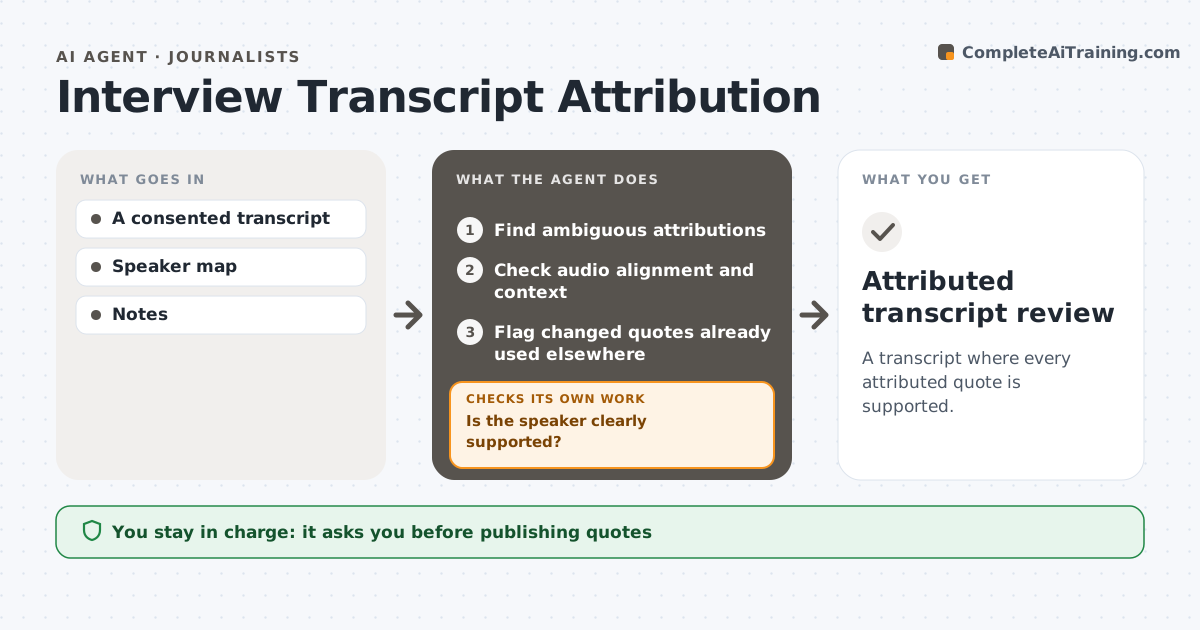
A transcript where every attributed quote is supported.
What it does
Edited interview transcripts sometimes put words in the wrong person's mouth, especially when speakers overlap or the editing moved lines around. This agent finds every attribution that might be wrong or ambiguous. It checks each against the audio alignment, the speaker's voice timing and the surrounding context. When the evidence clearly supports one speaker, it corrects the attribution. When evidence conflicts or audio overlaps, the speaker stays marked as uncertain rather than given a plausible name. It prepares a corrected draft with each change explained. The editor or journalist decides before the transcript is used for quotes. Edge case: a quote already used in a published article is flagged separately if its attribution changes.
How it works
Follow the arrows from top to bottom. The orange dashed arrow is the loop: when a check fails, the agent goes back and tries again.
Read the steps as a list
- Transcript edited
- Find ambiguous attributions
- Check audio alignment and context
- Is the speaker clearly supported?If not: mark the speaker as uncertain. Back to step 3.
- Flag changed quotes already used elsewhere
- Prepare the corrected draft
- Journalist approves before quotes are usedThe agent waits here for your OK.
- Attributed transcript review
How it decides
It attributes only with audio or context support.
- Uncertain speakers stay marked uncertain.
- Only clear audio evidence assigns a speaker.
- Changed published quotes are flagged.
- Every change is explained.
Make it yours
Every agent is a starting point. You choose these settings for your own situation.
- Audio and transcript sources
- Confidence needed to assign a speaker (default: clear audio match)
- How uncertain lines are marked
- Who approves (default: the journalist or editor)
- Whether to check published quotes (default yes)
What keeps you in control
It always asks you first
- Publishing quotes
Hard limits
- No guessed attribution.
It stops when
- Done: review ready.
Set it up
We guide you through the set-up, step by step
Members get the full set-up guide for this agent. No technical skills needed: you copy, paste and upload.
- One set of instructions to paste into your AI, with the clicks for ChatGPT, Claude, Microsoft 365 Copilot, Gemini and Grok
- The agent then walks you through connecting your own data, one source at a time
- A downloadable copy with the flow chart, the rules and the full guide