AI agent for account executives
Quote and Contract Approval Routing Agent
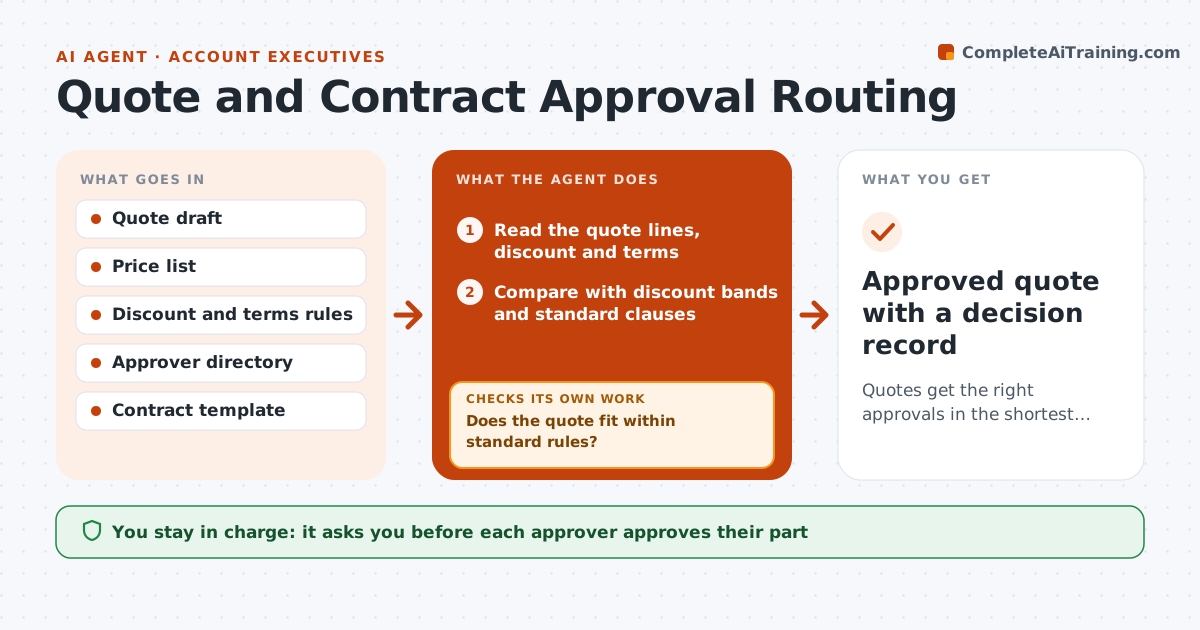
Quotes get the right approvals in the shortest time, with a clear record
What it does
A quote waits while finance reviews the margin, legal reads the terms and a manager signs off on the discount. Each team replies when it can, and the deal slips. This agent checks every quote against the discount and terms rules when it is submitted. It decides which approvers are needed, such as finance for discounts over a limit or legal for non-standard terms, and routes the request with the facts each one needs. It tracks status, reminds approvers who are late, and rechecks the quote whenever the rep edits it. If an edit changes the approval path, it reroutes. Everyone's decision is recorded. Edge case: the rep lowers the price after finance approves, so the quote returns to finance automatically.
How it works
Follow the arrows from top to bottom. The orange dashed arrow is the loop: when a check fails, the agent goes back and tries again.
Read the steps as a list
- Rep submits a quote
- Read the quote lines, discount and terms
- Compare with discount bands and standard clauses
- Does the quote fit within standard rules?If not: list each exception and who must approve it. Back to step 2.
- Route requests to finance, legal or the manager with a short summary
- Track status and remind approvers after 24 hours
- Has every required approver replied?If not: chase by another channel and escalate after 48 hours. Back to step 6.
- Recheck the quote if the rep edited it and reroute if the path changed
- Account executive and approvers sign offThe agent waits here for your OK.
- Approved quote with a decision record
How it decides
Each quote is compared with discount bands and standard terms. Any exceeding a band or changing a clause routes to the matching approver. Edits trigger a rerun of the rules.
- Route to finance when discount is over 15 percent
- Route to legal when any standard clause is changed
- Reroute whenever price or terms change after approval
- Escalate after 48 hours without a reply
Make it yours
Every agent is a starting point. You choose these settings for your own situation.
- Discount bands
- Clauses needing legal review
- Reminder and escalation times
- Approver list
What keeps you in control
It always asks you first
- Each approver approves their part
- Account executive approves sending the quote to the customer
Hard limits
- Never approve on behalf of anyone
- Do not change quote values
- Keep a record of every decision
It stops when
- Done: all approvals recorded and the quote sent
- Stop: an approver rejects the quote and the rep revises
Set it up
We guide you through the set-up, step by step
Members get the full set-up guide for this agent. No technical skills needed: you copy, paste and upload.
- One set of instructions to paste into your AI, with the clicks for ChatGPT, Claude, Microsoft 365 Copilot, Gemini and Grok
- The agent then walks you through connecting your own data, one source at a time
- A downloadable copy with the flow chart, the rules and the full guide