AI agent for inventory control specialists
Inventory Shrinkage Investigation Agent
Find and fix shrinkage causes
What it does
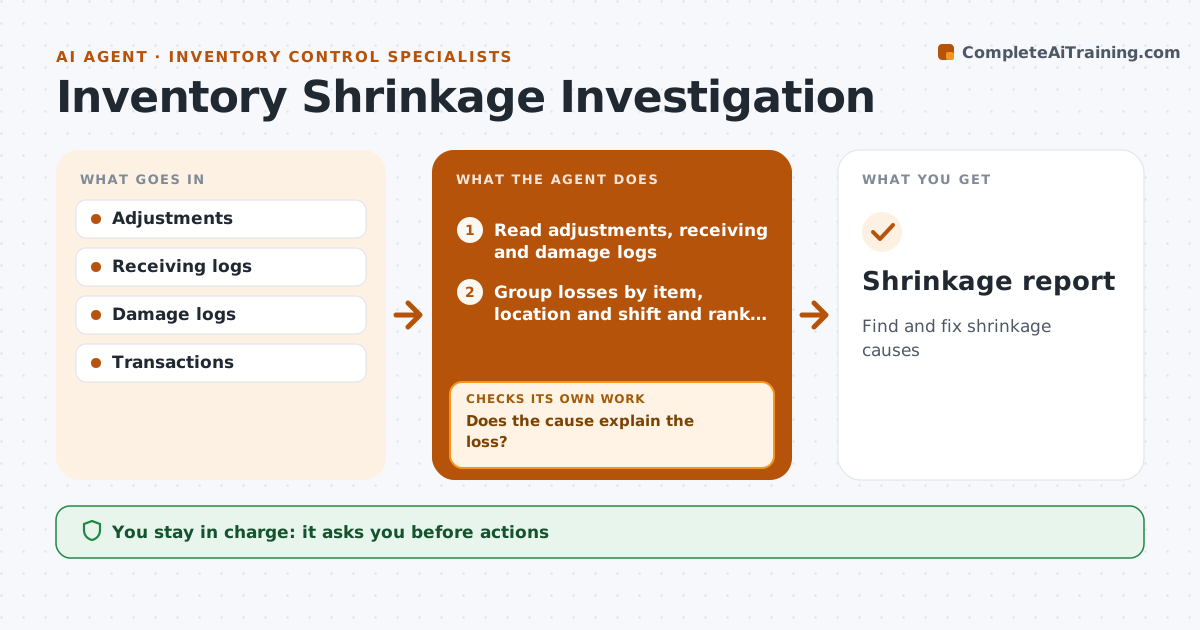
Shrinkage comes from theft, damage, receiving errors and system mistakes, and assuming theft first wastes time and damages trust. Each month this agent reads count adjustments, receiving discrepancies, damage logs and transaction history for items with losses. It groups losses by item, location and shift, and ranks them by value. It tests system causes first, such as unit of measure errors, missed receipts or wrong item codes, before considering physical loss. If a cause does not explain the loss, it tests the next one. A unit of measure mismatch is fixed rather than counted as loss. It drafts actions and a summary. A second check confirms the fix cleared the loss in the next count. The inventory manager approves actions, and any concern about a person goes to loss prevention. Edge case: a loss that appears only on one shift is reported by pattern, never by name.
How it works
Follow the arrows from top to bottom. The orange dashed arrow is the loop: when a check fails, the agent goes back and tries again.
Read the steps as a list
- Monthly run
- Read adjustments, receiving and damage logs
- Group losses by item, location and shift and rank by value
- Test system causes first, then physical causes
- Does the cause explain the loss?If not: test the next cause. Back to step 4.
- Draft actions and summary
- Inventory manager approves actionsThe agent waits here for your OK.
- Did the next count confirm the loss is cleared?If not: test the next cause for the remaining gap. Back to step 4.
- Shrinkage report
How it decides
It ranks losses by value and checks system causes before physical loss.
- System causes first
- Value ranking
- Person concerns to loss prevention
Make it yours
Every agent is a starting point. You choose these settings for your own situation.
- Value threshold
- Cause list
- Report
- Referral route
What keeps you in control
It always asks you first
- Actions
- Referrals to loss prevention
Hard limits
- Never accuses staff
- Never adjusts records
It stops when
- Done: causes found
- Stop: no cause found, recommend extra controls
Set it up
We guide you through the set-up, step by step
Members get the full set-up guide for this agent. No technical skills needed: you copy, paste and upload.
- One set of instructions to paste into your AI, with the clicks for ChatGPT, Claude, Microsoft 365 Copilot, Gemini and Grok
- The agent then walks you through connecting your own data, one source at a time
- A downloadable copy with the flow chart, the rules and the full guide