AI agent for portfolio managers
Investment Committee Pack Agent
A consistent committee pack delivered on time
What it does
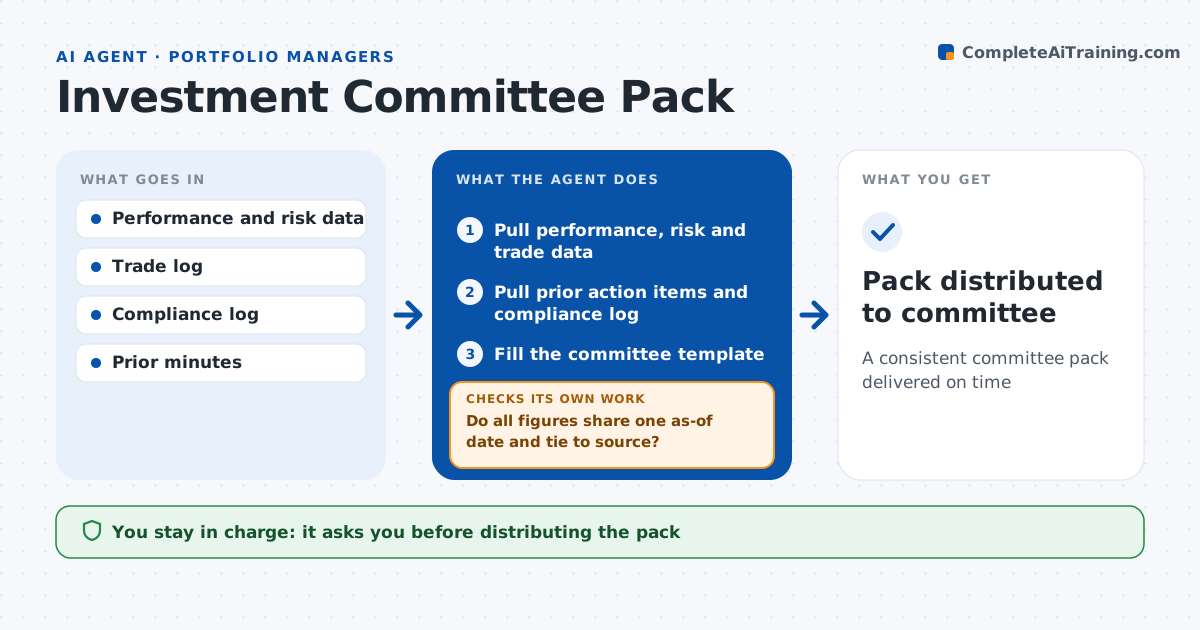
Committee packs often mix figures from different dates and systems, and members lose trust when numbers do not agree. Before each investment committee meeting, this agent assembles the pack. It pulls performance, risk, positioning, trade activity and compliance items for the period, plus the proposals the manager wants to present. It lists open action items from the last meeting and highlights any past due. It fills the committee template and checks that every figure uses the same as-of date and ties to the source system. When a figure does not tie, it refreshes it from the source or marks it clearly. Any compliance breach in the period gets a short summary. The manager reviews and approves the pack before it is distributed. Edge case: the risk and performance systems use different month-end dates, so the agent aligns both.
How it works
Follow the arrows from top to bottom. The orange dashed arrow is the loop: when a check fails, the agent goes back and tries again.
Read the steps as a list
- Committee meeting scheduled
- Pull performance, risk and trade data
- Pull prior action items and compliance log
- Fill the committee template
- Do all figures share one as-of date and tie to source?If not: refresh from source or mark the figure. Back to step 2.
- Manager approves packThe agent waits here for your OK.
- Pack distributed to committee
How it decides
It requires each figure to match source data at one as-of date.
- Figure from a different date: refresh
- Open action item past due: highlight
- Compliance breach in period: include summary
Make it yours
Every agent is a starting point. You choose these settings for your own situation.
- Template sections
- Delivery lead time
- As-of date rule
- Distribution list
What keeps you in control
It always asks you first
- Distributing the pack
Hard limits
- Never sends the pack without approval
- Never edits minutes
It stops when
- Done: pack sent
- Stop: source systems not closed for month
Set it up
We guide you through the set-up, step by step
Members get the full set-up guide for this agent. No technical skills needed: you copy, paste and upload.
- One set of instructions to paste into your AI, with the clicks for ChatGPT, Claude, Microsoft 365 Copilot, Gemini and Grok
- The agent then walks you through connecting your own data, one source at a time
- A downloadable copy with the flow chart, the rules and the full guide