AI agent for vp of its
IT Business Case Review Agent
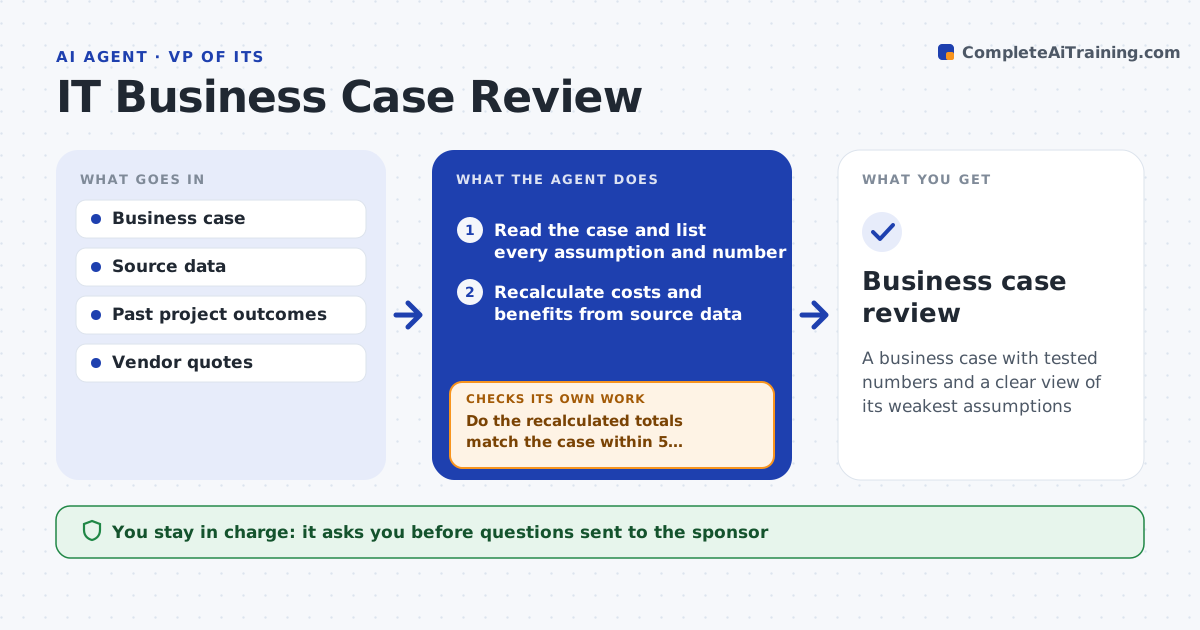
A business case with tested numbers and a clear view of its weakest assumptions
What it does
A project says it will save 30 percent and pay back in a year, and no one checks. This agent reads a business case and recalculates costs and benefits from the source data, such as vendor quotes, current spend, headcount and volumes. It lists each assumption and tests it with a low, expected and high range to see how the result changes. It compares the assumptions with what similar past projects actually delivered, including their overruns. It flags assumptions that are far more optimistic than history, such as full adoption in month one. It asks the sponsor for support on flagged items and recalculates once answers arrive. It then writes the result with the strongest and weakest points. The leader approves the conclusion. Edge case: savings count staff time that will not actually be released.
How it works
Follow the arrows from top to bottom. The orange dashed arrow is the loop: when a check fails, the agent goes back and tries again.
Read the steps as a list
- Business case is submitted for review
- Read the case and list every assumption and number
- Recalculate costs and benefits from source data
- Do the recalculated totals match the case within 5 percent?If not: list the differences and the data behind each. Back to step 3.
- Test each key assumption with low, expected and high values
- Compare assumptions with past project outcomes
- Do any assumptions beat history by over 25 percent or flip the result in the low case?If not: flag them and prepare questions for the sponsor. Back to step 4.
- Leader approves the questions to the sponsorThe agent waits here for your OK.
- Record sponsor answers, recalculate and write the conclusion with strongest and weakest points
- Leader approves the conclusionThe agent waits here for your OK.
- Business case review
How it decides
An assumption is weak if the result flips at a realistic low case, or if it is more than 25 percent better than past similar projects.
- Flag an assumption better than history by over 25 percent
- Count time savings only if the time is released
- Test a 6-month delay in every case
- Use quotes, not estimates, for costs where possible
Make it yours
Every agent is a starting point. You choose these settings for your own situation.
- Cases tested
- Delay scenario (default 6 months)
- History gap threshold (default 25 percent)
- Past project source
What keeps you in control
It always asks you first
- Questions sent to the sponsor
- The conclusion
Hard limits
- Never approves or rejects the project
- Shows ranges, not a single number
It stops when
- Done: tested conclusion approved
- Stop: source data for key numbers is unavailable
Set it up
We guide you through the set-up, step by step
Members get the full set-up guide for this agent. No technical skills needed: you copy, paste and upload.
- One set of instructions to paste into your AI, with the clicks for ChatGPT, Claude, Microsoft 365 Copilot, Gemini and Grok
- The agent then walks you through connecting your own data, one source at a time
- A downloadable copy with the flow chart, the rules and the full guide