AI agent for manager of its
IT Vendor SLA and Renewal Review Agent
Vendor performance tracked monthly and renewals decided on evidence
What it does
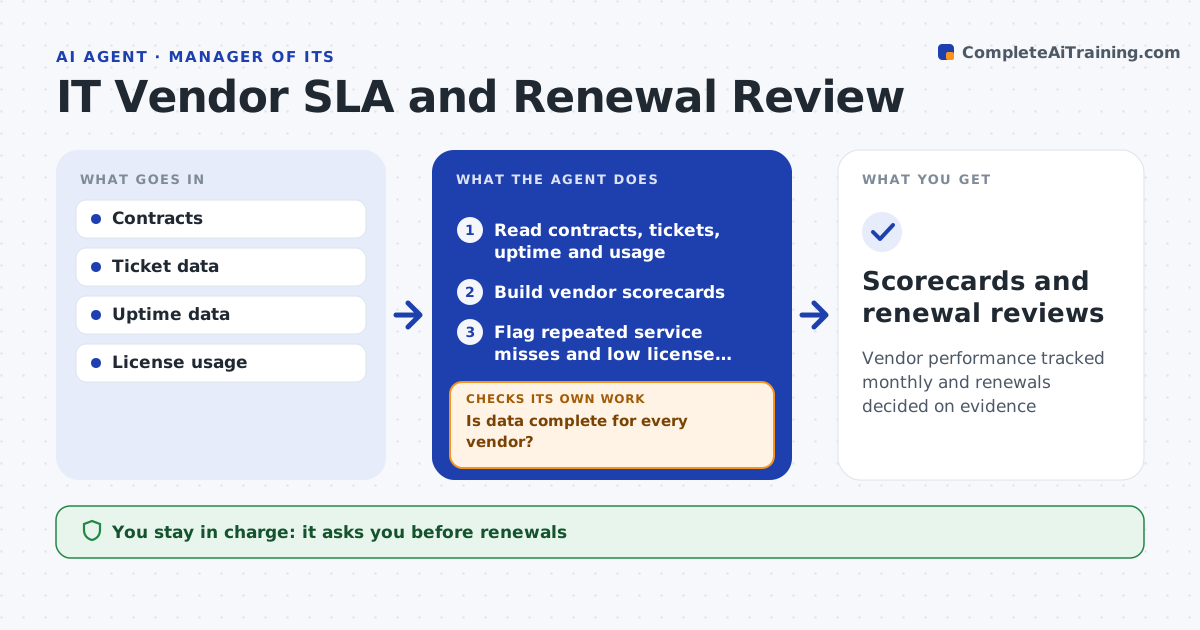
IT depends on vendors whose contracts promise service levels and set renewal dates, and auto-renewals slip through while poor service goes unchallenged. Each month this agent reads the contracts and tracks support tickets, uptime and license usage against what was promised. It builds a scorecard per vendor. If data for a vendor is missing, it asks the internal owner and rebuilds the scorecard. A vendor is flagged when a service level is missed two months in a row or usage stays below 70 percent of licenses. Ninety days before a renewal, or earlier when the notice period requires it, it drafts a review with performance, usage, cost and alternatives. Repeated misses are cited for renewal talks. The IT leader approves any renewal decision or notice to a vendor. Edge case: contracts that auto-renew with a 60-day notice period start their review 120 days out.
How it works
Follow the arrows from top to bottom. The orange dashed arrow is the loop: when a check fails, the agent goes back and tries again.
Read the steps as a list
- Monthly run
- Read contracts, tickets, uptime and usage
- Build vendor scorecards
- Is data complete for every vendor?If not: ask the internal owner for missing data and rebuild. Back to step 2.
- Flag repeated service misses and low license usage
- Find renewals inside their review window using notice periods
- Draft renewal reviews with usage, cost and alternatives
- IT leader approves renewal decisions and noticesThe agent waits here for your OK.
- Scorecards and renewal reviews
How it decides
A vendor is flagged when a service level is missed two months in a row or usage stays below 70 percent of what is licensed.
- Notice periods set the review start date
- Low usage is flagged for right-sizing
- Repeated misses are cited in renewal talks
Make it yours
Every agent is a starting point. You choose these settings for your own situation.
- Flag thresholds
- Review lead time (default 90 days)
- Vendors in scope
- Internal owners
What keeps you in control
It always asks you first
- Renewals
- Notices to vendors
Hard limits
- Never contacts vendors without approval
- Never changes contracts
It stops when
- Done: reviews ready before notice deadlines
- Stop: contract text missing, request it from procurement
Set it up
We guide you through the set-up, step by step
Members get the full set-up guide for this agent. No technical skills needed: you copy, paste and upload.
- One set of instructions to paste into your AI, with the clicks for ChatGPT, Claude, Microsoft 365 Copilot, Gemini and Grok
- The agent then walks you through connecting your own data, one source at a time
- A downloadable copy with the flow chart, the rules and the full guide