AI agent for facilities managers
Janitorial Quality Inspection Agent
Build a fair inspection record and get repeated cleaning failures fixed.
What it does
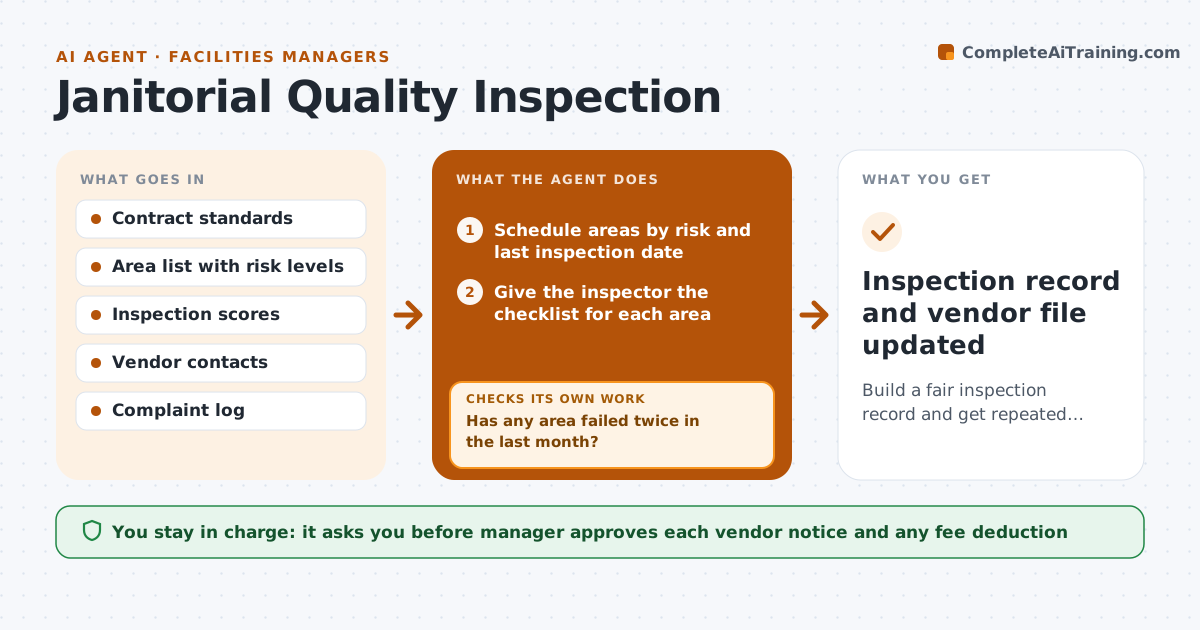
Cleaning quality is usually judged by who complains, which gives no fair record when the contract is reviewed. This agent plans inspections by area and risk, so washrooms and kitchens are checked more often than storage rooms. It gives the inspector a checklist matched to the contract standards and records the scores. It tracks repeat failures by area and by shift. When a pattern appears it drafts a notice to the vendor with the evidence. After the vendor responds, the agent schedules a recheck of the same area and compares scores. The manager approves any notice and any fee deduction. Edge case: a failure caused by a blocked access door is marked as not the vendor's fault.
How it works
Follow the arrows from top to bottom. The orange dashed arrow is the loop: when a check fails, the agent goes back and tries again.
Read the steps as a list
- Inspection week begins
- Schedule areas by risk and last inspection date
- Give the inspector the checklist for each area
- Record scores against the contract standard
- Find repeat failures by area and shift
- Has any area failed twice in the last month?If not: Keep monitoring and move on to the next area. Back to step 3.
- Draft a notice to the vendor with scores and photos
- Manager approves the notice and any fee deductionThe agent waits here for your OK.
- Send the notice and set a recheck date
- Does the rechecked area meet the standard?If not: Draft a firmer notice and flag it for the manager. Back to step 9.
- Inspection record and vendor file updated
How it decides
It flags a repeat failure when an area fails twice in a month, and closes it only when a recheck passes.
- Inspect high risk areas weekly and others monthly
- A score below 80 percent of standard is a fail
- Two fails in a month make a repeat failure
- Exclude failures caused by blocked access or client mess
Make it yours
Every agent is a starting point. You choose these settings for your own situation.
- Pass mark (default 80 percent)
- Inspection frequency by risk level
- Repeat failure rule (default 2 in a month)
- Notice tone
What keeps you in control
It always asks you first
- Manager approves each vendor notice and any fee deduction
Hard limits
- Never apply a fee deduction without the manager
- Never blame the vendor for a failure the client caused
It stops when
- Done: the area passes its recheck
- Stop: the vendor disputes the notice and the manager takes over
Set it up
We guide you through the set-up, step by step
Members get the full set-up guide for this agent. No technical skills needed: you copy, paste and upload.
- One set of instructions to paste into your AI, with the clicks for ChatGPT, Claude, Microsoft 365 Copilot, Gemini and Grok
- The agent then walks you through connecting your own data, one source at a time
- A downloadable copy with the flow chart, the rules and the full guide