AI agent for elearning developers
Learner Support Ticket Pattern Agent
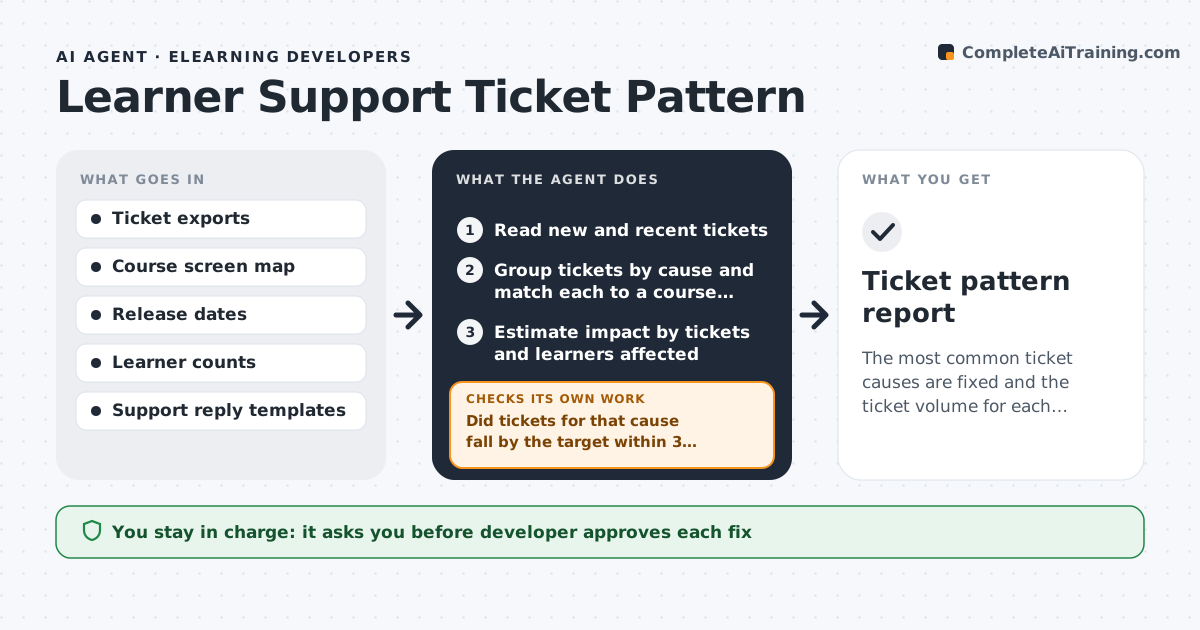
The most common ticket causes are fixed and the ticket volume for each falls.
What it does
Support tickets about the same course problem arrive again and again, and each one is closed without anyone fixing the cause. The agent reads the ticket queue and groups tickets by cause, such as a broken link, a confusing instruction or a tracking error. It links each group to the course screen involved, estimates the impact by counting tickets and learners affected, and ranks the groups. For the top groups it proposes a fix and a reply template for support staff. After the developer applies a fix, it watches the ticket count for that cause over the following weeks and checks whether it fell. If it did not, it reopens the cause and proposes another fix. The developer approves each change. Edge case: tickets spiking right after a release point to the release.
How it works
Follow the arrows from top to bottom. The orange dashed arrow is the loop: when a check fails, the agent goes back and tries again.
Read the steps as a list
- Weekly run
- Read new and recent tickets
- Group tickets by cause and match each to a course screen
- Estimate impact by tickets and learners affected
- Rank causes and propose a fix for the top ones
- Developer approves fixes and reply templatesThe agent waits here for your OK.
- Log the fix and the change date
- Count new tickets by cause after the change
- Did tickets for that cause fall by the target within 3 weeks?If not: Reopen the cause, review new tickets for a different reason and propose another fix. Back to step 3.
- Update the pattern report
- Ticket pattern report
How it decides
It groups by cause, ranks by tickets per learner, and judges a fix by the drop in new tickets after it.
- Cause with 5 or more tickets in a week is ranked
- A spike after a release is linked to the release
- A fix is successful when tickets drop 50% within 3 weeks
- Close a cause only after two quiet weeks
Make it yours
Every agent is a starting point. You choose these settings for your own situation.
- Ticket threshold per cause
- Target drop and period
- Report day
- Ticket categories
- Who receives the report
What keeps you in control
It always asks you first
- Developer approves each fix
- Support lead approves reply templates
Hard limits
- Never reply to learners itself
- Never change a course without approval
- Never include learner names in reports
It stops when
- Done: top causes are fixed and tickets have fallen
- Stop: tickets cannot be linked to the course
Set it up
We guide you through the set-up, step by step
Members get the full set-up guide for this agent. No technical skills needed: you copy, paste and upload.
- One set of instructions to paste into your AI, with the clicks for ChatGPT, Claude, Microsoft 365 Copilot, Gemini and Grok
- The agent then walks you through connecting your own data, one source at a time
- A downloadable copy with the flow chart, the rules and the full guide